Introduction
Kubernetes (often shortened to K8s) is the most powerful and widely adopted system for running containerized applications at scale. If Docker helps you package applications, Kubernetes helps you run, scale, update, and maintain those applications in production.
In this beginner-friendly guide, we’ll break down Kubernetes in simple terms — no prior experience needed.
🧱 What is Kubernetes?
Think of Kubernetes as:
A smart, automated system that ensures your applications are always running — even if servers fail or traffic spikes.
If your application lives inside containers, Kubernetes is the brain that:
- Starts containers
- Repairs containers if they crash
- Distributes containers across machines
- Scales replicas up or down
- Updates apps with zero downtime
🏗️ Key Kubernetes Concepts
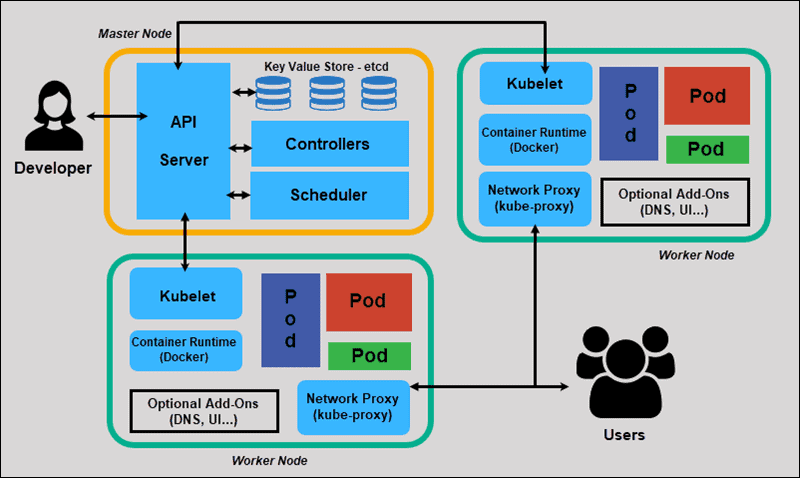
Image Description: A visual representation of Kubernetes architecture and its components, showcasing how different elements interact within a Kubernetes cluster.
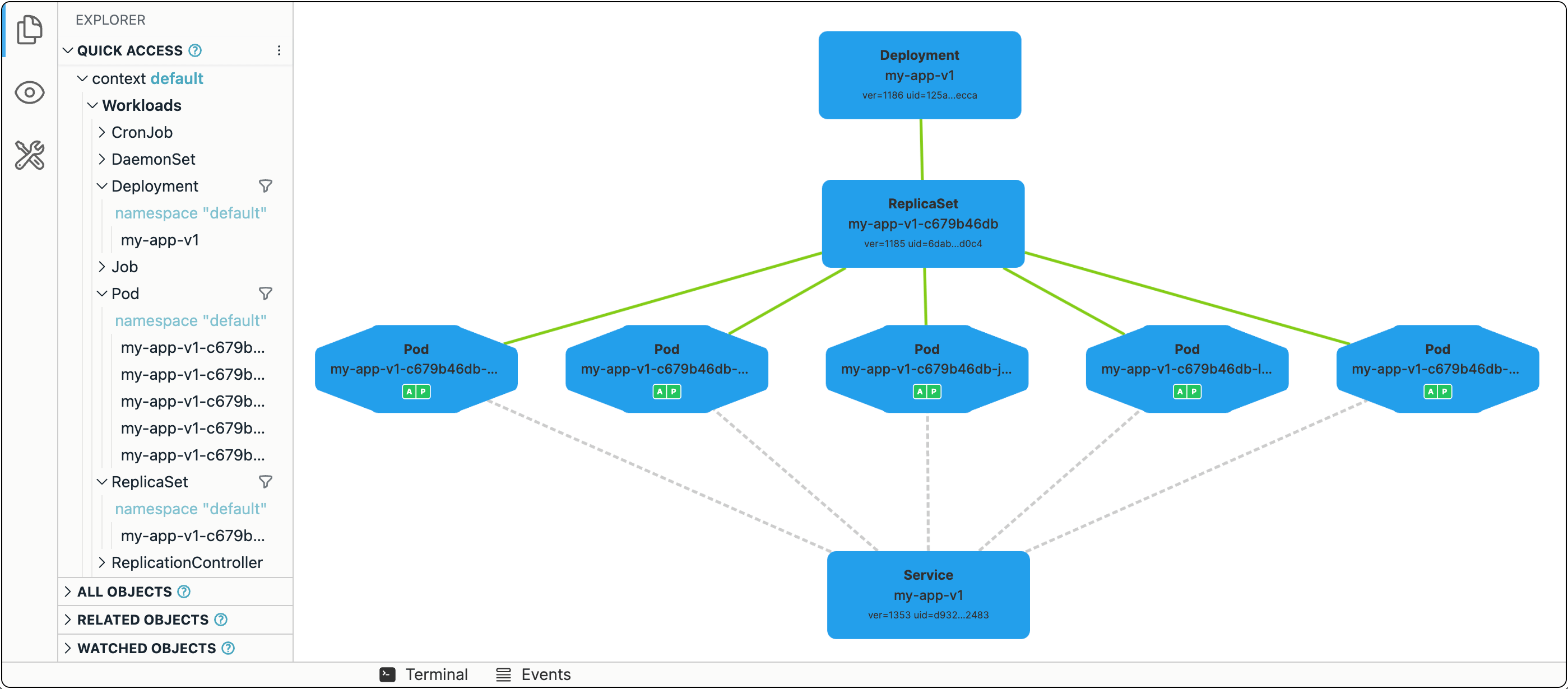
The images above visually represent the architecture and components of a Kubernetes cluster. They illustrate how various elements, such as pods, nodes, and services, interact within a Kubernetes environment. The diagrams highlight the structure that enables Kubernetes to manage containerized applications effectively, showcasing the control plane’s role and the distribution of workloads across worker nodes. These visual aids serve as a helpful reference for understanding Kubernetes’ complex functionalities and overall framework.
1️⃣ Cluster
A Kubernetes cluster is made up of:
- Master (control plane) — the brain
- Worker nodes — where containers run
2️⃣ Nodes
A node is a server (virtual or physical).
Kubernetes spreads workloads across nodes automatically.
3️⃣ Pods
Smallest unit in Kubernetes.
A pod = one or more containers working together.
If containers need to share storage or network, put them in the same pod.
4️⃣ Deployments
A deployment tells Kubernetes:
- what container image to run
- how many replicas to maintain
- how to roll out updates safely
5️⃣ Services
A service gives your pods a stable network identity — even when pods restart or move.
Types:
- ClusterIP (internal)
- NodePort (external)
- LoadBalancer (cloud-integrated)
- Ingress (HTTP/HTTPS routing)
🚀 Why Use Kubernetes? (Benefits)
✔️ High Availability
If a pod or node fails, Kubernetes restarts or relocates it instantly.
✔️ Automatic Scaling
Traffic spike? Kubernetes adds replicas.
Traffic drops? It scales down to save money.
✔️ Zero-Downtime Updates
Using rolling updates and rollbacks.
✔️ Consistent Across Clouds
Run Kubernetes on:
- AWS (EKS)
- Azure (AKS)
- Google Cloud (GKE)
- On-Prem or Bare Metal
✔️ Community, Ecosystem, and Extensibility
Thousands of add-ons:
- Prometheus / Grafana
- Istio
- ArgoCD
- Helm
⚙️ How Kubernetes Works (Easy Visualization)
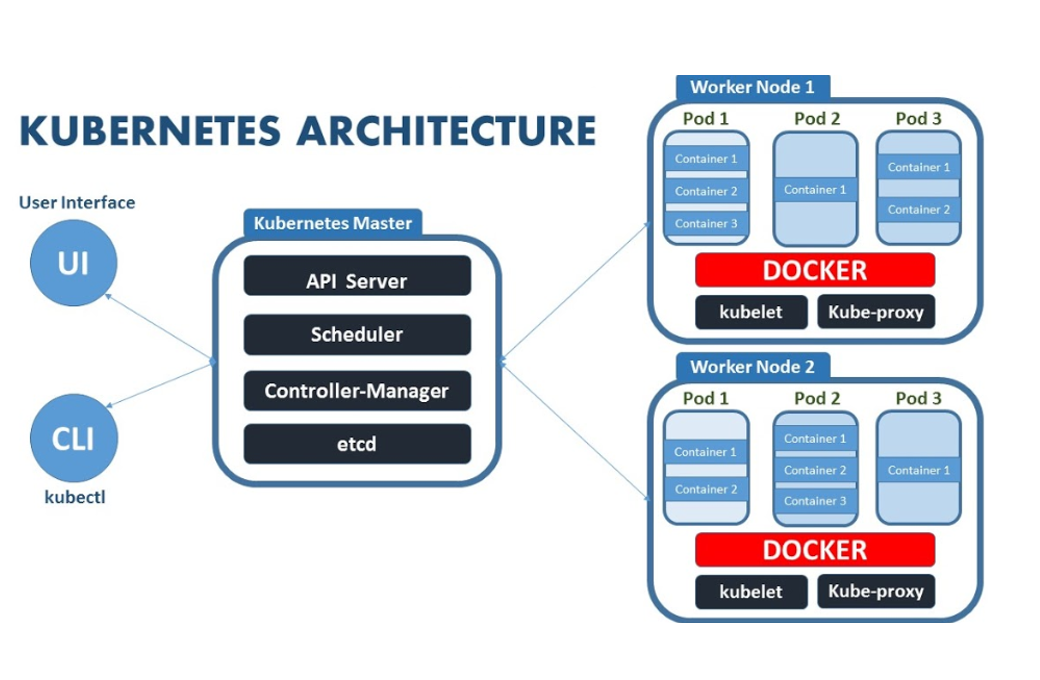
Image Description: Kubernetes Architecture Diagram
Simple workflow:
- You write a deployment YAML describing how your app should run
- You apply it to the cluster
- Kubernetes scheduler finds appropriate nodes
- Pods get created
- Services expose the app
- Kubernetes continuously monitors health
- Autoscaler adjusts replicas based on demand
🧪 Hands-On Example 101
Here’s a minimal example deployment:
apiVersion: apps/v1
kind: Deployment
metadata:
  name: hello-world
spec:
  replicas: 3
  selector:
    matchLabels:
      app: hello-world
  template:
    metadata:
      labels:
        app: hello-world
    spec:
      containers:
      - name: hello-world
        image: nginx
        ports:
        - containerPort: 80
Expose it:
kubectl expose deployment hello-world --type=LoadBalancer --port=80
This creates:
- a deployment with 3 pods
- a service that exposes them to the internet (if supported by cloud provider)
🔒 Basic Security Tips for Beginners
Even on day one, consider these:
- Always use namespaces (dev, staging, production)
- Avoid running containers as root
- Limit resource usage (CPU/memory)
- Use role-based access control (RBAC)
- Scan container images
🌐 Where to Run Kubernetes?
Cloud Options
- AWS EKS
- Azure AKS
- Google GKE
Local Options
- Docker Desktop
- Minikube
- kind (Kubernetes in Docker)
🏁 Conclusion
Kubernetes is an orchestration system that keeps modern applications healthy, scalable, and resilient. Even though it looks intimidating at first, learning the basics — pods, deployments, services, nodes — unlocks enormous power.

 My Daily Cloud Blog
Leave a comment