
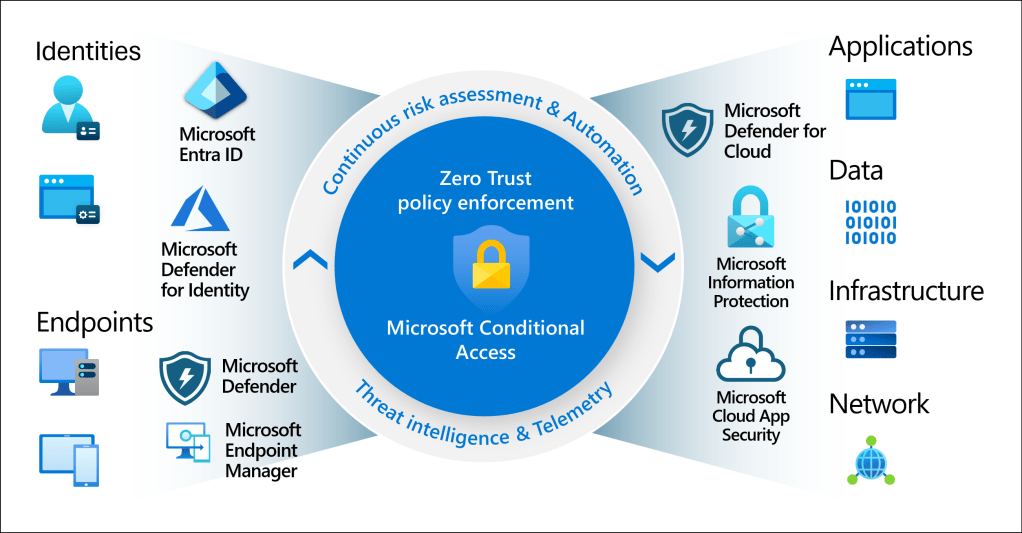
Image courtesy of Microsoft
So, What Is Azure Entra ID?
Azure Entra ID (formerly Azure Active Directory) is Microsoft’s cloud service for managing identities and access. In plain terms, it controls who can sign in, what they can access, and under what conditions.
If your company uses Azure, Microsoft 365, or any modern SaaS apps, Azure Entra ID is already working behind the scenes.
Why Identity Matters
In today’s world, networks aren’t the main security boundary anymore—identity is.
Users log in from:
- Home
- Coffee shops
- Mobile devices
- Multiple clouds
Azure Entra ID makes sure access is secure, verified, and intentional, no matter where users are.
What Azure Entra ID Actually Does
1. Handles Sign-In (Authentication)
Azure Entra ID verifies who you are when you sign in.
It supports:
- Username & password
- Multi-Factor Authentication (MFA)
- Passwordless sign-in
- Security keys (FIDO2)
- Certificates
This helps protect against stolen passwords and phishing attacks.
2. Controls Access (Authorization)
Once you’re signed in, Entra ID decides what you’re allowed to access:
- Azure resources
- Microsoft 365
- SaaS apps
- Internal applications
This is done using:
- Roles
- Groups
- App permissions
- Least privilege access
3. Single Sign-On (SSO)
SSO means:
Log in once → access everything you’re allowed to use.
Azure Entra ID provides SSO to:
- Microsoft 365
- Azure Portal
- Thousands of SaaS apps
- Custom apps
This improves security and user experience at the same time.
4. Conditional Access (Smart Security Rules)
Conditional Access lets you set “if-this-then-that” rules for access.
Examples:
- Require MFA if signing in from outside the country
- Block access from risky locations
- Allow access only from compliant devices
- Add extra checks for admin users
This is the backbone of Zero Trust security.
5. Protects Against Risky Logins
Azure Entra ID uses Microsoft’s threat intelligence to spot:
- Suspicious sign-ins
- Unusual locations
- Compromised credentials
When something looks risky, it can:
- Force MFA
- Block the sign-in
- Require a password reset
All automatically.
6. Works with On-Prem Active Directory
If you still have on-prem Active Directory, no problem.
Azure Entra ID supports hybrid identity, allowing:
- One username/password for cloud & on-prem
- Seamless SSO
- Gradual cloud migration
This is common in real-world enterprise environments.
7. Manages Users, Devices, and Apps
Azure Entra ID doesn’t just manage people:
- Users
- Devices (Azure AD Join / Hybrid Join)
- Applications
- Service accounts
- Cloud workloads
It also integrates tightly with tools like Intune, Defender, and Azure RBAC.
Where You’ll Commonly See It Used
- Securing Microsoft 365
- Protecting Azure subscriptions
- Enabling SaaS app SSO
- Enforcing Zero Trust
- Partner access (B2B)
- Customer sign-ins (B2C)
- Cloud-native app authentication
Licensing (Quick Version)
- Free – Basic identity & SSO
- Premium P1 – Conditional Access, hybrid features
- Premium P2 – Advanced security, identity risk detection, PIM
Why Azure Entra ID Is a Big Deal
Azure Entra ID gives you:
- Centralized identity control
- Strong security without killing productivity
- Cloud-scale reliability
- Deep Microsoft ecosystem integration
If you’re using Azure or Microsoft 365, Azure Entra ID is not optional—it’s foundational.
Final Thoughts
Azure Entra ID is basically the front door to your cloud environment. Lock it down properly, and everything behind it becomes more secure.
Whether you’re:
- Migrating to the cloud
- Building cloud-native apps
- Implementing Zero Trust
- Or just trying to secure users better
Azure Entra ID should be one of the first things you get right.


 My Daily Cloud Blog
Leave a comment