Azure Migrate is Microsoft’s comprehensive migration service, helping users discover, assess, migrate, and modernize workloads effectively, with step-by-step guidance and best practices.
Migrating to Azure can feel overwhelming—especially when you’re dealing with legacy infrastructure, tight timelines, and business-critical workloads.
That’s where Azure Migrate comes in.
Azure Migrate is Microsoft’s central hub for cloud migration. It helps you discover, assess, migrate, and modernize
workloads moving to Azure—while keeping everything tracked in one place.
What Is Azure Migrate?
Azure Migrate is a service in the Azure portal that provides a single migration experience for moving:
VMware workloads
Hyper-V workloads
Physical servers
Applications and databases
Data and file servers
It’s not just one tool—it’s an orchestrator that ties together discovery, assessment, and migration tooling so you can plan confidently and execute in waves.
Daily Cloud Blog Note: Most migration issues come from skipping discovery, underestimating dependencies, or mis-sizing workloads. Azure Migrate is designed to prevent those surprises.
Core Components of Azure Migrate
1) Discovery & Assessment
Azure Migrate discovers your environment and answers:
What do we have (inventory)?
Is it ready for Azure?
What size should it be in Azure (performance-based sizing)?
How much will it cost?
What are the dependencies (app-to-app, server-to-server)?
2) Migration & Modernization
Based on the assessment, you choose a strategy (rehost/replatform/refactor) and migrate with tools like:
Azure Migrate: Server Migration (agentless replication for VMware; agent-based options for others)
Azure Database Migration Service for database moves
Azure Site Recovery–based replication patterns
3) Tracking & Governance
Azure Migrate helps track migration progress and aligns well with good governance:
Wave-based execution
Readiness checks and reporting
Cost planning
Security posture improvements when paired with Defender for Cloud
High-Level Workflow
Discover workloads (VMware/Hyper-V/physical)
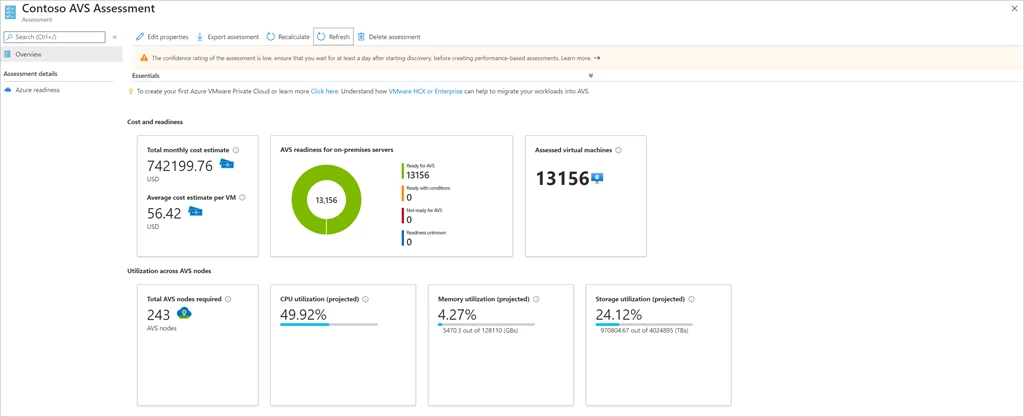
Assess readiness, sizing, and cost
Plan migration waves and cutover schedule
Migrate with replication + test migrations
Cutover and validate
Optimize (rightsizing, security, modernization)
Common Best Practices
Always use performance-based assessments (not “guess sizing”).
Turn on dependency mapping early for critical apps.
Migrate in waves (pilot → business apps → mission-critical).
Reduce DNS TTL ahead of cutover and document rollback steps.
Revisit sizing after migration (rightsizing saves big money).
Step-by-Step Azure Migrate Demos
Below are practical demos you can follow in a lab or real environment. Each demo includes the goal, prerequisites, and step-by-step actions.
Replace the placeholders (subscription, region, resource group names) with yours.
Demo 0 — Prerequisites (Do this once)
Permissions: Owner or Contributor in the subscription + rights to create resource groups, storage, vaults, and network objects.
Target region decision: Choose the Azure region where migrated VMs will live (e.g., East US, West Europe).
Landing Zone readiness: Ensure networking, identity, and policies are ready (hub/spoke, DNS, firewall, RBAC).
Connectivity: On-prem to Azure connectivity for replication (VPN/ExpressRoute). For labs, public internet can work.
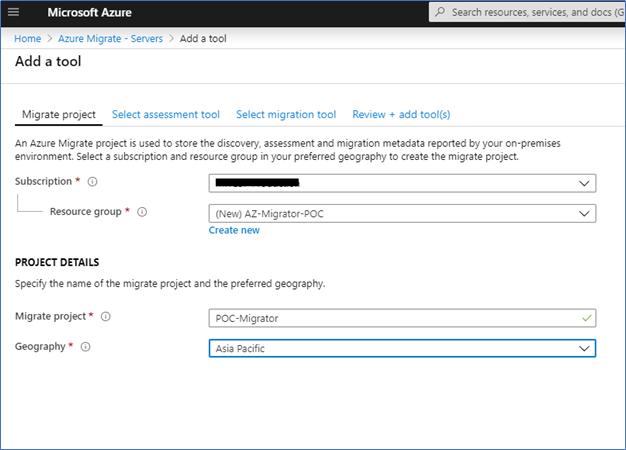
Demo 1 — Create an Azure Migrate Project
Goal: Stand up the Azure Migrate hub to manage discovery, assessments, and migrations.
In the Azure portal, search for Azure Migrate → open it.
Select Servers, databases and web apps (or the relevant migration tile).
Click Create project.
Choose your Subscription, Resource group, and Geography (project metadata).
Name the project (example: dcB-azmigrate-prod) and click Create.








 My Daily Cloud Blog
Leave a comment