Daily Cloud Blog
Practical Cloud • DevOps • Security • Automation
Jenkins Explained: How It Powers CI/CD Pipelines
By Daily Cloud Blog
In toda’s modern DevOps environments, automation is everything. From building code to testing, packaging, and deploying applications, teams rely on Continuous Integration and Continuous Delivery (CI/CD) to move fast without breaking things. One of the most widely adopted tools enabling this automation is Jenkins.
This article provides a clear, practical overview of what Jenkins is, how it works, and how it enables CI/CD pipelines in real-world environments.
What Is Jenkins?
Jenkins is an open-source automation server used to automate repetitive tasks in the software development lifecycle. Its most common use cases include:
- Continuous Integration (CI)
- Continuous Delivery (CD)
- Build automation
- Test automation
- Deployment orchestration
Originally created as Hudson, Jenkins has evolved into a highly extensible platform with thousands of plugins supporting nearly every language, framework, cloud provider, and DevOps tool.
Why Jenkins Matters in CI/CD
Without CI/CD, development teams often struggle with:
- Manual builds and deployments
- Late detection of bugs
- Inconsistent environments
- Slow release cycles
Jenkins solves these problems by:
- Automatically building code on every change
- Running tests early and often
- Enforcing consistent pipelines
- Reducing human error
- Accelerating software delivery
Jenkins Architecture (High Level)
At its core, Jenkins follows a controller–agent architecture:

1. Jenkins Controller (Master)
- Hosts the Jenkins UI and API
- Manages job configuration and scheduling
- Orchestrates pipeline execution
- Stores logs and build metadata
2. Jenkins Agents (Workers)
- Execute the actual jobs
- Can be physical servers, VMs, containers, or cloud instances
- Allow horizontal scaling of pipelines
This separation makes Jenkins highly scalable and suitable for enterprise workloads.
How Jenkins Works Step by Step
Here’s a simplified CI/CD flow using Jenkins:
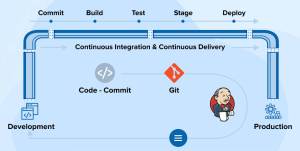
Step 1: Code Change
A developer pushes code to a version control system such as GitHub, GitLab, or Bitbucket.
Step 2: Trigger
Jenkins detects the change via:
- Webhooks
- Polling the repository
- Scheduled builds
Step 3: Build
Jenkins:
- Pulls the latest code
- Compiles it
- Resolves dependencies
Step 4: Test
Automated tests are executed:
- Unit tests
- Integration tests
- Security scans
- Linting and quality checks
Step 5: Package
Artifacts are created:
- JAR/WAR files
- Docker images
- ZIP/TAR bundles
Step 6: Deploy
Artifacts are deployed to:
- Development
- Staging
- Production environments
This entire process runs automatically, often in minutes.
Jenkins Pipelines (The Heart of CI/CD)
Modern Jenkins uses Pipeline as Code, defined in a Jenkinsfile.
Key benefits of pipelines:
- Version-controlled
- Repeatable
- Auditable
- Easy to review and update
Jenkins Plugins Ecosystem
One of Jenkins’ biggest strengths is its plugin ecosystem.
Popular plugin categories include:
- Source Control: Git, GitHub, GitLab
- Build Tools: Maven, Gradle, npm
- Containers & Cloud: Docker, Kubernetes, AWS, Azure
- Testing: JUnit, Selenium
- Notifications: Slack, email, MS Teams
- Security: Credentials, secrets management
Plugins allow Jenkins to integrate seamlessly into almost any DevOps toolchain.
Jenkins in Cloud & Container Environments
Jenkins works well in:
- On-prem data centers
- Hybrid environments
- Public cloud (AWS, Azure, GCP)
- Kubernetes clusters
A common modern pattern:
- Jenkins controller runs in Kubernetes
- Agents are spun up dynamically as pods
- Pipelines scale automatically based on workload
This model reduces infrastructure cost and improves resilience.
Common Jenkins Use Cases
- CI/CD for microservices
- Infrastructure automation (Terraform, Ansible)
- Container image builds
- Security and compliance pipelines
- Blue/green and canary deployments
Jenkins vs Other CI/CD Tools (Quick Take)
| Tool | Best For |
|---|---|
| Jenkins | Maximum flexibility and customization |
| GitHub Actions | Tight GitHub integration |
| GitLab CI | All-in-one DevOps platform |
| Azure DevOps | Microsoft-centric environments |
Jenkins remains a strong choice when custom pipelines, complex workflows, or hybrid environments are required.
Key Advantages of Jenkins
✅ Open-source and free
✅ Massive plugin ecosystem
✅ Highly customizable
✅ Strong community support
✅ Cloud and container friendly
Final Thoughts
Jenkins remains one of the most powerful and flexible CI/CD tools available today. While newer platforms offer more “out-of-the-box” simplicity, Jenkins continues to excel in environments that demand control, extensibility, and scale.
Whether you’re building a startup CI pipeline or running enterprise-grade DevOps workflows, Jenkins provides the foundation to automate, test, and deploy with confidence.
© Daily Cloud Blog – Cloud • DevOps • Automation


 My Daily Cloud Blog
Leave a comment