Daily Cloud Blog • AWS Networking
Route 53 + Elastic Load Balancer for a Highly Available WordPress Site on AWS
Learn how Amazon Route 53 and Elastic Load Balancer (ALB) work together to deliver scalable DNS, secure HTTPS, and resilient traffic distribution for WordPress.
Route 53 resolves your domain and can steer traffic intelligently; an Application Load Balancer terminates HTTPS and spreads requests across healthy WordPress servers—boosting uptime, scale, and security.
In this guide
- What is Route 53?
- What is Elastic Load Balancer (ELB)?
- How Route 53 and ELB work together
- Reference architecture for WordPress
- Route 53 routing policies that matter
- Security best practices
- Benefits recap
- Final thoughts
WordPress is easy to launch—but running it reliably in production is a different game. If your site supports a business, a brand, or an e-commerce store,
you need an architecture designed for availability, performance, and secure traffic handling.
Two AWS services form the backbone of most production WordPress deployments:
Amazon Route 53 (DNS + traffic steering) and Elastic Load Balancing (traffic distribution + health checks).
This post explains how they fit together—and how to use them the right way.
What Is Amazon Route 53?
Amazon Route 53 is AWS’s scalable, highly available DNS service. Its job is to translate your domain name
(like www.example.com) into a destination your users can reach.
Route 53 features that matter for WordPress
- DNS hosting + domain management in one place
- Health checks to detect unhealthy endpoints
- Routing policies for failover, latency-based routing, and traffic shifting
- Alias records that point directly to AWS resources like load balancers
Common record types you’ll use
| Record Type | Typical Use |
|---|---|
| A / AAAA | Map a hostname to an IPv4/IPv6 address |
| Alias | Point to AWS resources (ALB/CloudFront/S3) without a CNAME |
| CNAME | Map one hostname to another hostname (not for zone apex) |
| TXT | Domain verification, SPF/DMARC, and other text-based settings |
What Is Elastic Load Balancer (ELB)?
Elastic Load Balancing distributes incoming requests across multiple targets—like EC2 instances or containers—so you’re not relying on a single server.
For WordPress, ELB is the difference between “one instance goes down and we’re offline” and “traffic routes around failures automatically.”
Which load balancer should you use?
- Application Load Balancer (ALB) – Best for WordPress (HTTP/HTTPS, path-based routing, redirects)
- Network Load Balancer (NLB) – TCP/UDP, ultra-high performance (usually not necessary for WP)
- Classic Load Balancer – Legacy (avoid for new builds)
Use an ALB for WordPress. It handles HTTPS termination cleanly and integrates nicely with Auto Scaling Groups and WAF.
How Route 53 and ELB Work Together
Think of Route 53 as the front desk that directs visitors to the right entrance, and the ALB as the traffic controller that distributes visitors
across healthy WordPress servers.
Typical traffic flow
- A user visits
www.yoursite.com - Route 53 resolves the hostname using an Alias record
- The Alias points to your Application Load Balancer
- The ALB terminates HTTPS and forwards traffic to a Target Group
- Health checks ensure only healthy WordPress instances receive traffic
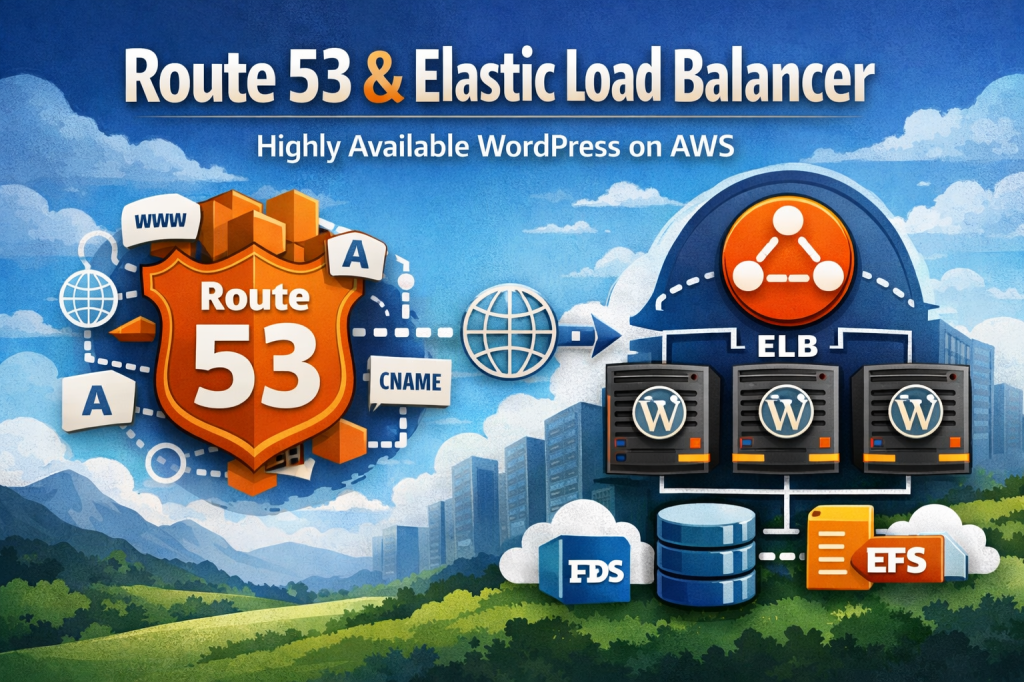
User → Route 53 (DNS) → ALB (HTTPS + routing)
→ WordPress instances (Auto Scaling)
 ↘ health checks & failover logic ↙
Reference Architecture for WordPress on AWS
Here’s a battle-tested baseline architecture for WordPress that uses Route 53 + ALB as the entry point.
Core components
- Route 53 – DNS and (optionally) health checks / routing policies
- Application Load Balancer – HTTPS termination + traffic distribution
- EC2 Auto Scaling Group – multiple WordPress web nodes across Availability Zones
- Amazon RDS – managed MySQL for the WordPress database
- Amazon EFS – shared storage for
wp-content(uploads/themes/plugins) - AWS Certificate Manager (ACM) – free SSL/TLS certificates for ALB
If you want even better global performance, put CloudFront in front of the ALB. Route 53 can Alias to CloudFront too.
Route 53 Routing Policies That Matter
Route 53 can do more than “point domain to load balancer.” These routing policies unlock uptime and safer deployments.
1) Simple routing
One record, one destination (your ALB). Perfect for most single-region WordPress sites.
2) Failover routing
Primary ALB + secondary ALB. Route 53 health checks can shift DNS to the backup if the primary fails—useful for DR patterns.
3) Latency-based routing
Send users to the region that offers the lowest latency (helpful if you run WordPress in multiple regions).
4) Weighted routing
Shift traffic gradually between environments—great for blue/green deployments during WordPress upgrades or major plugin changes.
Security Best Practices
- Terminate HTTPS at the ALB using ACM certificates
- Redirect HTTP → HTTPS at the ALB listener
- Keep WordPress instances private (only the ALB is public)
- Attach AWS WAF to the ALB to block common attacks (SQLi/XSS, bad bots)
- Use Security Groups intentionally (ALB → instances only; instances → DB/EFS only)
- Enable access logs (ALB logs to S3; WordPress logs to CloudWatch)
WordPress gets targeted constantly. Putting an ALB in front (with WAF + HTTPS) is one of the easiest “big wins” you can make.
Benefits Recap
- High availability across multiple Availability Zones
- Better performance under load with horizontal scaling
- Resiliency via health checks and automatic traffic distribution
- Cleaner security posture with HTTPS termination + WAF integration
- Safer deployments using weighted or failover routing patterns
Final Thoughts
Route 53 and an Application Load Balancer are a foundational combo for production WordPress on AWS.
They give you reliable DNS resolution, intelligent traffic steering, secure HTTPS handling, and a scalable front door that can survive instance failures.
Want to take this further? A common next step is adding CloudFront for caching and global edge delivery,
plus a hardened WAF rule set tailored to WordPress.



 My Daily Cloud Blog
Leave a comment