Daily Cloud Blog • Virtualization • Infrastructure Strategy
AWS PrivateLink: What It Is and the Gotchas You Should Know
An article that will provide insights into AWS PrivateLink and the common pitfalls to avoid.
Author
Daily Cloud Blog Editorial Team
Published
April 2, 2026
Read Time
10 min read
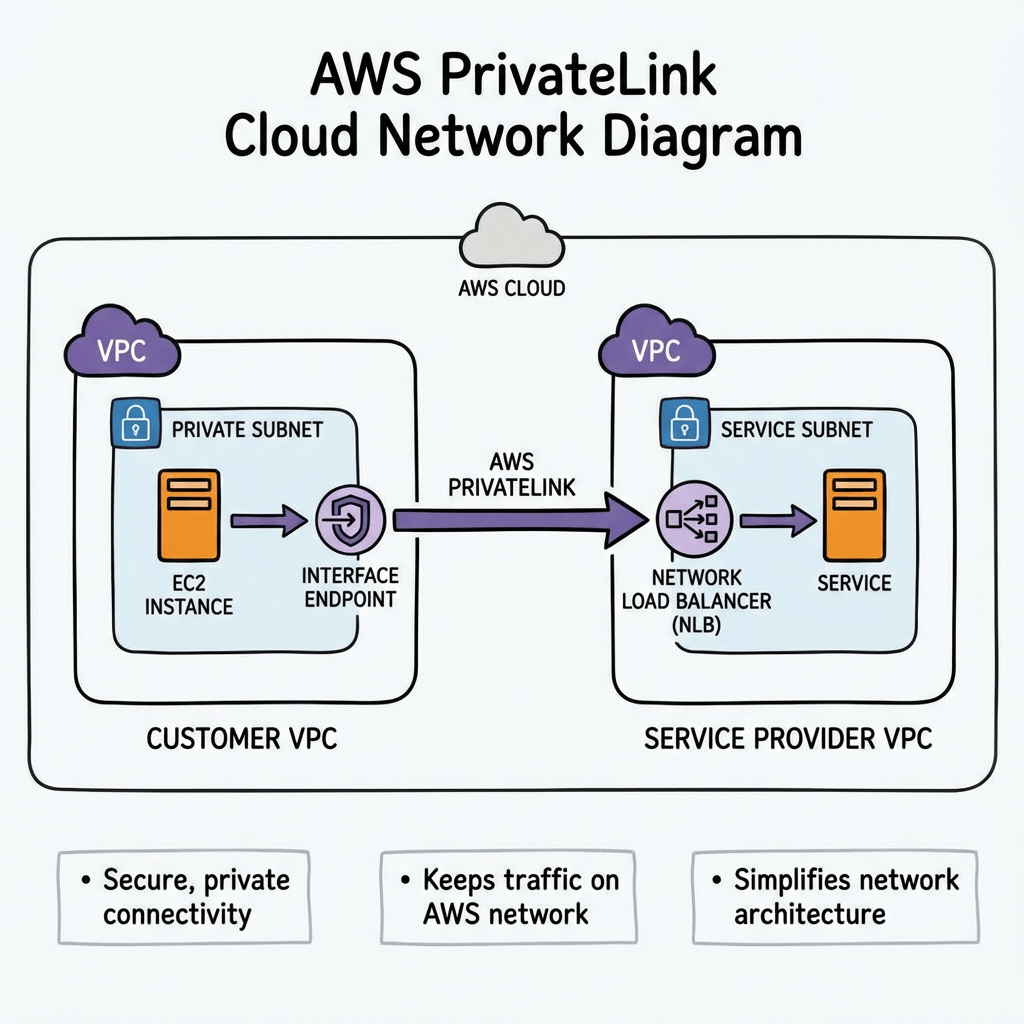
PrivateLink allows you to connect privately to services without exposing traffic to the public internet, which is critical for security, compliance, and enterprise architectures.
However, while the concept sounds simple, there are several design considerations and configuration gotchas that architects often discover the hard way.
In this post we’ll cover:
- What AWS PrivateLink is
- When to use it
- How it works architecturally
- Common configuration mistakes and gotchas
What is AWS PrivateLink?

AWS PrivateLink allows you to privately access services hosted in another VPC, AWS service, or partner service through interface endpoints.
Instead of routing traffic through:
- Internet Gateway
- NAT Gateway
- VPN
- Direct Connect public endpoints
PrivateLink allows communication entirely within the AWS network.
In short:
PrivateLink provides private connectivity to services using private IP addresses inside your VPC.
How AWS PrivateLink Works
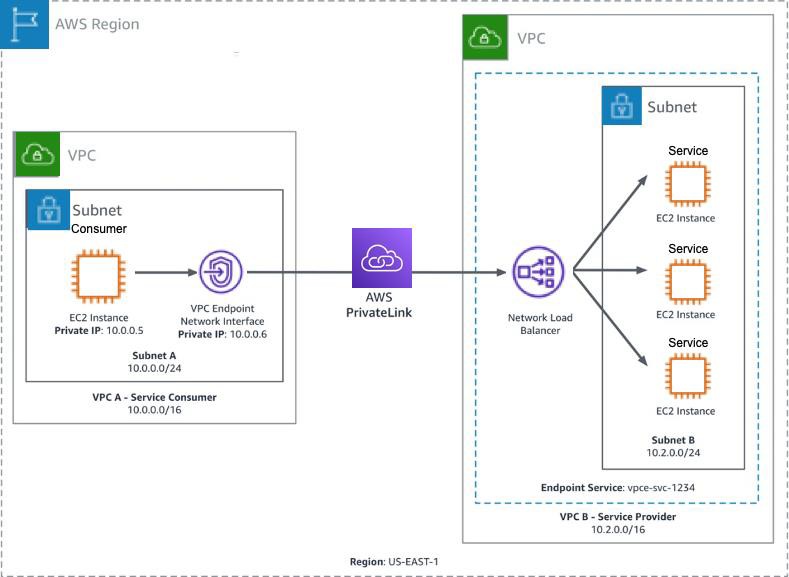
At a high level, PrivateLink connects service consumers and service providers.
Components
Service Provider
- Hosts the service
- Usually fronted by a Network Load Balancer (NLB)
- Creates an Endpoint Service
Service Consumer
- Creates an Interface VPC Endpoint
- Receives private ENIs in their subnets
- Connects to the service via private DNS
Traffic Flow
- Service provider exposes service behind Network Load Balancer
- Provider creates VPC Endpoint Service
- Consumer creates Interface Endpoint
- AWS creates Elastic Network Interfaces (ENIs) in consumer subnets
- Traffic flows privately inside AWS backbone
When Should You Use PrivateLink?
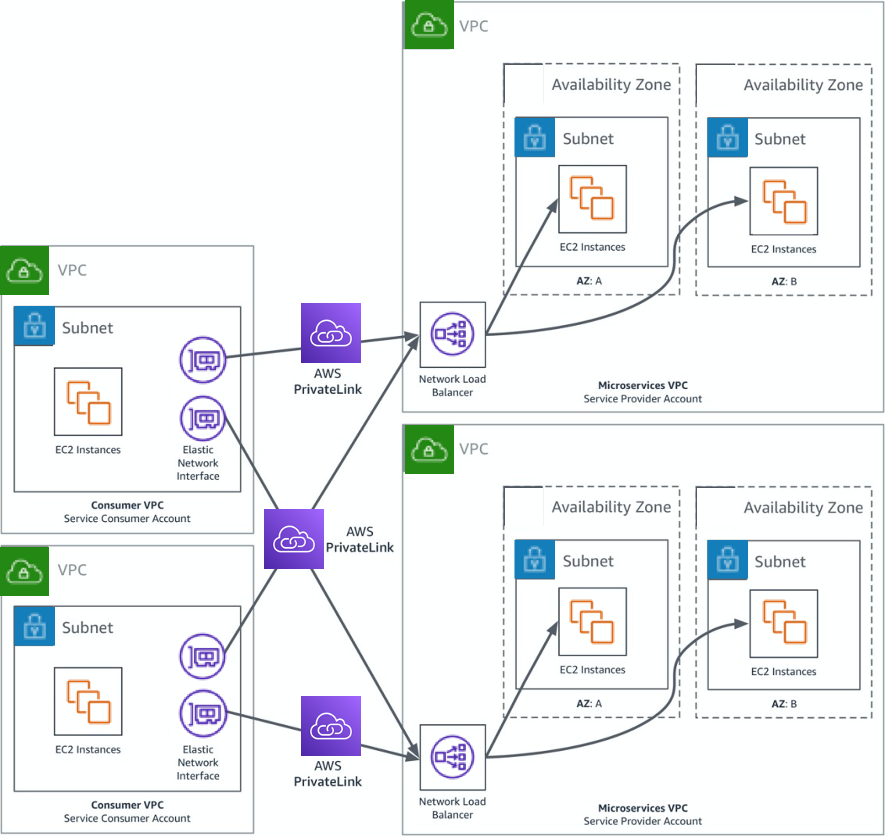
PrivateLink is ideal when you want secure service consumption without network-level connectivity.
Common use cases:
1️⃣ Access AWS Services Privately
Example:
- S3
- DynamoDB
- Secrets Manager
- KMS
Your workloads can access these services without a NAT gateway or internet access.
2️⃣ SaaS Providers
If you’re offering a SaaS platform:
PrivateLink allows customers to access your service without exposing public endpoints.
Example:
3️⃣ Cross-Account Service Sharing
Organizations often expose internal services across accounts using PrivateLink instead of:
- VPC Peering
- Transit Gateway
4️⃣ Highly Regulated Environments
Industries like:
- Government
- Finance
- Healthcare
often require no internet exposure, making PrivateLink ideal.
PrivateLink vs VPC Peering
| Feature | PrivateLink | VPC Peering |
|---|---|---|
| Connectivity | Service-based | Network-based |
| CIDR overlap allowed | Yes | No |
| Access granularity | Single service | Entire VPC |
| Transitive routing | No | No |
| Security exposure | Minimal | Larger |
PrivateLink is often preferred when you only want to expose a specific service.
Common AWS PrivateLink Gotchas
Even experienced cloud engineers run into these issues.
Let’s walk through the most common ones.
Gotcha #1 — Requires a Network Load Balancer
PrivateLink only supports Network Load Balancers for endpoint services.
This means:
❌ Application Load Balancer not supported
❌ Classic Load Balancer not supported
If your service runs behind an ALB, you’ll need to place an NLB in front of it.
Typical workaround architecture:
Gotcha #2 — One Endpoint Per AZ
Interface endpoints create Elastic Network Interfaces in each AZ.
If you deploy across 3 AZs:
3 ENIs
This increases cost.
Gotcha #3 — It Can Get Expensive
PrivateLink pricing includes:
- Hourly endpoint cost
- Data processing cost
For high-throughput workloads, this can become more expensive than NAT Gateway or Transit Gateway.
Always estimate traffic costs before large deployments.
Gotcha #4 — DNS Can Be Tricky
Private DNS works only when enabled and supported by the service.
Common mistakes include:
- Forgetting to enable Private DNS
- Custom DNS servers not resolving AWS zones
- Split-horizon DNS conflicts
Example:
If Private DNS is enabled, the request resolves to the private endpoint IP.
Gotcha #5 — Security Groups Matter
Interface endpoints support security groups.
If misconfigured:
- Traffic silently fails
- Connectivity appears broken
Typical required rules:
Outbound: ephemeral return traffic
Gotcha #6 — Endpoint Policies Can Block Access
PrivateLink supports endpoint policies that restrict access.
Example policy:
“Statement”: [
{
“Effect”: “Allow”,
“Principal”: “*”,
“Action”: “s3:*”,
“Resource”: “*”
}
]
}
If misconfigured, requests may be denied even when networking is correct.
Gotcha #7 — Cross-Account Acceptance Required
For custom services, the provider must accept endpoint connections.
Common troubleshooting issue:
Provider must approve the request.
Gotcha #8 — Health Checks Can Break Connectivity
Since the service sits behind an NLB, NLB health checks must pass.
If health checks fail:
Service = unavailable
Always verify:
- Target group health
- Health check port
- Security groups
Architecture Example
Typical enterprise architecture using PrivateLink:
Account A (Service Provider)

---------------------------------

Application

│

Network Load Balancer

│

Endpoint ServiceAccount B (Consumer)

---------------------------------

VPC

│

Interface Endpoint

│

Application Servers
Best Practices
Use these best practices when deploying PrivateLink:
✔ Deploy endpoints in multiple AZs
✔ Enable private DNS when possible
✔ Monitor with VPC Flow Logs
✔ Estimate costs before deployment
✔ Use least-privilege endpoint policies
✔ Implement health checks carefully
Final Thoughts
AWS PrivateLink is an extremely powerful tool for building secure, service-oriented architectures in AWS.
It allows organizations to:
- Eliminate internet exposure
- Provide SaaS services securely
- Simplify cross-account access
- Meet strict compliance requirements
However, the networking and DNS components can introduce unexpected operational complexity, so careful design and testing are critical.
Stay Connected with Daily Cloud Blog
If you found this comparison helpful, follow Daily Cloud Blog for more practical content on cloud, virtualization, DevOps, cybersecurity, and infrastructure strategy.
We regularly share technical breakdowns, architecture guidance, and real-world insights designed for engineers, architects, and IT leaders.
Want more posts like this? Subscribe for fresh content on AWS, Azure, Kubernetes, virtualization, and modern infrastructure trends.
About Daily Cloud Blog
Daily Cloud Blog shares practical insights on cloud, virtualization, infrastructure, and modern IT strategy for engineers, architects, and technology leaders.

 My Daily Cloud Blog