-
My First Impression of VMware Cloud Foundation 9.1: Private Cloud Is Becoming the AI Control Plane
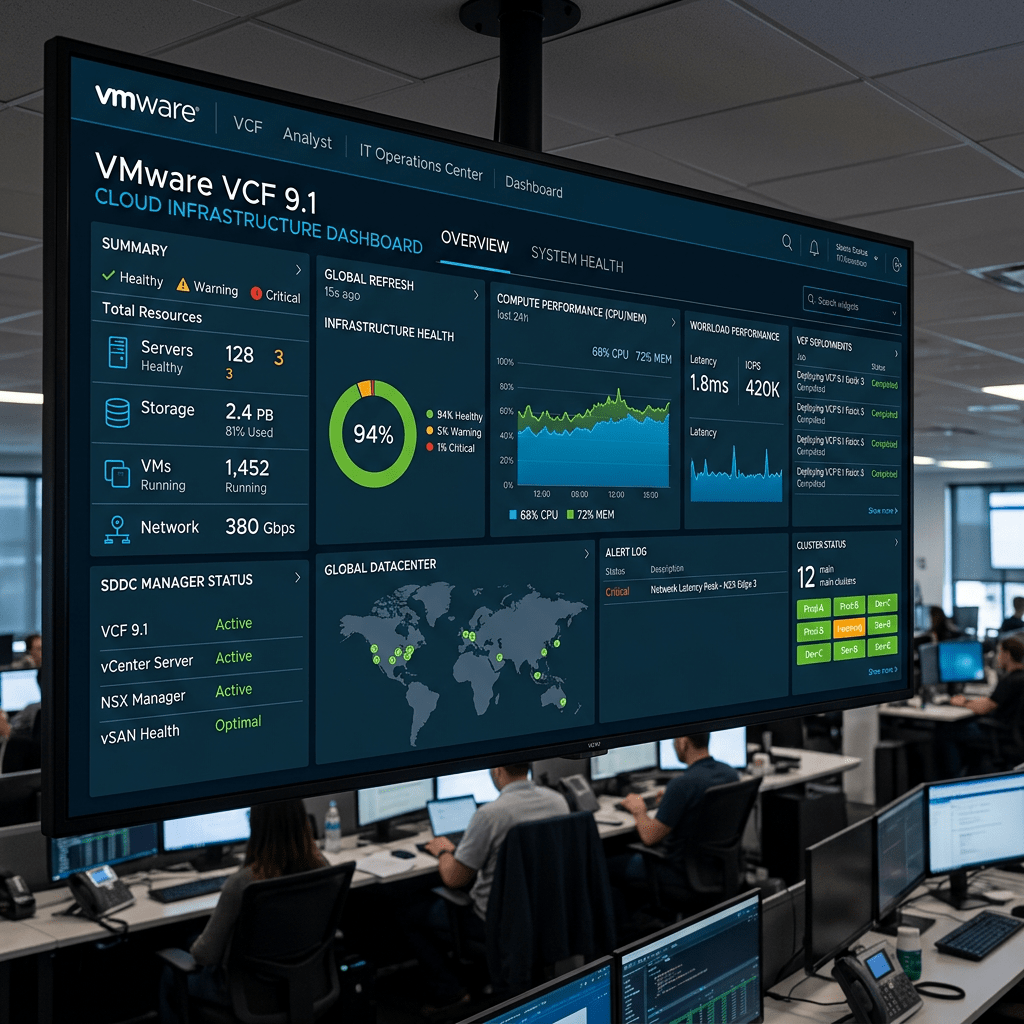
Daily Cloud Blog • First Impression
My First Impression of VMware Cloud Foundation 9.1: Private Cloud Is Becoming the AI Control Plane
VMware Cloud Foundation 9.1 is not just another platform release. My first impression is that Broadcom is positioning VCF as a serious private cloud foundation for production AI, modern applications, data sovereignty, security, and enterprise cost control.
Author: Christian Marrero Bonilla
Blog: Daily Cloud Blog
Topic: VMware Cloud Foundation 9.1, Private Cloud, AI Infrastructure, Enterprise CloudFirst Impression
After reading VMware’s announcement on VCF 9.1: The Secure, Cost-Effective Private Cloud Platform for Production AI, my first reaction is simple: VMware is clearly trying to redefine the private cloud conversation around AI, security, sovereignty, and operational efficiency.
For years, many organizations looked at public cloud as the default path for innovation. But with AI workloads growing, data governance becoming more complex, and infrastructure costs getting harder to control, the private cloud is becoming relevant again — not as legacy infrastructure, but as a strategic platform.
My Take
VCF 9.1 feels like VMware’s message to enterprise IT: you can run AI, containers, virtual machines, modern apps, and traditional workloads under one private cloud operating model without giving up security, governance, or cost discipline.
Why This Release Matters
The article highlights three major forces shaping enterprise infrastructure in 2026: AI demand, geopolitical and data sovereignty pressure, and budget compression. That combination is very real for enterprise IT teams. Businesses want AI capabilities, but they also need to protect sensitive data, control where workloads run, and avoid uncontrolled cloud spending.
This is where VCF 9.1 becomes interesting. Instead of treating private cloud as only a virtualization platform, VMware is presenting it as a production-ready cloud platform for AI-enabled workloads, Kubernetes, databases, ransomware recovery, compliance, and infrastructure automation.
AI on Private Cloud Is the Big Message
One of the strongest parts of this announcement is the focus on production AI. Many organizations are experimenting with AI, but moving from proof of concept to production is much harder. Production AI requires GPU visibility, performance monitoring, data control, cost management, and security from day one.
VCF 9.1 introduces capabilities such as Private AI model and GPU metrics, enhanced DirectPath I/O for newer AMD GPUs, and topology-aware scheduling. From an infrastructure perspective, that matters because AI workloads are not just “another VM.” They are resource-heavy, latency-sensitive, expensive, and often tied to sensitive data.
Key AI Infrastructure Takeaway
If VMware can make GPU-backed private cloud easier to operate, monitor, and secure, VCF could become a strong option for enterprises that want AI capabilities without moving every sensitive workload into the public cloud.
Cost Control Is Front and Center
Another major theme is cost efficiency. VMware mentions features like Enhanced NVMe Memory Tiering, extended vSAN deduplication and compression, larger fleet scale, and operational observability. These are not flashy features, but they are important for real enterprise environments.
In my opinion, this is where VMware needs to win back confidence. Many customers are carefully evaluating the cost of VMware licensing, hardware refreshes, public cloud alternatives, and hybrid cloud strategies. If VCF 9.1 can help organizations drive more workload density, improve resource utilization, and simplify operations, that becomes a strong business case.
Security and Ransomware Recovery Stand Out
The security improvements are another area that caught my attention. VCF 9.1 places strong emphasis on ransomware recovery, encrypted vMotion, continuous compliance enforcement, live patching for TPM-enabled hosts, and lateral security controls.
This is important because private cloud environments are often running mission-critical systems. If those systems support AI models, regulated data, healthcare workloads, financial systems, or government services, security cannot be an add-on. It has to be part of the platform architecture.
Security First Impression
VCF 9.1 appears to be moving security from a separate operational task into a continuous platform capability. That is the right direction for modern private cloud.
Application Delivery Looks More Modern
Another positive sign is the focus on application delivery. VMware highlights VKS scale improvements, VM Fast-Deploy, simplified Container-as-a-Service, Tanzu Marketplace integration, SQL Server DBaaS, native object storage preview, and application stack blueprints.
This tells me VMware understands that enterprise platforms can no longer be focused only on virtual machines. Developers and platform teams need Kubernetes, databases, object storage, automation, blueprints, and self-service capabilities. The closer VCF gets to a true internal cloud platform, the more valuable it becomes.
My Honest Opinion
My honest first impression is that VCF 9.1 is a strong step in the right direction. It feels more aligned with where enterprise IT is going: hybrid cloud, private AI, secure infrastructure, automation, compliance, and cost visibility.
However, the real test will be execution. Customers will want to know how simple the upgrade path is, how licensing and cost compare against alternatives, how mature the AI capabilities are in production, and how easy it is to operate this platform at scale.
What I Like
Strong focus on private AI, GPU visibility, ransomware recovery, compliance, and unified operations.
What I’m Watching
Cost model, upgrade complexity, licensing impact, operational simplicity, and ecosystem adoption.
Best Fit
Enterprises needing secure private cloud, AI workloads, data sovereignty, Kubernetes, and traditional VM support.
Final Thoughts
VCF 9.1 reinforces a major trend: private cloud is not dead. In fact, for many organizations, private cloud may become the preferred platform for sensitive AI, regulated workloads, and business-critical applications.
Public cloud will continue to be important, but not every workload belongs there. The future is hybrid, and platforms like VMware Cloud Foundation are being positioned to give organizations more control over cost, security, data, and infrastructure strategy.
My first impression: VCF 9.1 is VMware’s strongest statement yet that the private cloud has a major role to play in the AI era.
Need Help Planning Your Private Cloud or Hybrid Cloud Strategy?
MB Technology Group LLC helps organizations evaluate, design, and modernize cloud, infrastructure, virtualization, and data center platforms.
Daily Cloud Blog — Practical insights on cloud, infrastructure, virtualization, cybersecurity, and enterprise technology modernization.
-
Azure VMware Solution: Bringing VMware Workloads to Microsoft Azure
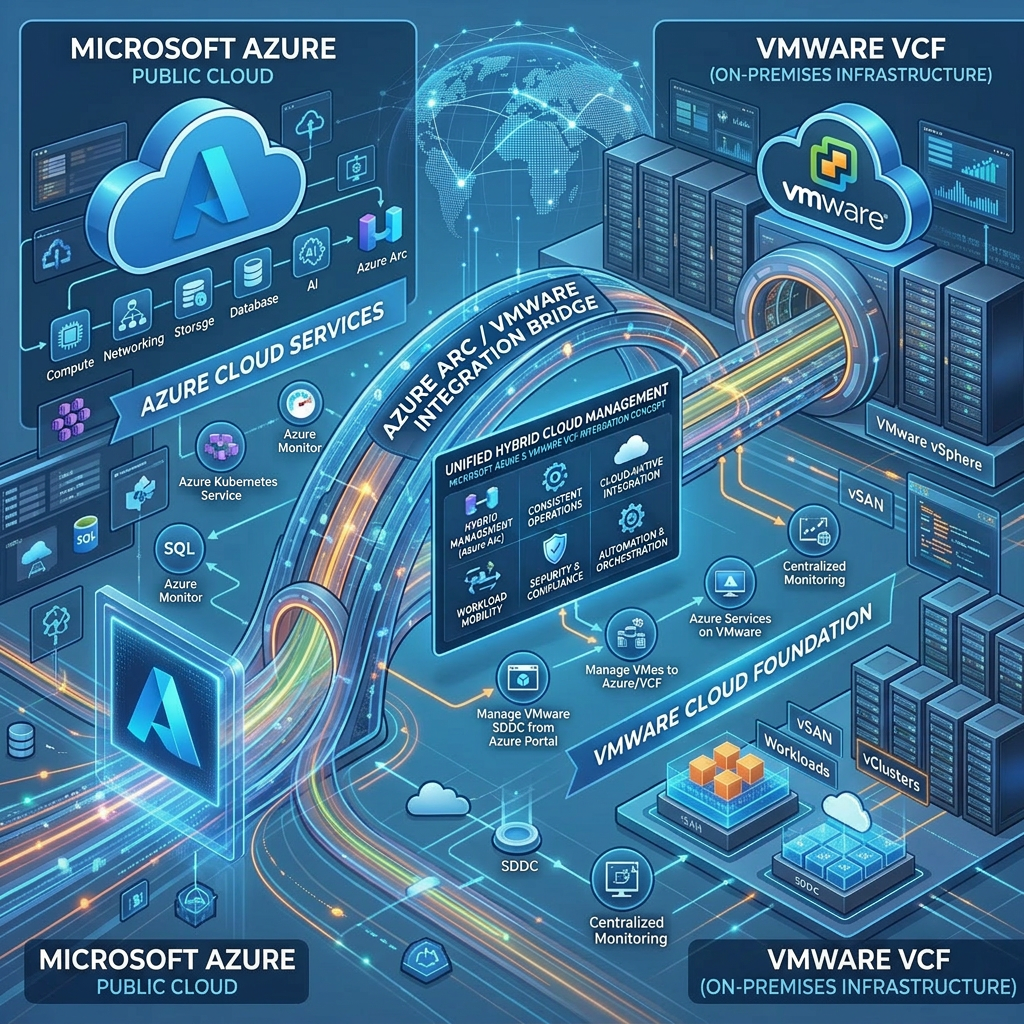
Azure VMware Solution: Bringing VMware Workloads to Microsoft Azure
Azure VMware Solution enables organizations to migrate, extend, and modernize VMware environments directly into Microsoft Azure while maintaining operational consistency and enterprise scalability.
By Daily Cloud Blog | Hybrid Cloud | VMware | AzureImage source: Microsoft Azure VMware Solution
What Is Azure VMware Solution?
Azure VMware Solution (AVS) is a Microsoft-managed service that allows organizations to run VMware workloads natively on Azure infrastructure using familiar VMware technologies including vSphere, NSX, HCX, and vSAN.
Instead of completely redesigning applications for cloud-native platforms, enterprises can migrate existing VMware virtual machines into Azure while maintaining operational familiarity and leveraging Azure cloud services.
Why Organizations Are Looking at AVS
Many enterprises are under pressure to modernize infrastructure, reduce data center costs, improve disaster recovery, and accelerate cloud adoption. However, not every workload can immediately move to Kubernetes, containers, or serverless architectures.
Azure VMware Solution provides a strategic bridge between traditional VMware environments and modern Azure cloud services.
Key Benefits of Azure VMware Solution
Faster Migration
Move VMware workloads into Azure without major application redesigns.
Hybrid Cloud Integration
Extend on-premises VMware environments directly into Azure.
Operational Consistency
Continue using familiar VMware tools, processes, and skillsets.
Azure Native Services
Integrate workloads with Azure AI, monitoring, backup, security, and analytics services.
Azure VMware Solution Architecture
Azure VMware Solution integrates VMware infrastructure directly into Azure while allowing organizations to connect workloads to Azure-native services.
Azure VMware Solution migration and HCX connectivity overview.
Integration between Azure VMware Solution and Azure native services.
Common Enterprise Use Cases
- Data center migration and consolidation
- Disaster recovery and business continuity
- Hybrid cloud expansion
- Legacy application hosting
- Cloud bursting and temporary scaling
- Infrastructure modernization
- VMware workload migration with minimal disruption
High-Level AVS Connectivity Flow
 On-Premises VMware Environment
            |
            |  ExpressRoute / HCX
            |
            V

 +----------------------------------+
 | Azure VMware Solution (AVS)      |
 |----------------------------------|
 | vSphere                          |
 | NSX                              |
 | vSAN                             |
 | HCX                              |
 +----------------------------------+
            |
            |
            V

 +----------------------------------+
 | Azure Native Services            |
 |----------------------------------|
 | Azure Monitor                    |
 | Microsoft Defender for Cloud     |
 | Azure Backup                     |
 | Azure Arc                        |
 | Microsoft Sentinel               |
 | Azure NetApp Files               |
 +----------------------------------+
Best Fit Scenarios
Azure VMware Solution is especially valuable for organizations that want to accelerate cloud adoption while preserving VMware operational consistency. It works particularly well for enterprises with large VMware estates, compliance-sensitive workloads, or aggressive data center exit timelines.
Security and Governance Considerations
Security should be embedded into every AVS deployment strategy. Organizations should integrate Azure VMware Solution with Microsoft Defender for Cloud, Microsoft Sentinel, Azure Monitor, network segmentation, RBAC, backup solutions, and governance frameworks.
A properly designed AVS environment can improve operational visibility, disaster recovery readiness, compliance posture, and workload resilience.
Modernization Journey
Azure VMware Solution modernization and transformation strategy.
Final Thoughts
Azure VMware Solution is more than a migration platform. It acts as a modernization bridge between traditional virtualization environments and cloud-native Azure services.
For organizations heavily invested in VMware, AVS provides a realistic and strategic path toward hybrid cloud adoption, operational modernization, disaster recovery improvements, and long-term cloud transformation.
Need Help Designing a Hybrid Cloud Strategy?
MB Technology Group LLC helps organizations modernize infrastructure, migrate workloads, improve resiliency, and architect secure hybrid cloud solutions across Azure, AWS, VMware, Nutanix, and enterprise platforms.
Azure VPN Gateway: Building Secure Hybrid Cloud Connectivity
Azure Networking • Hybrid Cloud • Secure Connectivity
Azure VPN Gateway: Building Secure Hybrid Cloud Connectivity
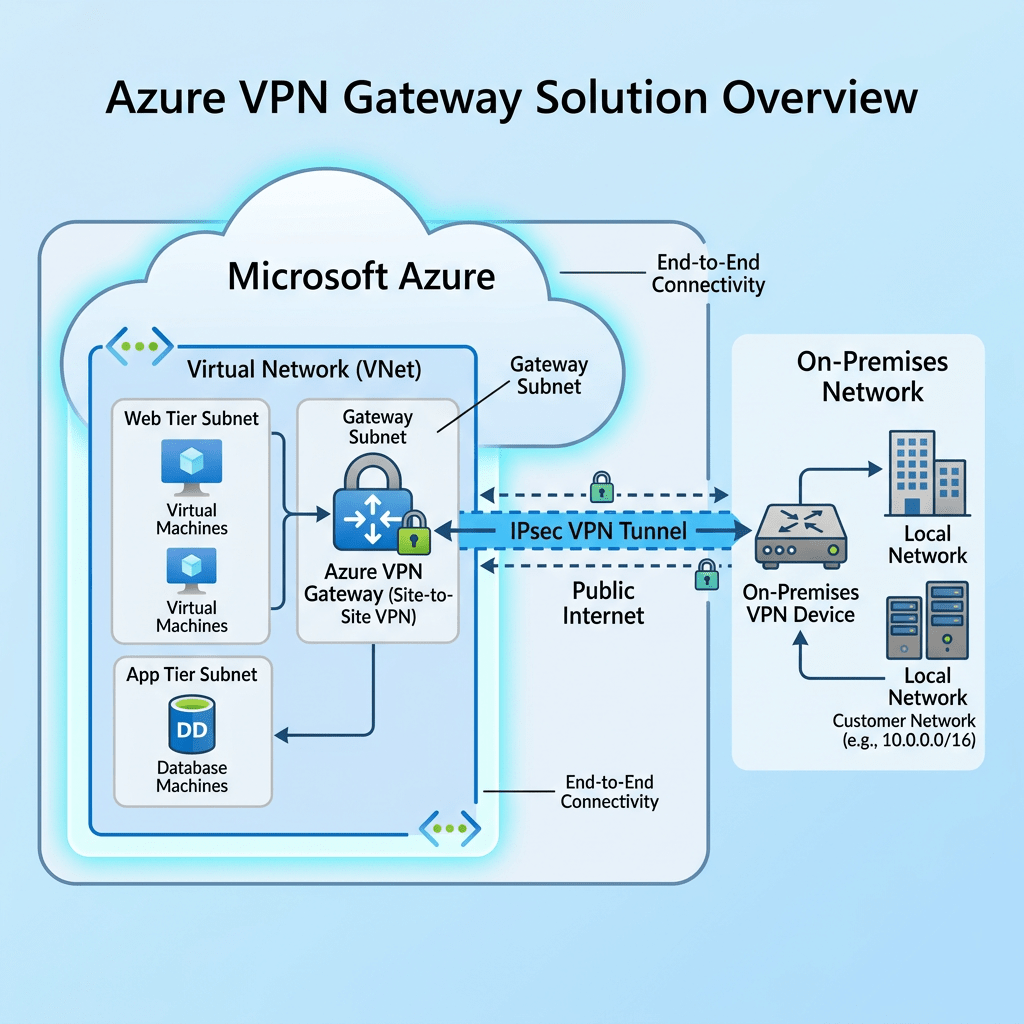
Azure VPN Gateway allows organizations to securely connect on-premises networks, remote users, branch offices, and Azure virtual networks using encrypted IPsec/IKE tunnels. It is one of the foundational services for building a practical hybrid cloud architecture.
Site-to-Site VPN
Point-to-Site VPN
VNet-to-VNet
Hybrid CloudDaily Cloud Blog • Azure Networking Overview • Hybrid Cloud Architecture
What Is Azure VPN Gateway?
Azure VPN Gateway is a Microsoft Azure networking service that provides secure encrypted connectivity between Azure virtual networks and external networks such as on-premises datacenters, branch offices, remote users, or other Azure VNets.
For organizations adopting hybrid cloud, Azure VPN Gateway is often the first step toward securely extending existing infrastructure into Azure without exposing workloads directly to the public internet.
Site-to-Site VPN
Connect an on-premises firewall or router to Azure over an encrypted IPsec/IKE tunnel.
Point-to-Site VPN
Allow individual users to securely connect from laptops or remote locations into Azure.
VNet-to-VNet
Connect Azure virtual networks across regions or environments for disaster recovery and segmentation.
Architecture Diagram: Site-to-Site VPN
This diagram shows a common hybrid cloud architecture where an on-premises datacenter connects securely to Azure through Azure VPN Gateway.
On-Premises Datacenter
UsersAD / DNSFile ServersFirewall / VPN DeviceExample CIDR: 192.168.1.0/24
Encrypted IPsec/IKE TunnelInternet TransportMicrosoft Azure
Azure VNetGatewaySubnetVPN GatewayAzure WorkloadsExample CIDR: 10.10.0.0/16
Core Azure VPN Gateway Components
Virtual Network
The Azure network where virtual machines, private endpoints, firewalls, and application resources are deployed.
GatewaySubnet
A required subnet named exactly GatewaySubnet. This is where Azure deploys the VPN Gateway service.
Local Network Gateway
Represents the on-premises VPN device, public IP address, and local network address spaces.
Connection Resource
Defines the tunnel relationship between the Azure VPN Gateway and the on-premises network gateway.
Architecture Diagram: Hub-and-Spoke VPN Design
For enterprise environments, Azure VPN Gateway is commonly placed in a central hub virtual network. Spoke VNets connect to the hub using VNet peering, allowing shared security and connectivity services.
On-Premises
Datacenter
Branch Office
Firewall/VPN DeviceAzure Hub VNet
VPN GatewayAzure FirewallDNS ServicesMonitoringSpoke VNet 1
Production WorkloadsSpoke VNet 2
Dev/Test WorkloadsSpoke VNet 3
Security / ManagementStep-by-Step Deployment Overview
- Create the Azure Virtual Network with a non-overlapping address space such as
10.10.0.0/16. - Create the GatewaySubnet, commonly sized as
/27or larger for future scalability. - Deploy the Azure VPN Gateway using a route-based VPN type and the appropriate SKU.
- Create the Local Network Gateway to define the on-premises firewall public IP and local address ranges.
- Create the VPN Connection and configure the shared key, IKE/IPsec parameters, and routing.
- Configure the on-premises VPN device with matching tunnel settings.
- Validate connectivity using ping, private IP connectivity, route tables, and Azure VPN diagnostics.
Security and Design Best Practices
Use route-based VPN for modern deployments.Enable BGP where dynamic routing is required.Use active-active VPN Gateway for high availability.Inspect traffic through Azure Firewall or NVA where required.Avoid overlapping IP ranges between Azure and on-premises.Monitor tunnel health using Azure Monitor and Log Analytics.Azure VPN Gateway vs ExpressRoute
Feature Azure VPN Gateway ExpressRoute Transport Internet-based encrypted tunnel Private dedicated circuit Cost Lower entry cost Higher cost Performance Good for SMB and many hybrid scenarios Best for enterprise high-throughput needs Best Use Case Hybrid cloud, remote access, migration, DR Mission-critical enterprise connectivity Real-World Use Cases
Cloud Migration
Move applications, servers, and data into Azure using private connectivity.Disaster Recovery
Replicate workloads into Azure and maintain secure connectivity during failover.Hybrid Identity
Extend Active Directory, DNS, and management services into Azure.Remote Administration
Allow IT administrators to securely manage Azure resources through private IP connectivity.Recommended Enterprise Design
For most organizations building a scalable hybrid cloud, a hub-and-spoke model is the recommended starting point. Place shared services such as VPN Gateway, Azure Firewall, DNS forwarding, monitoring, and management services in the hub. Application workloads should live in separate spoke VNets.
- Hub VNet for connectivity and security services
- Spoke VNets for production, development, security, and management workloads
- Azure Firewall or network virtual appliance for traffic inspection
- BGP-enabled VPN tunnels for dynamic routing
- Future-ready design that can later support ExpressRoute
Final Thoughts
Azure VPN Gateway is a practical and powerful service for organizations starting or expanding their hybrid cloud journey. It provides secure connectivity, supports multiple deployment models, and fits well into modern Azure hub-and-spoke architectures.
Stay Connected with Daily Cloud Blog
If you found this comparison helpful, follow Daily Cloud Blog for more practical content on cloud, virtualization, DevOps, cybersecurity, and infrastructure strategy.
We regularly share technical breakdowns, architecture guidance, and real-world insights designed for engineers, architects, and IT leaders.
Want more posts like this? Subscribe for fresh content on AWS, Azure, Kubernetes, virtualization, and modern infrastructure trends.
About Daily Cloud Blog
Daily Cloud Blog shares practical insights on cloud, virtualization, infrastructure, and modern IT strategy for engineers, architects, and technology leaders.
Containers Technology: A Detailed Overview for Modern Application Delivery
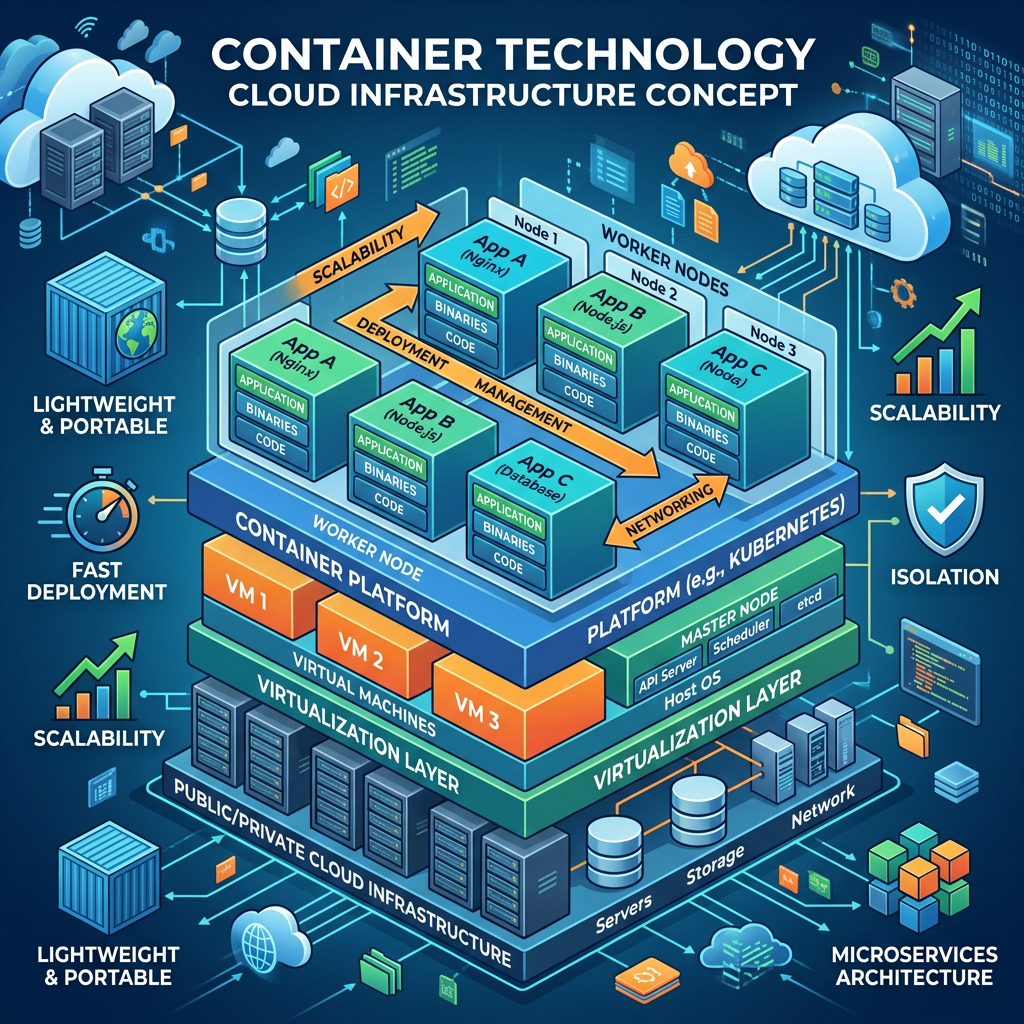
Containers | Kubernetes | DevOps | Cloud-Native | Application Modernization
Containers Technology: A Deep Dive into Modern Application Delivery
Containers have become a foundational technology for modern application delivery, allowing organizations to package applications, dependencies, libraries, and runtime components into consistent and portable units that can run across development, testing, production, on-premises infrastructure, public cloud, and edge environments.
Author: Christian Marrero
Blog: Daily Cloud Blog
Topic: Containers Technology OverviewContainers Technology
Cloud-Native • Kubernetes • Docker • Microservices • DevOps • CI/CD • Application Modernization
What Are Containers?
Containers are lightweight application runtime environments that package application code, dependencies, libraries, and configuration into a consistent deployable unit.
Instead of installing an application directly onto a server and depending on that server’s configuration, containers allow the application to carry what it needs to run. This makes the application more portable, predictable, and easier to deploy across multiple environments.
Daily Cloud Blog Take: Containers are not just about running applications differently — they are about changing how organizations build, secure, deploy, scale, and operate modern platforms.Why Containers Matter
Modern enterprise applications need speed, consistency, portability, and automation. Traditional deployment models often create problems because an application may work in development but fail in production due to differences in operating systems, installed packages, dependencies, or configuration.
Containers help solve this challenge by creating a standard application package that can move from a developer workstation to a CI/CD pipeline, container registry, Kubernetes cluster, cloud platform, or edge location.
With containers, organizations can reduce configuration drift, improve deployment reliability, increase automation, and create a stronger foundation for cloud-native application delivery.
Core Container Capabilities
Portability
Run applications consistently across development, testing, production, cloud, and on-premises environments.
Speed
Containers start quickly and support faster release cycles compared to traditional deployment models.
Automation
Container images fit naturally into CI/CD pipelines, GitOps workflows, and Infrastructure as Code practices.
Containers vs Virtual Machines
Virtual machines virtualize hardware and require a full operating system for each workload. Containers virtualize the application runtime and share the host operating system kernel.
This makes containers smaller, faster to start, and easier to scale compared to traditional virtual machines. However, virtual machines still provide strong isolation and remain valuable for legacy applications, full operating system requirements, and workloads that are not designed for containerized deployment.
Key Advantage: Containers are best when portability, faster deployment, automation, scalability, and repeatable application delivery are priorities.Containers and Kubernetes
Containers are powerful by themselves, but Kubernetes provides the orchestration layer required to operate them at enterprise scale. Kubernetes manages scheduling, scaling, service discovery, rolling updates, self-healing, and workload placement across clusters.
For smaller environments, Docker or a basic container runtime may be enough. For enterprise environments, Kubernetes is often the standard platform for running containerized applications across cloud, hybrid, and on-premises environments.
Key Advantage: Kubernetes turns containers into a complete application platform by adding automation, resiliency, networking, scaling, and lifecycle management.Container Registries
A container registry is where container images are stored, versioned, scanned, and distributed. Registries are a critical part of the container lifecycle because they become the trusted source for approved application images.
Common examples include Docker Hub, Azure Container Registry, Amazon Elastic Container Registry, Google Artifact Registry, GitHub Container Registry, and private enterprise registries.
Security with Containers
Container security should be designed across the full lifecycle: image build, registry storage, deployment, runtime, networking, monitoring, and incident response.
Security Capabilities
- Private container registries
- Image vulnerability scanning
- Image signing and verification
- Least privilege runtime permissions
- Secrets management integration
- Network policies and segmentation
- Runtime monitoring and threat detection
- Patch management for base images
Containers and DevOps
Containers align closely with DevOps practices because they make application delivery more repeatable and automated. Development teams can build images, operations teams can deploy them consistently, and security teams can scan and enforce policies before production deployment.
When containers are combined with Infrastructure as Code, CI/CD pipelines, GitOps, and Kubernetes, organizations can create a consistent delivery model across multiple environments.
Where Containers Make Sense
- Modern web applications
- API-based applications
- Microservices platforms
- DevOps and CI/CD pipelines
- Cloud-native applications
- Stateless workloads
- Application modernization initiatives
- Hybrid and multi-cloud deployments
- Development and testing environments
- Edge computing workloads
Common Mistakes to Avoid
Common Pitfalls: Treating containers like small virtual machines, running containers as root, skipping image scanning, storing secrets inside images, ignoring observability, overusing Kubernetes for simple workloads, and failing to create governance standards before scaling container adoption.Final Thoughts
Containers represent a major shift in how applications are built, packaged, deployed, and operated. They bring consistency, portability, speed, and automation to modern IT environments.
For organizations moving toward DevOps, Kubernetes, cloud-native platforms, and hybrid cloud architectures, containers are one of the most important technologies to understand.
Container adoption should be intentional. The best results come when containers are combined with strong security practices, automation, observability, governance, and a clear understanding of which workloads are the right fit.
For infrastructure architects, cloud engineers, DevOps teams, and IT leaders, containers are no longer optional knowledge — they are a foundation of modern application delivery.
Stay Connected with Daily Cloud Blog
If you found this containers technology overview helpful, follow Daily Cloud Blog for more practical content on Kubernetes, DevOps, cloud-native platforms, hybrid cloud, virtualization, cybersecurity, and modern infrastructure.
Stay ahead with insights on AWS, Azure, Kubernetes, virtualization, cybersecurity, and modern infrastructure.
About Daily Cloud Blog
Daily Cloud Blog shares practical insights on cloud, virtualization, infrastructure, hybrid environments, and modern IT strategy.Azure Arc: A Deep Dive into Hybrid and Multi-Cloud Management
Microsoft Azure | Hybrid Cloud | Multi-Cloud | Infrastructure
Azure Arc: A Deep Dive into Hybrid and Multi-Cloud Management
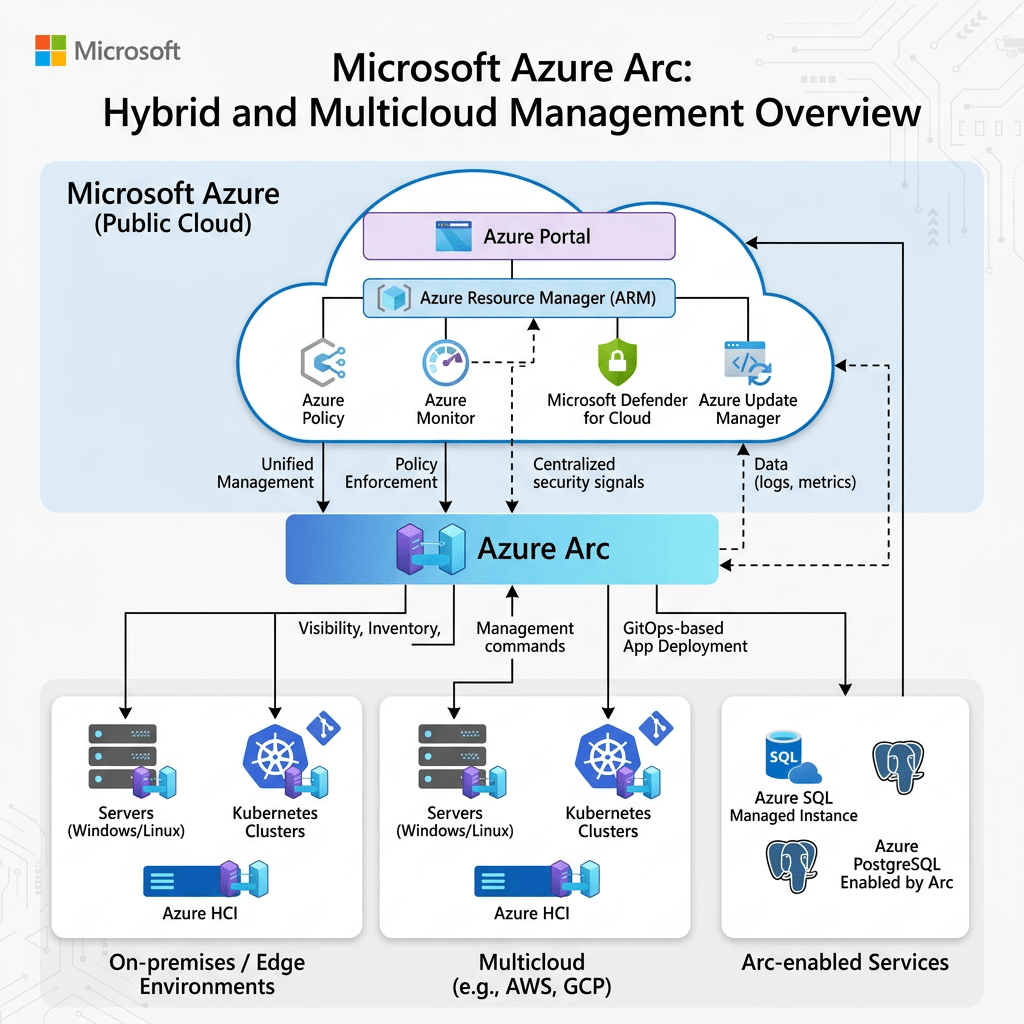
Azure Arc extends Azure management and services beyond the cloud, allowing organizations to manage servers, Kubernetes clusters, and applications across on-premises, multi-cloud, and edge environments using a single control plane.
Author: Christian Marrero
Blog: Daily Cloud Blog
Topic: Azure Arc OverviewMicrosoft Azure Arc
Hybrid Cloud • Multi-Cloud • Governance • Kubernetes • Servers • Data Services • Azure Control Plane
What Is Azure Arc?
Azure Arc is a set of technologies that brings Azure management and services to infrastructure running outside of Azure. This includes on-premises data centers, other cloud providers such as AWS and Google Cloud, and edge environments.
Instead of forcing all workloads into Azure, Azure Arc allows organizations to project their existing resources into Azure as manageable objects. Once connected, these resources can be governed, secured, and operated using Azure-native tools.
Daily Cloud Blog Take: Azure Arc is not about moving workloads — it’s about extending Azure’s control plane to wherever your workloads already live.
Why Azure Arc Matters
Modern enterprise environments are no longer confined to a single data center or cloud provider. Organizations operate across hybrid environments, multiple clouds, remote sites, and edge locations.
This creates operational complexity, inconsistent security policies, fragmented visibility, and management overhead. Azure Arc solves this by centralizing control through Azure.
With Azure Arc, you can manage distributed infrastructure using a consistent set of tools, policies, and automation frameworks.
Core Azure Arc Capabilities
Key Features
- Manage on-premises and multi-cloud servers
- Govern Kubernetes clusters anywhere
- Apply Azure Policy and compliance controls
- Enable Azure Monitor and Defender for Cloud
- Deploy Azure data services outside Azure
- Use GitOps for Kubernetes configuration
- Extend RBAC and identity controls via Entra ID
Azure Arc for Servers
Azure Arc allows you to onboard physical and virtual servers running outside Azure into Azure Resource Manager. Once connected, these servers appear as Azure resources and can be managed using familiar Azure tools.
This includes applying tags, policies, monitoring, security baselines, and automation scripts across all environments consistently.
Whether your servers run in AWS, VMware, Nutanix, or physical infrastructure, Azure Arc gives you a unified management layer.
Azure Arc for Kubernetes
Kubernetes is a core part of modern application platforms, and Azure Arc extends management capabilities to any CNCF-certified Kubernetes cluster.
This includes clusters running on-premises, in other clouds, or even at the edge. Azure Arc enables centralized governance, policy enforcement, monitoring, and application deployment through GitOps.
This allows organizations to standardize Kubernetes operations without locking into a single cloud provider.
Key Advantage: Azure Arc enables GitOps-driven deployments, allowing infrastructure and application configurations to be defined as code and automatically enforced across clusters.
Azure Arc-Enabled Data Services
Azure Arc also brings Azure data services such as Azure SQL Managed Instance and PostgreSQL Hyperscale to on-premises and multi-cloud environments.
These services run on Kubernetes but are managed through Azure, providing cloud-like capabilities such as scaling, monitoring, patching, and automation without requiring workloads to reside in Azure.
This is especially valuable for organizations with data residency, latency, or regulatory requirements.
Governance and Compliance
One of the strongest benefits of Azure Arc is governance. Organizations can apply Azure Policy across all resources, regardless of location.
This ensures consistent compliance, configuration standards, and security baselines across hybrid and multi-cloud environments.
Instead of managing policies separately in each platform, Azure Arc allows centralized policy enforcement through Azure.
Governance Capabilities
- Azure Policy enforcement across environments
- Tagging and resource organization
- Compliance reporting and auditing
- Standardized configuration management
- Security baseline enforcement
Security with Azure Arc
Azure Arc integrates with Microsoft Defender for Cloud, enabling security monitoring, vulnerability assessments, and threat detection across all connected resources.
This allows security teams to gain visibility into environments that were previously difficult to monitor consistently.
Combined with Microsoft Entra ID, organizations can enforce identity-based access controls, RBAC, and Zero Trust principles across their entire infrastructure footprint.
Azure Arc and DevOps
Azure Arc aligns closely with DevOps practices. It supports Infrastructure as Code, GitOps workflows, CI/CD pipelines, and automated deployments across hybrid environments.
Developers and operations teams can define desired state configurations in Git repositories, and Azure Arc ensures those configurations are continuously enforced.
This creates consistency, reduces drift, and improves deployment reliability across environments.
Where Azure Arc Makes Sense
- Organizations with hybrid cloud environments
- Multi-cloud strategies involving AWS or Google Cloud
- Edge computing and remote site deployments
- Kubernetes platform standardization
- Centralized governance and compliance needs
- Security visibility across distributed systems
Common Mistakes to Avoid
Common Pitfalls: Treating Azure Arc as a migration tool, ignoring governance planning, not integrating with identity and security controls, failing to use automation, and underestimating operational design.
Final Thoughts
Azure Arc represents a major shift in how cloud platforms are used. Instead of requiring everything to run in a single cloud, Azure is becoming a universal control plane for distributed infrastructure.
This approach aligns with real-world enterprise environments, where workloads are spread across multiple platforms for performance, compliance, cost, or business reasons.
Azure Arc enables organizations to modernize operations, improve security, and maintain flexibility without forcing a full cloud migration.
For infrastructure architects, cloud engineers, and IT leaders, Azure Arc is one of the most important technologies to understand when designing modern hybrid and multi-cloud environments.
Stay Connected with Daily Cloud Blog
If you found this Azure Arc overview helpful, follow Daily Cloud Blog for more practical content on hybrid cloud, Azure architecture, multi-cloud strategies, and enterprise infrastructure.
Stay ahead with insights on AWS, Azure, Kubernetes, virtualization, cybersecurity, and modern infrastructure.
About Daily Cloud Blog
Daily Cloud Blog shares practical insights on cloud, virtualization, infrastructure, hybrid environments, and modern IT strategy.Microsoft Entra ID: A Detailed Overview for Modern Identity and Access Management
Microsoft Entra | Identity Security | Zero Trust
Microsoft Entra ID: A Detailed Overview for Modern Identity and Access Management
Microsoft Entra ID is the cloud-based identity and access management platform that helps organizations manage users, devices, applications, access policies, authentication, and security across Microsoft 365, Azure, SaaS applications, and hybrid environments.
Author: Christian Marrero
Blog: Daily Cloud Blog
Topic: Microsoft Entra ID OverviewMicrosoft Entra ID
Identity • Access Management • MFA • Conditional Access • SSO • Governance • Zero Trust
What Is Microsoft Entra ID?
Microsoft Entra ID, formerly known as Azure Active Directory, is Microsoft’s cloud-based identity and access management service. It allows organizations to manage identities, secure authentication, control access to applications, enforce security policies, and support modern Zero Trust architecture.
In simple terms, Microsoft Entra ID acts as the identity control plane for users, groups, applications, devices, administrators, and external partners. It helps answer three critical security questions: who is signing in, what are they trying to access, and should access be allowed?
Daily Cloud Blog Take: Microsoft Entra ID is no longer just a cloud directory. It is the foundation for identity security, access control, hybrid authentication, SaaS integration, and Zero Trust enforcement.
Why Microsoft Entra ID Matters
Identity has become the new security perimeter. In traditional networks, security was often built around firewalls, VPNs, and internal network boundaries. Today, users access applications from home networks, mobile devices, cloud platforms, SaaS services, and unmanaged locations.
Because of this shift, organizations need a strong identity platform that can verify users, validate devices, enforce MFA, evaluate risk, and apply access policies in real time. Microsoft Entra ID helps provide that layer of control.
For most Microsoft-centric organizations, Entra ID is at the center of Microsoft 365, Azure, Intune, Defender, Teams, SharePoint, Exchange Online, and thousands of third-party SaaS applications.
Core Capabilities of Microsoft Entra ID
Microsoft Entra ID includes a wide range of identity and access management capabilities. These features help administrators manage identities, secure authentication, protect privileged access, and automate identity lifecycle operations.
Key Microsoft Entra ID Capabilities
- User and group management
- Single sign-on for cloud and SaaS applications
- Multifactor authentication
- Conditional Access policies
- Passwordless authentication
- Application registrations and enterprise applications
- Role-based access control
- Privileged Identity Management
- Identity Protection
- Access reviews and identity governance
- Hybrid identity with Active Directory synchronization
- External identities for partners, vendors, and guests
Entra ID vs Traditional Active Directory
One common misconception is that Microsoft Entra ID is simply Active Directory in the cloud. It is not. Traditional Active Directory Domain Services was designed for domain-joined computers, Kerberos authentication, LDAP, Group Policy, and internal network-based identity.
Microsoft Entra ID was designed for cloud identity, web authentication, OAuth, OpenID Connect, SAML, SaaS applications, mobile devices, and modern access control. Both platforms can work together, but they serve different roles.
Feature Active Directory DS Microsoft Entra ID Primary Use On-premises identity Cloud identity and access management Authentication Kerberos, NTLM, LDAP OAuth, SAML, OpenID Connect Device Model Domain-joined devices Cloud-joined and hybrid-joined devices Policy Control Group Policy Conditional Access and cloud policies Best Fit Legacy apps and internal infrastructure Microsoft 365, Azure, SaaS, and Zero Trust Single Sign-On
Single sign-on is one of the most important user experience benefits of Microsoft Entra ID. With SSO, users can sign in once and access multiple applications without repeatedly entering credentials.
Entra ID supports thousands of SaaS applications through the Microsoft Entra application gallery. It also supports custom application integrations using modern authentication protocols such as SAML, OAuth 2.0, and OpenID Connect.
For organizations, SSO improves security and productivity. Users have fewer passwords to manage, administrators get centralized access control, and security teams gain better visibility into sign-in behavior.
Multifactor Authentication
Multifactor authentication is one of the most effective ways to protect user accounts. Microsoft Entra ID supports MFA through push notifications, one-time passcodes, phone methods, FIDO2 security keys, Windows Hello for Business, and passwordless authentication options.
MFA should be treated as a baseline security requirement, especially for administrators, remote users, executives, finance teams, and anyone accessing sensitive data.
Best Practice: Start with MFA for all users, then move toward phishing-resistant authentication such as FIDO2 security keys, certificate-based authentication, or Windows Hello for Business.
Conditional Access
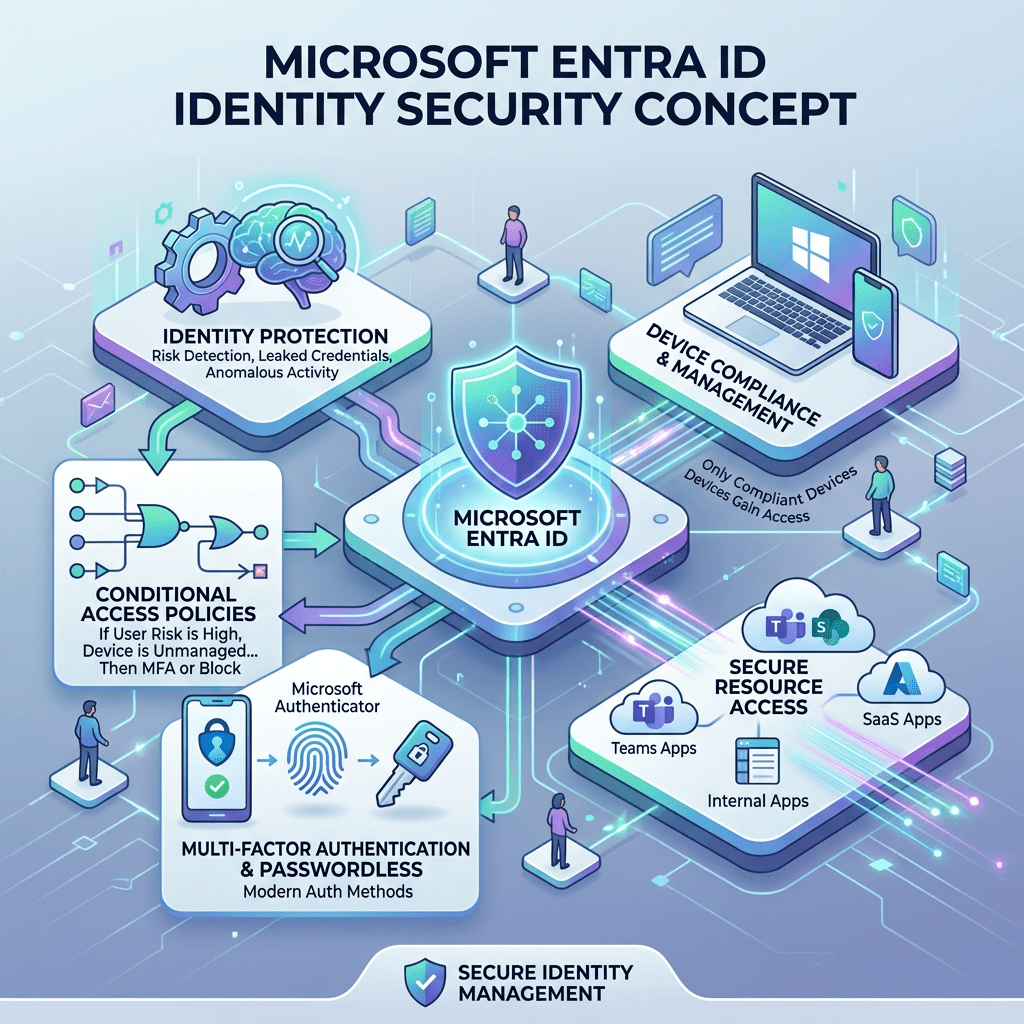
Conditional Access is one of the most powerful features in Microsoft Entra ID. It allows organizations to make access decisions based on signals such as user, group, location, device compliance, application, risk level, and authentication strength.
Instead of allowing or blocking access with a single static rule, Conditional Access lets administrators create smarter policies. For example, a user accessing SharePoint from a compliant corporate laptop may be allowed normally, while the same user accessing from an unknown device in a risky location may be required to complete MFA or be blocked.
Common Conditional Access Scenarios
- Require MFA for all users
- Require compliant or hybrid-joined devices
- Block legacy authentication
- Restrict access from high-risk countries
- Require stronger authentication for administrators
- Control access to sensitive applications
- Apply session controls for unmanaged devices
Identity Protection
Microsoft Entra ID Protection helps detect identity-based risks such as risky sign-ins, leaked credentials, unfamiliar sign-in properties, impossible travel patterns, and suspicious activity.
These risk signals can be used with Conditional Access to automate response actions. For example, a risky sign-in may require MFA, while a high-risk user may be required to reset their password.
This is where Entra ID becomes more than a directory. It becomes a security decision engine that evaluates identity risk before granting access.
Privileged Identity Management
Privileged Identity Management, commonly known as PIM, helps reduce standing administrative access. Instead of giving administrators permanent privileged roles, organizations can require just-in-time activation.
With PIM, an administrator can request temporary access to a privileged role, provide justification, complete MFA, and receive access only for a limited time. This reduces the attack surface if an admin account is compromised.
Security Reminder: Permanent Global Administrator access should be extremely limited. Use PIM, break-glass accounts, alerting, and strong authentication controls.
Identity Governance
Identity Governance helps organizations manage the full lifecycle of access. This includes onboarding, access requests, entitlement management, access reviews, lifecycle workflows, and automated removal of access when users change roles or leave the organization.
Without governance, access tends to accumulate over time. Users change jobs, join projects, move departments, and keep permissions they no longer need. Entra ID Governance helps reduce this risk by making access reviewable, auditable, and temporary where needed.
Hybrid Identity
Many organizations still use on-premises Active Directory. Microsoft Entra ID supports hybrid identity by synchronizing users, groups, and credentials from on-premises AD into Entra ID.
This allows users to have a common identity across on-premises resources, Microsoft 365, Azure, and cloud applications. Hybrid identity is commonly implemented using Microsoft Entra Connect Sync or Microsoft Entra Cloud Sync.
Hybrid identity is especially important for organizations that still rely on file servers, legacy applications, domain-joined devices, or traditional Windows Server infrastructure.
External Identities
Microsoft Entra ID also supports external collaboration. Organizations can invite partners, contractors, vendors, and customers to access applications or resources without creating traditional internal accounts for every external user.
This is commonly used for Microsoft Teams collaboration, SharePoint access, B2B partnerships, and vendor access to business applications.
External access should always be controlled with Conditional Access, MFA, access reviews, and expiration policies.
Application Management
Applications are a major part of Entra ID. Administrators can manage enterprise applications, configure SSO, assign users and groups, review permissions, manage consent, and monitor sign-ins.
Developers can also register applications in Entra ID to use Microsoft identity services for authentication and authorization.
Application governance is important because OAuth permissions, admin consent, and third-party app integrations can become major security risks if they are not reviewed properly.
Device Identity and Intune Integration
Microsoft Entra ID integrates closely with Microsoft Intune and device management. Devices can be Microsoft Entra joined, hybrid joined, or registered. Device identity can then be used as a Conditional Access signal.
This means organizations can create policies that require devices to be compliant before accessing corporate resources. For example, a device may need encryption, antivirus, updated security patches, and a compliant configuration before accessing Exchange Online or SharePoint.
Zero Trust and Microsoft Entra ID
Microsoft Entra ID is a key component of a Zero Trust strategy. Zero Trust is based on the principle of never trust, always verify. Instead of assuming users or devices are trusted because they are on the corporate network, every access request is evaluated.
Entra ID supports this model by evaluating identity, device health, location, risk, application sensitivity, and authentication strength before access is granted.
Zero Trust Controls with Entra ID
- Verify explicitly with MFA and strong authentication
- Use least privilege with PIM and RBAC
- Assume breach with risk-based access controls
- Continuously monitor sign-ins and user behavior
- Limit access based on device compliance
- Review and remove unnecessary permissions
Recommended Baseline Design
A good Microsoft Entra ID deployment should not be treated as a default configuration. It should be designed carefully around security, operations, compliance, and user experience.
- Enable MFA for all users.
- Use phishing-resistant authentication for privileged roles.
- Block legacy authentication.
- Implement Conditional Access in report-only mode first.
- Use PIM for administrative roles.
- Create emergency break-glass accounts.
- Monitor risky users and risky sign-ins.
- Review enterprise application permissions regularly.
- Use access reviews for guests and privileged groups.
- Integrate logs with Microsoft Sentinel or another SIEM.
Common Mistakes to Avoid
Microsoft Entra ID is powerful, but poor configuration can create risk. Many organizations enable cloud identity quickly but fail to properly secure privileged accounts, external users, app consent, and legacy protocols.
Common Mistakes: No MFA baseline, too many Global Administrators, unmanaged guest accounts, excessive app permissions, no access reviews, weak break-glass strategy, and Conditional Access policies that are never tested.
Where Microsoft Entra ID Fits in the Enterprise
Microsoft Entra ID is now one of the most important platforms in the enterprise technology stack. It touches security, cloud, endpoint management, compliance, collaboration, DevOps, and application access.
For cloud architects, Entra ID is critical for Azure RBAC, workload identity, managed identities, application access, and secure administration. For security teams, it provides identity risk data, authentication controls, privileged access management, and audit logs. For IT operations, it simplifies user lifecycle, group management, SSO, and access control.
Final Thoughts
Microsoft Entra ID is more than the replacement name for Azure Active Directory. It represents Microsoft’s broader identity security strategy for modern enterprises.
As organizations continue moving toward cloud, SaaS, hybrid work, and Zero Trust security models, identity becomes the most important control point. Microsoft Entra ID gives organizations the tools to secure access, reduce risk, simplify sign-in, govern permissions, and protect critical resources.
The organizations that get the most value from Entra ID are the ones that treat it as a strategic security platform, not just a user directory.
Stay Connected with Daily Cloud Blog
If you found this Microsoft Entra ID overview helpful, follow Daily Cloud Blog for more practical content on cloud identity, Microsoft security, Azure architecture, cybersecurity, and enterprise infrastructure.
We regularly share technical breakdowns, architecture guidance, and real-world insights designed for engineers, architects, and IT leaders.
Want more posts like this? Subscribe for fresh content on AWS, Azure, Microsoft Entra, Windows Server, cybersecurity, virtualization, and modern infrastructure trends.
About Daily Cloud Blog
Daily Cloud Blog shares practical insights on cloud, virtualization, infrastructure, identity security, and modern IT strategy for engineers, architects, and technology leaders.My First Impression of Windows Server 2025
Microsoft Infrastructure | Windows Server | Enterprise IT
My First Impression of Windows Server 2025
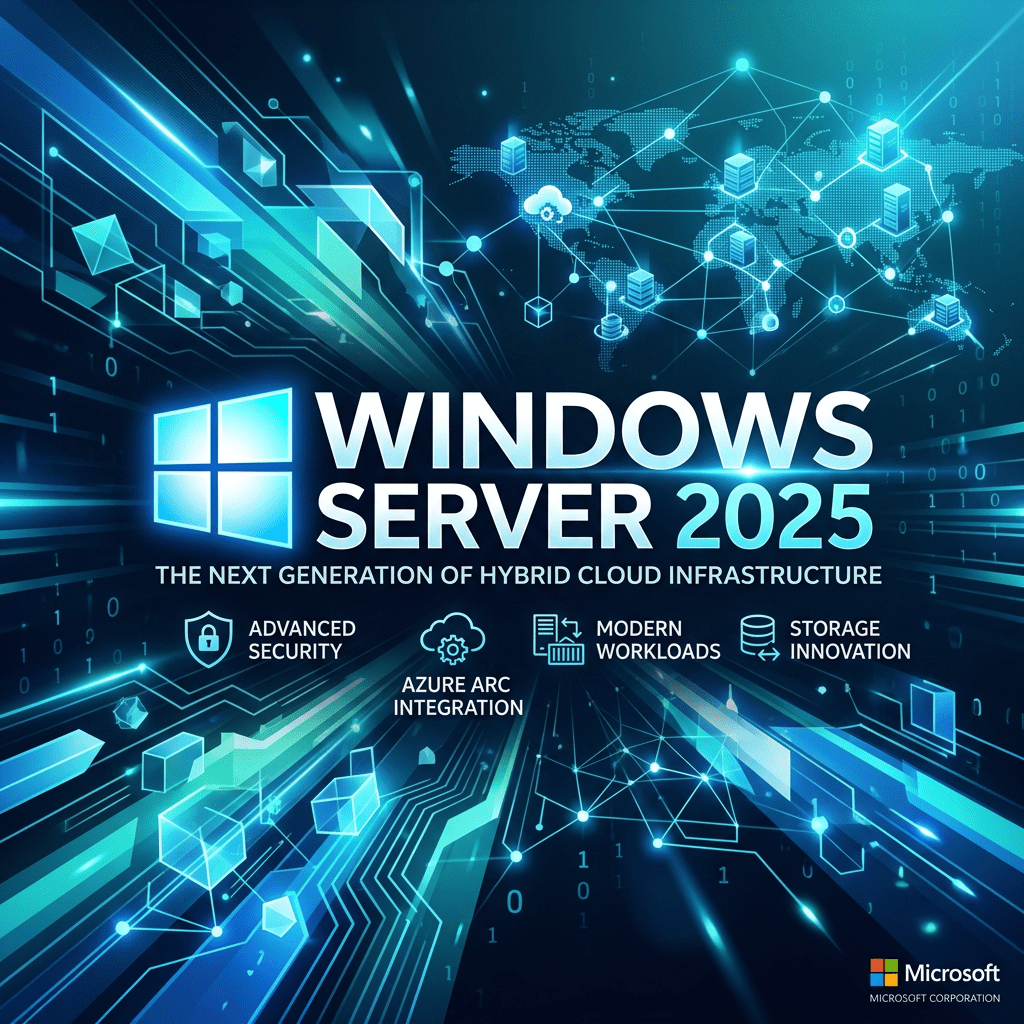
Windows Server 2025 feels less like a dramatic reinvention and more like a serious modernization of the platform many enterprises still rely on every day. After looking at the new release, my first impression is simple: Microsoft is pushing Windows Server deeper into security, hybrid cloud, automation, and modern infrastructure operations.
Author: Christian Marrero
Blog: Daily Cloud Blog
Topic: Windows Server 2025 First ImpressionWindows Server 2025
Modern Security • Hybrid Cloud • Active Directory Enhancements • SMB Improvements • Azure Arc Integration
First Impression: Familiar, But Clearly More Modern
The first thing that stands out about Windows Server 2025 is that it still feels familiar. Microsoft did not completely redesign the Windows Server experience, and honestly, that is a good thing for enterprise environments. Administrators do not want unnecessary disruption in a server operating system. They want stability, compatibility, better security, and improved manageability.
Windows Server 2025 keeps the traditional server foundation intact but introduces a more modern desktop experience, Windows Terminal, WinGet, improved compression options, updated Task Manager, and a Windows 11-style interface. These are not just cosmetic changes. They make the platform feel more aligned with the modern Windows ecosystem.
Security Is Clearly the Main Theme
My biggest takeaway is that Windows Server 2025 is heavily focused on security. Microsoft is not treating security as an add-on anymore. Features like Credential Guard being enabled by default on supported systems, stronger SMB security, LDAP improvements, and Active Directory enhancements show that Microsoft understands where enterprise risk really lives.
My take: Windows Server 2025 feels like a release designed for administrators who are under pressure to modernize security without completely rebuilding their environment from scratch.
Active Directory Still Matters
One of the strongest signals in Windows Server 2025 is that Active Directory is not going away anytime soon. Even in a world of Microsoft Entra ID, cloud identity, SaaS platforms, and zero-trust architecture, AD DS is still deeply embedded in enterprise infrastructure.
Windows Server 2025 introduces important Active Directory improvements, including optional 32k database page size support, LDAP channel binding audit events, and domain controller discovery improvements. These may not sound exciting to everyone, but for infrastructure engineers and architects, they matter.
This tells me Microsoft is continuing to modernize the traditional enterprise identity layer while giving organizations a better bridge toward hybrid identity.
SMB Improvements Are a Big Deal
File services are still one of the most widely used roles in Windows Server environments. Windows Server 2025 improves SMB security with stronger defaults, better protection against brute-force attacks, and support for SMB over QUIC for secure file access scenarios.
This is especially important for organizations trying to reduce VPN dependency while still providing secure access to file shares. SMB over QUIC could become very useful for hybrid work, branch offices, and distributed users when designed correctly.
Hybrid Cloud Is Now Built Into the Conversation
Windows Server 2025 continues Microsoft’s strategy of connecting traditional infrastructure with Azure services. Azure Arc plays a major role here, especially with management, licensing options, and hotpatch capabilities.
The message is clear: Microsoft does not expect every workload to move fully into Azure. Instead, they are making Windows Server easier to manage as part of a hybrid environment.
Where Windows Server 2025 Makes Sense
- Enterprise Active Directory environments
- Hybrid cloud infrastructure connected to Azure Arc
- Secure file services and SMB modernization
- Virtualization and Hyper-V workloads
- Organizations planning long-term Windows Server refresh cycles
Hyper-V and Scalability Improvements
Windows Server 2025 also improves scalability for Hyper-V environments. Microsoft has increased support for very large memory and processor configurations, which shows that Windows Server is still relevant for enterprise virtualization and large workload hosting.
While many organizations are evaluating VMware alternatives, Nutanix, Azure Local, Proxmox, and container platforms, Hyper-V still has a place — especially in Microsoft-heavy environments.
What I Like So Far
- Security-first direction: Better defaults and stronger identity protections.
- Hybrid cloud alignment: Azure Arc integration feels more important than ever.
- SMB modernization: File services are becoming more secure and cloud-friendly.
- Familiar administration: It does not force admins to relearn everything.
- Better platform tooling: Windows Terminal and WinGet being available by default is a welcome improvement.
What I Would Watch Closely
Even though Windows Server 2025 looks promising, I would not rush every production workload into it without a proper validation plan. Organizations should test application compatibility, driver support, backup agents, monitoring tools, endpoint protection, GPO behavior, and domain controller upgrade paths.
For production environments, I would start with lab testing, then pilot non-critical workloads, then build a phased upgrade plan.
My First Impression
My first impression of Windows Server 2025 is positive. It feels like a practical, enterprise-focused release. It does not try to be flashy. Instead, it strengthens the areas that matter most: identity, security, hybrid management, file services, and operational consistency.
For cloud and infrastructure professionals, this release is worth paying attention to because it reflects where Microsoft sees the future of enterprise infrastructure: hybrid, secure, identity-driven, and centrally managed.
Final Thoughts
Windows Server 2025 is not just another server OS upgrade. It is a signal that traditional infrastructure is evolving, not disappearing. Many organizations will continue running Active Directory, file servers, Hyper-V, and Windows-based workloads for years to come.
The real opportunity is not simply upgrading the OS. The opportunity is using Windows Server 2025 as a reason to modernize security, clean up identity, improve file services, connect systems to Azure Arc, and build a stronger hybrid-cloud foundation.
Stay Connected with Daily Cloud Blog
If you found this first impression helpful, follow Daily Cloud Blog for more practical content on cloud, virtualization, Microsoft infrastructure, cybersecurity, and enterprise architecture.
We regularly share technical breakdowns, architecture guidance, and real-world insights designed for engineers, architects, and IT leaders.
Want more posts like this? Subscribe for fresh content on AWS, Azure, Windows Server, Kubernetes, virtualization, and modern infrastructure trends.
About Daily Cloud Blog
Daily Cloud Blog shares practical insights on cloud, virtualization, infrastructure, and modern IT strategy for engineers, architects, and technology leaders.How to Build a Full Hybrid Cloud with Nutanix
Cloud, Hybrid Cloud, HCI, Nutanix, Infrastructure, technology
Cloud Infrastructure | Private Cloud | Architecture
How to Build a Full Hybrid Cloud with Nutanix
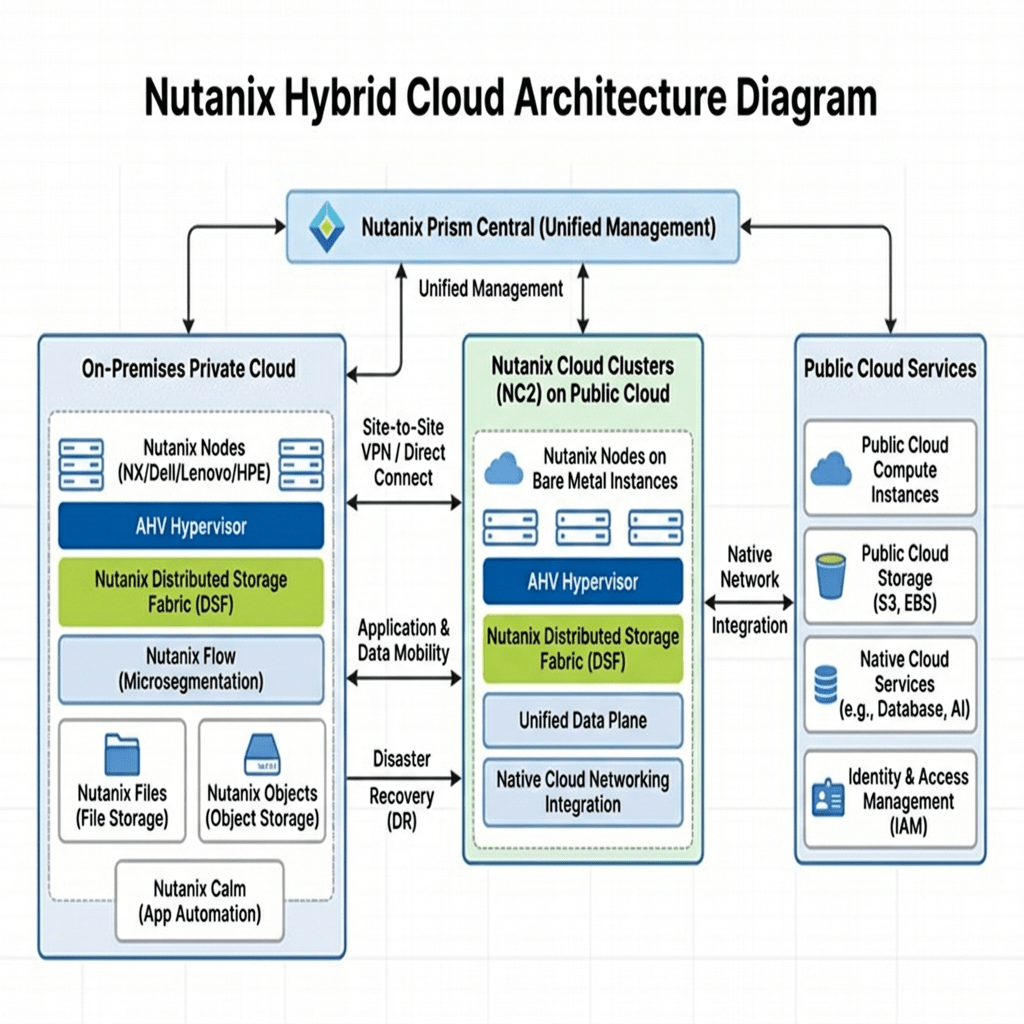
Building your own clouBuilding a full hybrid cloud with Nutanix means combining a strong on-prem private cloud foundation with a well-designed public cloud extension so workloads can move, scale, recover, and stay operationally consistent across both environments.
Author: Christian MarreroBlog: Daily Cloud BlogTopic: Nutanix Hybrid Cloud ArchitectureBuilding a hybrid cloud with Nutanix is not just about linking your datacenter to a public cloud provider. The real objective is to create a platform that allows your organization to operate with more flexibility while maintaining control, consistency, and resilience.
For many organizations, the challenge is not deciding whether cloud has value. The challenge is figuring out how to extend into cloud without losing the benefits of the infrastructure already running on-prem. That is where Nutanix can become a practical fit.
A Nutanix-based hybrid cloud can give you the ability to support existing enterprise workloads in a private cloud model while also creating a path for migration, disaster recovery, burst capacity, and modernization. The key is to build it intentionally and in phases.
What a Full Hybrid Cloud with Nutanix Looks Like
A full Nutanix hybrid cloud usually starts with an on-prem environment that acts as the private cloud core. From there, public cloud becomes an extension of that model rather than a separate, disconnected platform. This creates a more consistent way to manage workloads, recovery, networking, and operational processes.
Instead of treating cloud as a replacement for everything on-prem, the design works best when it supports both. Some workloads may stay local because of performance, dependency, or compliance needs. Others may benefit from being moved or extended into the cloud. A well-built hybrid design supports both decisions.
The Core Components
Private Cloud Foundation
The first part of the design is the on-prem Nutanix environment. This becomes the operational base for your private cloud and should be stable, well-segmented, monitored, and ready for production.
- Nutanix cluster sized for current demand and future growth
- Management visibility and operational control
- Segmentation for production, management, backup, and replication traffic
- Identity integration and role-based access controls
- Backup and recovery planning from the beginning
Public Cloud Extension
The next part is extending into public cloud. This allows you to support additional use cases such as disaster recovery, migration, workload flexibility, or temporary scale.
- Structured landing zone in the cloud
- Clear security and access boundaries
- Cloud networking aligned to the on-prem design
- Governance and cost visibility built in early
Connectivity and Networking
Networking is one of the most important parts of any hybrid cloud project. Weak routing, poor DNS planning, or overlapping IP space can make the environment harder to operate and can slow migration efforts significantly.
- VPN can support early testing or smaller environments
- Dedicated connectivity is often better for production
- DNS planning should happen early
- IP addressing should be clean and non-overlapping
Migration and Workload Mobility
A strong hybrid cloud is not about moving everything. It is about understanding which workloads should stay on-prem, which can move smoothly, and which may need to be modernized in stages over time.
- Start with lower-risk workloads first
- Map dependencies before migration begins
- Validate routing, identity, DNS, and rollback steps
- Use phased migration waves instead of one major cutover
Disaster Recovery and Operations
One of the strongest reasons to build hybrid cloud is resilience. But that value only shows up when recovery plans are tested, documented, and owned operationally.
- Replication and backup planning across environments
- Documented failover and failback procedures
- Monitoring and alerting across both sides
- Clear operational ownership and governance
A Simple Build Approach
Phase 1: Build the On-Prem Core
Start with a strong private cloud foundation. Make sure the environment is healthy, documented, monitored, and protected before extending outward.
- Validate cluster health and platform readiness
- Implement identity integration and access control
- Establish backup, monitoring, and documentation
- Separate traffic types clearly
Phase 2: Create the Cloud Landing Zone
Build the public cloud side with structure and discipline so it can support hybrid connectivity and future workloads cleanly.
- Create network segmentation and routing boundaries
- Implement access control and logging
- Prepare governance and cloud cost visibility
- Align the cloud design to the on-prem strategy
Phase 3: Connect and Validate
Once both environments exist, validate connectivity before moving workloads. That includes routing, DNS, management access, and service communication paths.
- Test site-to-site communication
- Validate DNS across both environments
- Confirm management traffic and workload traffic behavior
- Document constraints before migration waves begin
Phase 4: Migrate in Waves
Begin with pilot workloads and use those moves to refine documentation, procedures, and operational confidence.
- Move lower-risk workloads first
- Review performance and dependencies after each wave
- Adjust runbooks as needed
- Expand only after validation
Phase 5: Add Recovery, Governance, and Automation
Once the hybrid environment is working well, mature it into a long-term platform with tested recovery, stronger governance, and repeatable automation.
- Formalize DR runbooks
- Improve governance and access reviews
- Add automation for repeatable tasks
- Track performance, capacity, and cloud consumption
Common Challenges
The biggest challenge in hybrid cloud projects is usually not the hardware or the platform itself. It is the operational complexity that comes from weak planning. If networking, DNS, documentation, recovery, and governance are treated as secondary concerns, the environment will be much harder to manage over time.
- Networking: poor routing and name resolution create migration issues
- Operations: weak documentation slows support and recovery
- Security: inconsistent controls create risk across environments
- Recovery: untested DR workflows often fail when needed
- Governance: lack of cost and policy control leads to cloud sprawl
Best Use Cases
A Nutanix hybrid cloud can be a strong fit in several practical scenarios.
- Disaster recovery and business continuity
- Cloud extension for selected workloads
- Migration path from traditional virtualization environments
- Staged modernization of enterprise applications
- Private cloud control with public cloud flexibility
My Take
Nutanix hybrid cloud makes the most sense when the goal is not simply “move to cloud,” but rather build a platform strategy that gives the business more options without losing operational discipline.
That is what makes hybrid cloud valuable. It gives infrastructure teams flexibility, but it also gives them a way to modernize in layers instead of trying to force every application into the same path.
Final Thoughts
Building a full hybrid cloud with Nutanix is really about creating options. It gives you a stronger private cloud, a cleaner path to public cloud, and a more resilient platform strategy for the future.
Start with the foundation, build intentionally, validate each phase, and focus just as much on operations as you do on infrastructure. That is how hybrid cloud becomes practical and sustainable.
Stay Connected with Daily Cloud Blog
If you found this comparison helpful, follow Daily Cloud Blog for more practical content on cloud, virtualization, DevOps, cybersecurity, and infrastructure strategy.
We regularly share technical breakdowns, architecture guidance, and real-world insights designed for engineers, architects, and IT leaders.
Want more posts like this? Subscribe for fresh content on AWS, Azure, Kubernetes, virtualization, and modern infrastructure trends.
About Daily Cloud Blog
Daily Cloud Blog shares practical insights on cloud, virtualization, infrastructure, and modern IT strategy for engineers, architects, and technology leaders.
How to Create Your Own Cloud Platform

Cloud Infrastructure | Private Cloud | Architecture
How to Create Your Own Cloud Platform
Building your own cloud does not mean competing directly with AWS or Azure. It means creating a private cloud platform that gives you control over compute, storage, networking, automation, and self-service infrastructure.
Author: Christian MarreroBlog: Daily Cloud BlogTopic: Private Cloud StrategyMany IT professionals and architects eventually ask the same question: Can I build my own cloud? The answer is yes — but it is important to define what that really means. Creating your own cloud is not about replacing hyperscalers. Instead, it is about designing and operating a private cloud environment that delivers many of the same benefits: virtualization, automation, self-service provisioning, scalable storage, network isolation, and centralized management.
Whether you want to build a serious home lab, a hosted infrastructure platform, or the foundation for a future service offering, creating your own cloud is one of the best ways to sharpen your architecture skills and gain end-to-end control over your environment.
What “Building Your Own Cloud” Really Means
In practical terms, it means combining compute, storage, networking, identity, and orchestration into a platform that can host applications, virtual machines, containers, and services with centralized control and repeatable deployment.
Three Ways to Build Your Own Cloud
1. Home Lab or Private Cloud
This is the best starting point for most architects, engineers, and technology enthusiasts. You use your own servers, storage, and network equipment to create a private cloud environment inside your home lab or office.
- Run virtual machines and containers
- Create isolated networks and VLANs
- Provide shared storage for workloads
- Experiment with automation, HA, and orchestration
2. Hosted Private Cloud
The next step is deploying your platform on dedicated bare-metal servers from a provider such as Hetzner, OVHcloud, or other colocation options. This gives you a more production-like environment and opens the door to hosting real workloads or customer solutions.
- More reliable infrastructure than a home lab
- Better external connectivity
- Potential for hosted services or consulting platforms
3. Full Cloud Platform
This is the startup-level path. At this stage, your platform becomes multi-tenant, API-driven, and service-oriented. You add authentication, metering, policy controls, automation pipelines, and even billing or subscription features.
- Multi-user self-service portal
- Infrastructure APIs and Terraform integration
- Usage tracking and billing models
- Niche cloud services for specific industries or workloads
The Core Components of a Cloud Platform
To build a real cloud, you need more than just a hypervisor. A cloud platform is made up of several foundational layers working together.
Compute Layer
This is where workloads actually run. In most private cloud builds, this starts with virtualization and may later expand into container platforms.
- Proxmox VE – Excellent for labs and serious private cloud environments
- VMware ESXi / vSphere – Enterprise-grade virtualization
- KVM – Flexible and open-source foundation
- Kubernetes – For containerized platform services
Storage Layer
Storage is one of the most important design decisions in any cloud environment. You need reliable, scalable, and preferably redundant storage for virtual machines, container volumes, and backups.
- Ceph – Distributed storage for block, file, and object workloads
- TrueNAS – Powerful NAS and shared storage platform
- ZFS-based storage – Great for snapshots, integrity, and performance
Networking Layer
Networking transforms a virtualization environment into a cloud-like platform. Segmentation, routing, remote access, and traffic distribution are all critical.
- VLANs and network segmentation
- WireGuard or OpenVPN for remote secure access
- HAProxy or NGINX for load balancing
- Open vSwitch for advanced virtual switching
Identity and Access
A real cloud needs centralized authentication and role-based access control.
- Keycloak for SSO and identity federation
- FreeIPA for directory services
- LDAP or Active Directory integration where needed
Management and Orchestration
This is the layer that makes your infrastructure feel like a real cloud instead of a collection of servers.
- OpenStack for full private cloud orchestration
- Apache CloudStack for cloud management and provisioning
- Terraform for Infrastructure as Code
- Ansible for configuration automation
A Practical Build Path
Phase 1: Build the Core
Start simple and build a stable private cloud foundation:
- Deploy 2–3 Proxmox nodes
- Add shared or distributed storage with Ceph or ZFS
- Create VLANs for management, storage, and workload traffic
- Secure remote access with WireGuard
- Implement backups and snapshots
Phase 2: Add Platform Services
Once the core is stable, expand into application delivery and automation:
- Deploy Kubernetes for containerized workloads
- Add ingress and load balancing
- Integrate CI/CD pipelines
- Use Terraform and Ansible for repeatable deployment
Phase 3: Create a Service Platform
At this level, your cloud becomes a true service platform:
- Self-service provisioning portal
- Multi-user role-based access
- API-driven infrastructure requests
- Monitoring, chargeback, or billing integrations
What Makes DIY Cloud Projects Fail?
The most common mistake is focusing only on virtualization while ignoring operations. A cloud is not just compute. It also requires discipline in monitoring, logging, backup, security, and lifecycle management.
- Monitoring: Prometheus, Grafana, alerts, and dashboards
- Logging: Centralized log collection and retention
- Backup and DR: Proven restore capability, not just backups
- Security: Hardening, MFA, patching, and least privilege
- Automation: Reduce drift with Infrastructure as Code
Best Use Cases for Your Own Cloud
Building your own cloud can create real value beyond the lab. Here are a few practical directions:
- Private hosting platform for client workloads
- Secure development and testing environments
- Cybersecurity lab infrastructure
- Hybrid-cloud extension for specialized workloads
- Niche hosting service for SMB or regulated environments
My Take
If you are serious about cloud engineering, platform architecture, or building a future product, creating your own cloud is one of the best hands-on projects you can take on. It forces you to think like both an engineer and an operator — which is exactly where real platform maturity starts.
Final Thoughts
Creating your own cloud is not about replacing hyperscale providers. It is about building a platform you control — one that teaches you how compute, storage, networking, identity, automation, and operations come together to deliver real services.
Start small, design intentionally, and build in layers. A solid private cloud can evolve from a lab into a serious platform, and in the right hands, even into a business opportunity.
Stay Connected with Daily Cloud Blog
If you found this comparison helpful, follow Daily Cloud Blog for more practical content on cloud, virtualization, DevOps, cybersecurity, and infrastructure strategy.
We regularly share technical breakdowns, architecture guidance, and real-world insights designed for engineers, architects, and IT leaders.
Want more posts like this? Subscribe for fresh content on AWS, Azure, Kubernetes, virtualization, and modern infrastructure trends.
About Daily Cloud Blog
Daily Cloud Blog shares practical insights on cloud, virtualization, infrastructure, and modern IT strategy for engineers, architects, and technology leaders.
ITIL Overview: Understanding the Framework Behind Modern IT Service Management
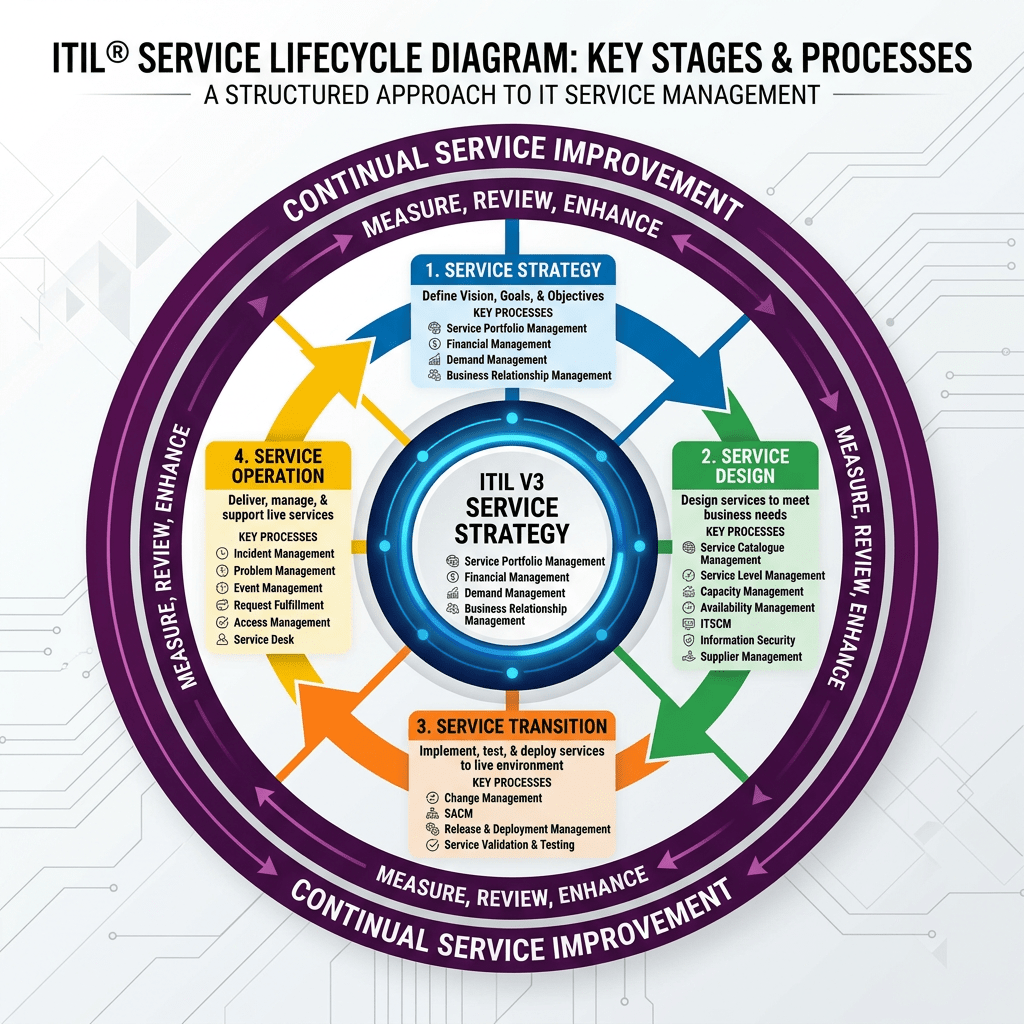
IT Service Management | Operations | Governance
ITIL Overview: Understanding the Framework Behind Modern IT Service Management
A practical introduction to ITIL 4, the Service Value System, the Service Value Chain, guiding principles, and why the framework still matters in modern IT operations and digital transformation.
Author: Christian MarreroPublication: Daily Cloud BlogCategory: IT Service ManagementIn modern IT environments, success is no longer measured only by whether infrastructure is running or tickets are being closed. Organizations are expected to deliver reliable services, improve user experience, support business outcomes, and adapt quickly to change. That is exactly why frameworks like ITIL continue to play such an important role in IT operations and service management.
ITIL is one of the most recognized frameworks for IT service management. It provides organizations with practical guidance for creating, delivering, supporting, and continually improving services. Rather than focusing only on technology, ITIL helps teams think in terms of value, outcomes, governance, collaboration, and continuous improvement.
Whether an organization is improving help desk operations, modernizing service delivery, aligning IT with business needs, or building a more mature operational model, ITIL offers a structured approach to make service management more effective.
Key idea: ITIL helps organizations shift from managing isolated IT activities to delivering services that create real business and customer value.
What is ITIL?
ITIL is a service management framework that provides best-practice guidance for how organizations design, deliver, support, and improve services. It gives IT teams a structured way to think about workflows, customer needs, operational consistency, governance, and ongoing service improvement.
At a practical level, ITIL helps answer questions such as:
- How do we design services that actually create value?
- How should teams handle service delivery, support, and change?
- How can IT work more closely with the business and end users?
- How do we measure performance and improve over time?
- How can governance and flexibility exist together in the same operating model?
Why ITIL Matters
Many organizations struggle with inconsistent support processes, poor visibility, siloed operational teams, unclear ownership, and service experiences that frustrate both users and the business. ITIL helps reduce that confusion by offering a framework for managing services in a more disciplined and outcome-oriented way.
In short, ITIL matters because it helps organizations treat IT as a service provider, not just a technical function. It encourages better alignment between operations, customer expectations, governance, and business value.
ITIL 4 and the Modern Service Management Model
The current version in broad use is ITIL 4, which introduced a more modern and flexible model for service management. ITIL 4 places strong emphasis on value co-creation, adaptability, governance, continual improvement, and integration with modern ways of working such as Agile, DevOps, and digital transformation initiatives.
Instead of viewing service management as a rigid set of isolated processes, ITIL 4 presents service delivery as a connected system built around value.
The Core of ITIL 4: The Service Value System (SVS)
One of the most important concepts in ITIL 4 is the Service Value System, or SVS. The SVS explains how the different parts of an organization work together to enable value creation through services.
Rather than focusing only on a service desk or a single operational workflow, the SVS provides a broader model that connects:
- Guiding principles
- Governance
- The service value chain
- Management practices
- Continual improvement
The Service Value Chain
At the center of the Service Value System is the Service Value Chain. This is the operating model that shows how demand is turned into value through key organizational activities.
The six value chain activities are:
Plan
Ensures a shared understanding of direction, priorities, and improvement opportunities.
Improve
Supports continual improvement across services, practices, and all service value chain activities.
Engage
Maintains relationships with stakeholders and ensures their needs and expectations are understood.
Design & Transition
Ensures products and services meet stakeholder expectations for quality, cost, and time-to-market.
Obtain / Build
Delivers service components when and where they are needed, including development, sourcing, and configuration.
Deliver & Support
Ensures services are delivered and supported according to agreed specifications and user expectations.
The Seven Guiding Principles of ITIL 4
ITIL 4 includes seven guiding principles that help teams make better decisions in different situations. These are meant to be broadly applicable, regardless of the specific technology stack, organization size, or operating model.
- Focus on value
- Start where you are
- Progress iteratively with feedback
- Collaborate and promote visibility
- Think and work holistically
- Keep it simple and practical
- Optimize and automate
The Four Dimensions of Service Management
ITIL 4 also emphasizes four dimensions of service management. These dimensions help organizations avoid focusing too narrowly on only one part of service delivery.
Organizations and People
Focuses on culture, roles, skills, team structures, and communication needed to support effective service management.
Information and Technology
Covers the data, tools, automation, systems, and technology capabilities needed to enable services.
Partners and Suppliers
Recognizes that modern service delivery often depends on third parties, vendors, and strategic partner ecosystems.
Value Streams and Processes
Focuses on workflows, activities, controls, and how work moves across the organization to deliver outcomes.
ITIL Practices in the Real World
ITIL 4 uses the concept of management practices rather than treating everything as a traditional process library. This is a more flexible and modern way to frame service management.
In real environments, teams often apply ITIL guidance through areas such as:
- Incident management
- Problem management
- Change enablement
- Service desk operations
- Service level management
- Continual improvement
- Monitoring and event management
- Knowledge management
What Makes ITIL Useful in Practice?
ITIL helps organizations bring structure to service delivery without losing sight of outcomes. It can improve consistency, clarify accountability, reduce operational noise, and create a stronger link between technical activities and business expectations.
It is especially useful for organizations that want to improve service quality, standardize support operations, build stronger governance, and create a culture of continual improvement.
Common ITIL Challenges
Like any framework, ITIL can be misunderstood or overcomplicated. One of the most common mistakes is treating it like a rigid compliance checklist instead of a practical guide for service improvement.
ITIL works best when it is adapted to the organization’s size, maturity, culture, and goals. The framework should enable better service management, not create unnecessary process overhead.
Why ITIL Still Matters in Modern IT
In cloud-first, fast-moving environments, some teams assume traditional service management frameworks are outdated. But the reality is that modern IT still needs reliability, governance, change coordination, support maturity, and clear accountability.
ITIL remains relevant because it provides a strong operating foundation for service management while still allowing teams to integrate modern practices such as Agile delivery, DevOps collaboration, automation, and platform-based operations.
Who Should Learn ITIL?
ITIL is valuable for service desk analysts, operations teams, infrastructure engineers, support leads, IT managers, service delivery managers, and technology leaders who need to improve how services are delivered and supported.
It is especially useful for professionals working in environments where reliability, user experience, governance, and continuous operational improvement matter.
Final Thoughts
ITIL remains one of the most recognized frameworks in IT service management because it helps organizations think beyond isolated tickets, tools, and operational tasks. It creates a more structured way to design, deliver, support, and improve services with value at the center.
Whether the goal is improving support maturity, aligning IT with the business, building stronger operational governance, or delivering better service experiences, ITIL provides a strong foundation for modern service management.
Bottom Line
ITIL is not just about ticketing or service desk process. It is a framework for building reliable, value-driven, and continually improving IT services across the enterprise.
Continue the Service Management Conversation
If you are exploring IT operations, service delivery, governance, cloud operations, or modern infrastructure management, follow Daily Cloud Blog for more practical breakdowns focused on modern IT and enterprise transformation.
Read more articles, share this post with your operations team, and stay connected for more IT leadership insights.
Home
1–2 minutes


