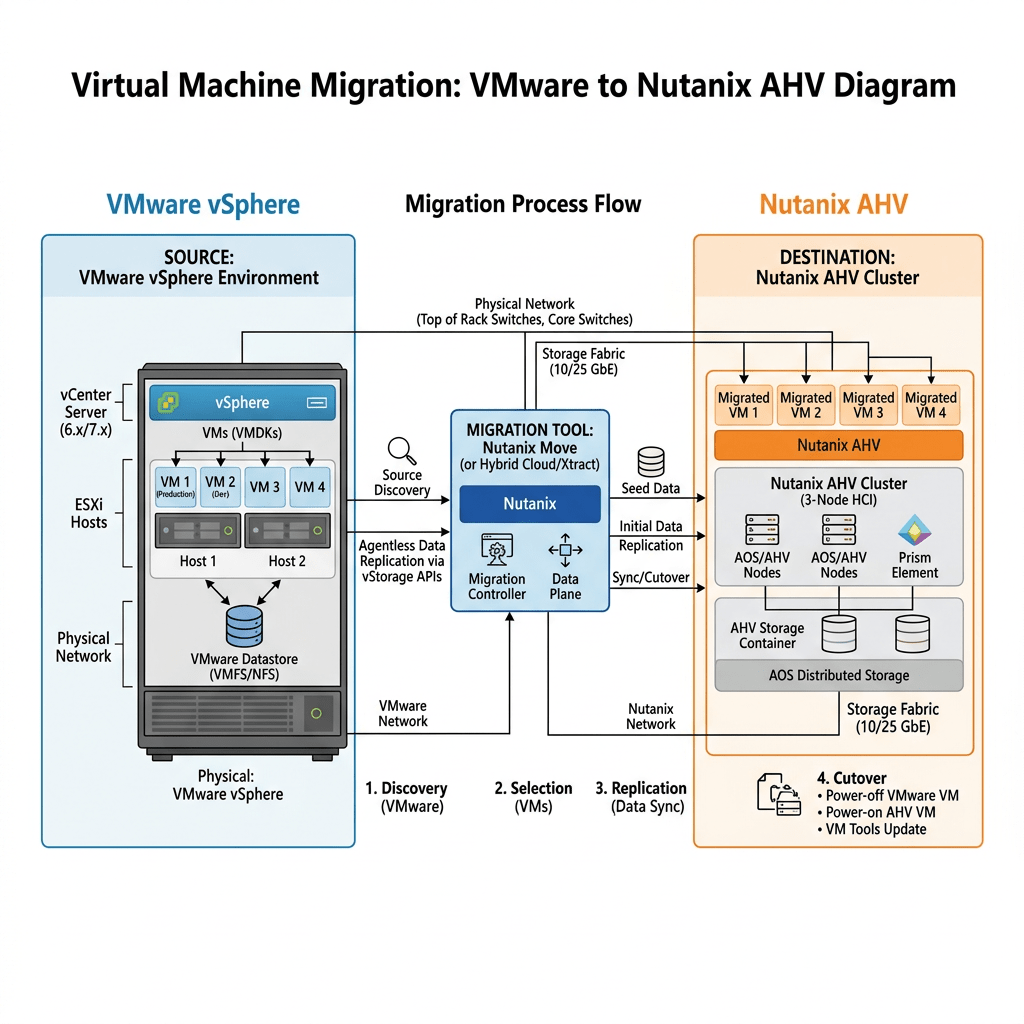
Virtualization • Hybrid Cloud • Nutanix AHV
Migrating VMware to Nutanix AHV: Best Practices and Pitfalls to Avoid
A practical field guide for planning, validating, and executing a clean VMware vSphere to Nutanix AHV migration with less risk, better visibility, and fewer surprises.
By Daily Cloud Blog • Updated for 2026 migration planning
However, a VMware-to-AHV migration should not be treated as a simple “lift and shift.” The hypervisor changes, the VM drivers change, the networking model changes, operational tooling changes, and backup, disaster recovery, monitoring, automation, and support processes must be validated.
1. Start With Assessment, Not Migration
The biggest mistake organizations make is starting with migration tooling before they understand the environment. Before building a Nutanix Move migration plan, perform a full workload assessment.
Inventory
Document all VMs, operating systems, CPU, memory, disk layout, snapshots, VMware Tools status, and business ownership.
Dependencies
Map application, database, DNS, AD, firewall, load balancer, and external service dependencies.
Performance
Collect CPU, memory, IOPS, latency, throughput, and growth trends before sizing the Nutanix target cluster.
Risk
Identify legacy operating systems, unsupported applications, physical dependencies, hard-coded IPs, and outage-sensitive workloads.
2. Design the Nutanix AHV Landing Zone First
Before migrating workloads, the AHV environment must be production-ready. This includes Prism Central, network segmentation, storage containers, image management, role-based access, monitoring, backup integration, and disaster recovery design.
Core AHV Landing Zone Checklist
- Validate Nutanix cluster health, AOS version, AHV version, firmware, NCC checks, and support readiness.
- Configure Prism Central for centralized management, policies, categories, and reporting.
- Map VMware port groups to AHV networks and confirm VLAN tagging, routing, firewall rules, and MTU settings.
- Design storage containers based on workload requirements, protection policies, and operational separation.
- Confirm DNS, NTP, Active Directory, identity, logging, alerting, and SMTP notifications.
- Integrate backup and recovery tooling before production cutover.
- Document rollback and recovery procedures for every migration wave.
3. Use Nutanix Move, But Do Not Rely on It Alone
Nutanix Move is commonly used to migrate VMs from VMware ESXi to Nutanix AHV. It helps automate migration tasks such as VM replication, cutover workflow, VirtIO driver handling, and IP address retention or mapping.
Best Practice for Nutanix Move
- Deploy Nutanix Move close to the destination Nutanix environment.
- Start with a small pilot group of low-risk VMs.
- Validate VMware credentials, vCenter access, AHV destination access, network mappings, and storage container placement.
- Confirm guest OS compatibility and VirtIO driver readiness.
- Run test migrations before business-critical workloads.
- Schedule cutovers during approved maintenance windows.
- Validate application functionality after cutover, not just VM power-on state.
4. Build Migration Waves Around Applications, Not Random VMs
A clean migration strategy groups workloads by business application, dependency, risk level, outage tolerance, and rollback complexity.
| Wave | Workload Type | Purpose |
|---|---|---|
| Wave 0 | Test VMs | Validate tooling, networking, drivers, and operational process. |
| Wave 1 | Low-risk systems | Build confidence and refine the migration runbook. |
| Wave 2 | Departmental apps | Migrate moderate-risk workloads with known owners. |
| Wave 3 | Business-critical apps | Execute only after validation, backup, rollback, and app testing are proven. |
5. Best Practices for VMware to Nutanix AHV Migration
Validate VM Hardware and Guest OS Readiness
Check each VM for guest OS support, disk configuration, VMware Tools status, snapshots, attached ISO files, RDMs, USB passthrough, legacy drivers, and special boot configurations.
Clean Up Before You Move
Remove stale snapshots, orphaned disks, unused NICs, old ISOs, powered-off zombie VMs, and overprovisioned resources. Migrating technical debt simply moves the problem to a new platform.
Right-Size the Workloads
Do not blindly copy VMware allocations into AHV. Use utilization data to right-size vCPU, memory, and storage. This improves density, performance, and cost efficiency.
Map Networks Carefully
VMware port groups and AHV networks are not the same operational construct. Validate VLAN IDs, IP retention, firewall rules, DNS, load balancer pools, DHCP reservations, and security policies before cutover.
Test Backups Before Production Migration
Ensure your backup platform supports Nutanix AHV and that restore procedures are tested. A migration is not complete until backup, recovery, and retention policies are confirmed.
Document Cutover and Rollback
Every wave should have a migration owner, app owner, test plan, communication plan, validation checklist, rollback trigger, and business sign-off.
6. Common Pitfalls to Avoid
Skipping Dependency Mapping
Moving an app server without its database, firewall rules, or DNS dependencies can create avoidable outages.
Ignoring Legacy Systems
Older operating systems may require special driver, boot, or support considerations before AHV migration.
No Rollback Plan
If the cutover fails, the team must know exactly when to stop, how to revert, and who approves the rollback.
Assuming Backups Still Work
Backup jobs, restore procedures, and retention policies must be revalidated after moving from VMware to AHV.
Weak Communication
Application owners, help desk teams, security teams, and business units need clear migration windows and escalation paths.
Post-Migration Validation Gaps
A VM powering on is not enough. Validate login, application workflow, database connectivity, performance, monitoring, and backups.
7. Recommended Migration Runbook
- Discovery: Collect inventory, performance data, app dependencies, and business ownership.
- Design: Prepare the AHV landing zone, networking, storage, backup, monitoring, and access controls.
- Pilot: Migrate test workloads and validate tooling, drivers, IP retention, and application access.
- Wave Planning: Group VMs by application, dependency, risk, and outage tolerance.
- Pre-Cutover: Confirm backups, freeze changes, notify stakeholders, and validate rollback steps.
- Cutover: Execute migration during an approved window and document every action.
- Validation: Confirm application functionality, performance, monitoring, backups, and user access.
- Optimization: Right-size resources, update documentation, and decommission legacy VMware components when safe.
Final Pre-Migration Checklist
- VM inventory completed and validated
- Application dependencies documented
- Nutanix AHV cluster health verified
- Prism Central configured
- VLAN and network mappings confirmed
- Guest OS and driver readiness validated
- Backup and restore tested
- Migration waves approved
- Maintenance windows scheduled
- Rollback plan documented
- Application owners assigned for validation
- Post-migration monitoring enabled
Final Thoughts
Migrating from VMware to Nutanix AHV can simplify operations, reduce hypervisor complexity, and position the organization for a more flexible hybrid cloud model. But the migration must be treated as a structured transformation, not a basic VM copy process.
The organizations that succeed are the ones that assess first, design the landing zone properly, migrate in controlled waves, validate every application, and avoid carrying old operational problems into the new platform.
Need Help Planning a VMware to Nutanix AHV Migration?
MB Technology Group LLC can help organizations assess VMware environments, design Nutanix AHV landing zones, create migration runbooks, validate dependencies, and execute production migrations with confidence.




Leave a comment