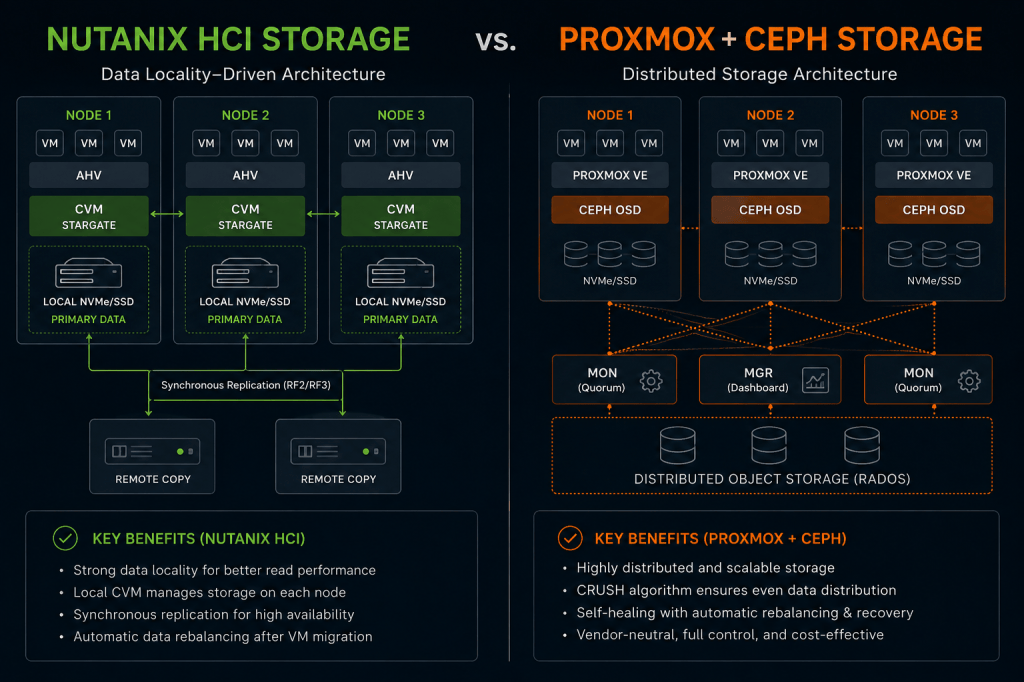
Nutanix HCI vs. Proxmox + Ceph
Understanding data locality, read and write paths, replication, CRUSH placement, and why two distributed HCI storage platforms can behave very differently.
I have spent a lot of time around Nutanix, and more recently I have been digging deeper into Proxmox VE with Ceph.
At first glance, the two architectures can look surprisingly similar. Both platforms can combine local SSD or NVMe devices across multiple servers into resilient distributed storage. Both can support VM mobility and high availability without depending on a traditional external SAN.
But once you follow a VM I/O request from the guest operating system all the way to physical storage, the design philosophy starts to look very different.
The Bigger Question
What actually happens to VM data when a workload reads or writes storage — and how does that behavior differ between Nutanix HCI and Proxmox with Ceph?
Architecture Overview
🟩 Nutanix HCI
A local Controller VM services the I/O for VMs running on the node, while AOS attempts to keep VM data local and protects it with copies on other nodes.
🟦 Proxmox + Ceph
The Proxmox RBD client maps VM data into RADOS objects and placement groups. CRUSH determines which OSDs across the cluster are responsible for storing those objects.
If you come from Nutanix, do not think of Ceph as “Nutanix storage without a CVM.” Both are distributed storage platforms, but their normal I/O paths and locality assumptions are fundamentally different.
How Nutanix Data Locality Works
Data locality is one of the most important concepts in Nutanix architecture. Every node runs a Controller VM, or CVM, and the local CVM services storage I/O generated by virtual machines on that hypervisor host.
Hypervisor→
Local CVM→
Local Data+
Remote Protection Copy

Conceptual Nutanix path: local CVM, local data access where possible, and remote protection across the cluster.
When locality exists, a read can stay inside the node instead of traversing the storage network. Writes still need distributed protection, but Nutanix starts from the idea that keeping a copy of the VM’s data physically close to the VM is beneficial.
Data locality is a performance optimization, not a replacement for replication. The VM can receive local reads while the platform still maintains protected copies on other nodes.
How Proxmox + Ceph Placement Works
Ceph starts from a different design principle. A VM disk stored in RBD is divided into RADOS objects. Those objects map into placement groups, and CRUSH determines the OSDs responsible for storing them.
QEMU / RBD→
RADOS Object→
Placement Group→
CRUSH→
OSDs
![[ Ceph ] 基本概念、原理及架构 - hukey - 博客园](https://images.openai.com/static-rsc-4/zbbC8KJEFlzvtbfWT8lcxMFX40riddgZWEGc0frW05avuo-ffIVaDOwhi9aeLn2BnAKTSFvz8KNz_QrQZtgNxrZi0aRusF5LJ1ioPPoPIxZQE2GaXvZxIzUKZSsovhejqtIdA8A7mTDRlHK3fObJn3HWtDfzhhaUD_w4cefDbp_NsHds_5aFENR-NBliMtew?purpose=fullsize)
The primary OSD for a placement group may be on the same Proxmox host as the VM, or it may be remote. Ceph does not normally move the object’s primary copy simply because the VM is running on a particular node.
Read Path: Nutanix vs. Ceph
Nutanix Read Path
VM → Hypervisor → Local CVM → Local Data
When data locality exists, most reads can avoid a network hop to another storage node.
Ceph Read Path
VM → RBD → PG → OSD
By default, RBD reads are directed to the placement group’s primary OSD. That primary can be local or remote relative to the VM.
Modern Ceph RBD supports replica-read policies. The
read_from_replica=localize policy can select the closest replica based on CRUSH location. That introduces locality awareness for reads, but it is still different from Nutanix’s VM-centric data-locality model.Write Path: Both Replicate, but Differently
Both architectures protect data by maintaining copies across the cluster. The major difference is where the write path begins.
VM-101
   │
   ▼
Local CVM
   │
   ├──────────────► Local Storage Copy
   │
   └──────────────► Remote Protection Copy
                         Another Node
VM-101
   │
   ▼
RBD Client
   │
   ▼
Placement Group
   │
   ▼
Primary OSD
   │
   ├──────────────► Replica OSD
   │
   └──────────────► Replica OSD
How I Think About It
Nutanix begins from compute locality and then adds distributed protection. Ceph begins from distributed placement and then allows the client to access whichever OSDs own the relevant objects.
What Happens When a VM Moves?
Nutanix
Suppose VM-101 is running on Node 1 and is migrated to Node 3. Some reads may initially come from remote storage, but Nutanix can re-localize data as the workload continues operating on the new node. New I/O is serviced by the new local CVM.
Live Migration→
VM on Node 3→
Remote Reads Initially→
Data Re-Localizes
Proxmox + Ceph
With Ceph, the RBD image does not need to follow the VM. The VM can migrate from Node 1 to Node 3 and continue accessing the same distributed RBD image.
Live Migration→
VM on Node 3→
Same RBD Image→
Same Distributed Ceph Pool
Storage does not have to migrate with the VM. Compute mobility and storage placement are decoupled, which is one of the reasons RBD works so well as shared storage for Proxmox HA.
Side-by-Side Architecture Comparison
| Area | Nutanix HCI | Proxmox + Ceph |
|---|---|---|
| Storage Architecture | Distributed HCI storage through Nutanix AOS | Distributed object storage exposed to VMs primarily through RBD |
| Node Storage Service | CVM / Stargate | Ceph OSDs with MON/MGR cluster services |
| VM-Centric Data Locality | Core design principle | Not the default placement model |
| Default Read Behavior | Prefer local VM data | Read from PG primary OSD |
| Localized Replica Reads | Part of the locality architecture | Optional through replica-read policy |
| Write Protection | Local data path plus remote protection according to resiliency policy | Primary OSD coordinates writes to the acting set |
| Placement Intelligence | AOS placement and data-locality behavior | CRUSH hierarchy, PGs, pool policy and OSD map |
| VM Migration | Data can re-localize around the new compute location | RBD object placement does not need to follow the VM |
| Network Dependency | East-west networking matters, but local reads reduce remote traffic | East-west storage networking is fundamental to normal I/O, replication and recovery |
| External SAN Required | No | No |
Why the Ceph Network Matters So Much
Once you understand the Ceph data path, one design decision becomes obvious: the network is part of the storage system.
🌐 Client I/O
Proxmox RBD clients communicate directly with OSDs responsible for the affected placement groups.
🛡️ Replication
Primary OSDs coordinate protected writes to other OSDs in the acting set.
♻️ Recovery
Disk and node failures generate additional OSD-to-OSD recovery traffic.
⚖️ Rebalancing
Adding or removing capacity can trigger significant east-west data movement.
With an all-flash Ceph cluster, network bandwidth can become the limiting component long before the SSDs do. For modern production designs, 25 GbE is an attractive starting point when the workload and budget justify it.
If You Come From Nutanix, Think About Ceph This Way
| Nutanix Concept | Closest Proxmox / Ceph Concept | Important Difference |
|---|---|---|
| AOS | Ceph | Different storage architecture and operational model |
| CVM | OSD / MON / MGR services | Ceph does not use one storage controller VM per node |
| Storage Container | Ceph Pool | Useful conceptual mapping, but not a one-to-one feature match |
| vDisk | RBD Image | RBD images are split into distributed RADOS objects |
| RF2 / RF3 | Replicated pool size 2 / 3 | Similar resilience idea, but semantics should not be assumed identical |
| Data Locality | CRUSH placement + optional localized replica reads | Ceph placement is not primarily tied to the VM’s compute location |
| Prism | Proxmox VE GUI + Ceph tooling | Nutanix offers a more tightly integrated management plane |
Which Architecture Is Better?
I would not reduce the answer to “Nutanix is faster” or “Ceph scales better.” Those statements are too broad to be useful.
Nutanix Makes Sense When…
You want a highly integrated HCI stack, VM-centric data locality, mature lifecycle management, operational simplicity, and a consistent vendor-supported platform.
Proxmox + Ceph Makes Sense When…
You want open architecture, commodity hardware flexibility, distributed shared storage, strong scale-out principles, and direct control over how the infrastructure is designed and operated.
Do not design Ceph around the expectation that a VM’s data will always remain physically local to its compute node. Design the storage fabric so remote distributed I/O is fast, resilient and predictable.
Final Thoughts
Nutanix and Proxmox with Ceph both demonstrate how virtualization can move beyond dependency on a dedicated external SAN.
Both can use storage inside standard servers. Both can distribute and protect data. Both can support VM mobility and high availability. Both can scale horizontally.
But they do not treat the relationship between compute and data in the same way.
That one architectural distinction changes the way I think about network design, failure domains, VM movement, recovery traffic and performance troubleshooting in each platform.
Keep Exploring Modern Infrastructure
Daily Cloud Blog covers Azure, AWS, Nutanix, VMware, Proxmox, Ceph, cloud architecture, virtualization, storage, security and enterprise infrastructure.


Leave a Reply