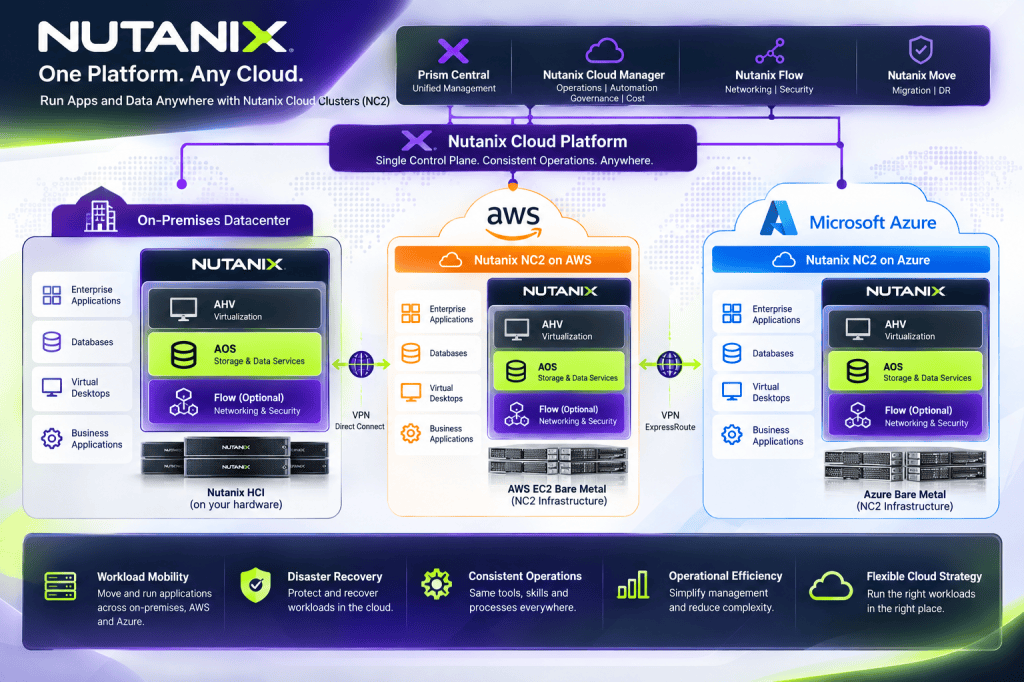
Nutanix NC2 Architecture Explained: Extending Your Datacenter into AWS and Azure
A practical architect’s look at how Nutanix Cloud Clusters works, where it fits, and what to consider before deploying it.
Why NC2 Is Worth a Closer Look
After working with virtualization, hyperconverged infrastructure, and public cloud platforms, one question keeps coming up: how do we move workloads to the cloud without rebuilding the entire operating model?
Moving a VM is relatively straightforward. Reworking its networking, storage, security, dependencies, and operational processes is where things get complicated.
That’s what makes Nutanix Cloud Clusters (NC2) interesting. Instead of requiring every workload to become cloud-native on day one, NC2 lets organizations operate the Nutanix platform on supported public-cloud infrastructure. It’s a useful option for applications that still benefit from a traditional VM architecture.
What Is Nutanix NC2?
NC2 deploys Nutanix software onto supported cloud-hosted bare-metal resources. The familiar building blocks remain: AHV for virtualization, AOS for distributed storage and infrastructure services, and Prism for management. Optional Nutanix Flow and cloud-management capabilities depend on licensing and deployment support.
AWS and Microsoft Azure are important NC2 deployment targets. Other cloud-provider offerings exist, but availability and feature parity must be checked individually.
Prism management • AHV virtualization • AOS storage
Consistent infrastructure concepts can simplify operations, but don’t mistake that for identical cloud behavior. Hardware choices, network integration, storage options, and costs remain provider-specific.
Inside an NC2 Cluster
At the node level, the model resembles a conventional Nutanix cluster: guest workloads run on AHV, while Nutanix Controller VMs participate in AOS distributed storage services. The difference is that the physical resources are provisioned from a cloud provider instead of being installed in your own racks.
That familiarity can be valuable for an infrastructure team already managing Nutanix. The team isn’t learning a completely new hypervisor just because the cluster is now hosted in a public cloud.
NC2 on AWS vs. NC2 on Azure
| Area | NC2 on AWS | NC2 on Azure |
|---|---|---|
| Infrastructure | Supported EC2 bare-metal instances | Supported Azure bare-metal nodes |
| Cloud network | Amazon VPC | Azure Virtual Network |
| Virtualization | Nutanix AHV | Nutanix AHV |
| Storage | Nutanix AOS | Nutanix AOS |
| Management | Nutanix Prism | Nutanix Prism |
| Hybrid connectivity | VPN / AWS Direct Connect | VPN / Azure ExpressRoute |
The common Nutanix stack makes the environments recognizable, but cloud networking is not interchangeable. In particular, native cloud networking, overlay networks, routing, and security integration need provider-specific designs.
Networking: Where I Would Start the Design
If I were preparing an NC2 deployment, networking would be one of the first workshops—not something to figure out after the cluster is online. Think about an application that moves to the cloud while its database or domain controllers remain on-premises. Even if the VM boots perfectly, latency and DNS issues can still break the application.
Design questions to answer early
- Will workloads retain their IP addresses or be readdressed?
- How will DNS, Active Directory, and other identity services be reached?
- What are the latency and bandwidth requirements between application tiers?
- Where will firewalls, route tables, and segmentation policies be enforced?
- Does the design need native cloud networking, Flow Virtual Networking, or both?
- How will you avoid overlapping subnets and asymmetric routing?
Storage: Familiar Architecture, Different Economics
NC2 uses AOS distributed storage services rather than treating every guest VM as an unrelated native cloud instance. That means the architecture still needs deliberate planning for capacity, performance, resilience, and data protection.
Supported storage options differ by provider and configuration. Some designs use local instance storage; supported external-storage choices can affect how independently compute and capacity can scale.
Migration: Move in Waves, Not All at Once
NC2 can be a practical landing zone for VM-based applications that aren’t ready for refactoring. Nutanix Move supports migration scenarios across selected source and target platforms, subject to the current compatibility matrix.
I’d begin with a small noncritical migration wave, verify performance and operational workflows, and then move progressively more complex applications. Every wave should have an owner, success criteria, a cutover window, and a rollback plan.
Disaster Recovery: A Compelling Use Case
For organizations that already operate Nutanix on-premises, NC2 can be part of a cloud-based disaster recovery strategy. Depending on the supported design, it may be possible to keep a smaller recovery footprint and expand resources when needed.
But disaster recovery isn’t a checkbox. The architecture still has to meet recovery point and recovery time objectives, preserve application consistency, and prove that cloud capacity and connectivity will be available during an event.
What About Cost?
NC2 may simplify the operating model, but it isn’t automatically cheaper than native AWS or Azure services. Its economics depend on workload density, node utilization, licensing, storage, networking, and how long workloads need to run.
| Cost area | What to include |
|---|---|
| Compute | Bare-metal nodes, commitments, capacity headroom |
| Licensing | Nutanix subscription and portability terms |
| Storage | Capacity, protection, supported external options |
| Networking | Data transfer, VPN, dedicated links, gateways |
| Operations | Management, monitoring, support, administration |
| DR | Standby resources, replication, recovery tests |
My preferred approach is a three-year TCO comparison: stay on-premises, move to NC2, or migrate to native cloud services. Include migration effort and people costs—not just the infrastructure line items.
When NC2 Makes Sense—and When It Doesn’t
My Take
What I find compelling about NC2 isn’t that it runs VMs in the cloud. We’ve had that option for a long time. It’s the possibility of keeping a consistent infrastructure operating model while changing where the infrastructure lives.
For a Nutanix shop with a sizable virtualization estate, that can make cloud migration less disruptive. But it doesn’t replace architecture work. Networking, storage, identity, security, recovery, and cost still need careful attention.
The goal isn’t to move every workload to the cloud. It’s to put each workload where it makes the most technical, operational, and financial sense.
References and Further Reading
The following vendor resources provide background and product guidance. Check current support matrices and deployment documentation before implementing a production design.
- Nutanix Cloud Clusters — Product Overview
- Nutanix NC2 on AWS — Datasheet
- Nutanix NC2 on Azure — Datasheet
- Nutanix Solutions Architecture
- Simplifying Hybrid Multicloud Networking with Nutanix
- Design Overview: AHV Metro on NC2 on AWS
The architecture diagrams above are original conceptual illustrations for educational purposes, not official Nutanix reference designs.
More Cloud Architecture, Less Hype
Explore practical discussions about infrastructure, hybrid cloud, automation, and cybersecurity.


Leave a Reply