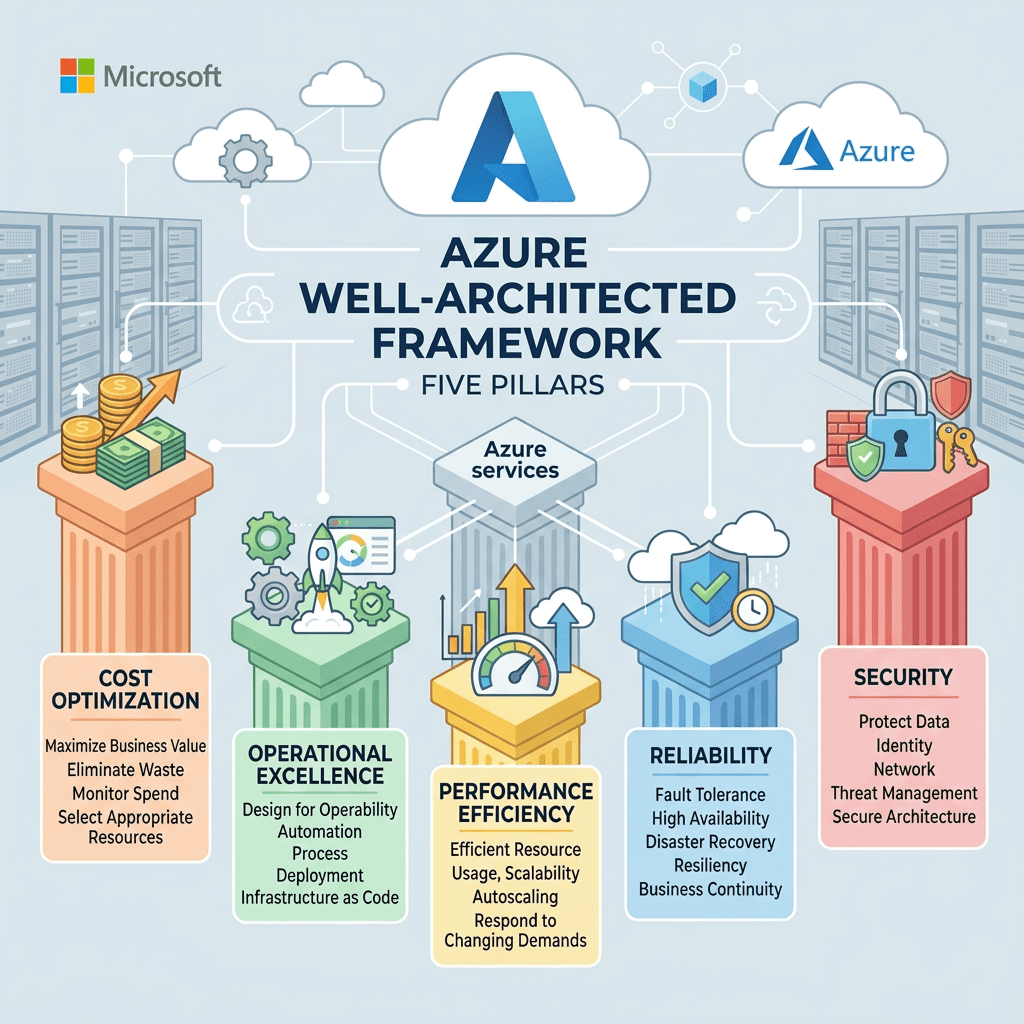
Azure Well-Architected Framework
A practical look at the five pillars and cloud architecture principles Microsoft recommends for building secure, reliable, scalable, cost-effective, and operationally efficient Azure solutions.
By Christian Marrero Bonilla | Daily Cloud Blog
Deploying resources in Microsoft Azure is relatively easy. Designing those resources so they remain secure, reliable, manageable, and cost-effective as the business grows is where the real architectural work begins.
The Azure Well-Architected Framework gives architects, engineers, developers, and IT leaders a consistent way to evaluate cloud workloads, identify risks, and make better design decisions.
I do not view the framework as a checklist that should be completed once and forgotten. It is better treated as an ongoing design and operational mindset that remains part of the workload throughout its lifecycle.
What Is the Azure Well-Architected Framework?
The Azure Well-Architected Framework is a collection of design principles, recommendations, and assessment guidance that helps organizations improve the quality of workloads running in Microsoft Azure.
It is organized around five pillars: Operational Excellence, Reliability, Performance Efficiency, Cost Optimization, and Security.
The Five Pillars
Operational Excellence
Run, monitor, automate, and continually improve systems and operational processes so technology consistently delivers business value.
Reliability
Recover from disruptions, scale resources as demand changes, and reduce the effect of infrastructure, network, application, and configuration failures.
Performance Efficiency
Use computing resources efficiently to meet workload requirements and maintain that efficiency as demand and technology change.
Cost Optimization
Avoid unnecessary spending, eliminate unused resources, and make sure cloud investments continue to provide business value.
Security
Protect identities, information, applications, systems, and infrastructure through risk assessments and layered security controls.
Understanding Architectural Tradeoffs
A well-architected workload does not focus on one pillar while ignoring the others. Every major design decision can create tradeoffs between security, reliability, performance, operational complexity, and cost.
Adding redundancy may improve reliability but increase cost. Stronger security controls may add operational complexity. Increasing performance may require additional compute resources or more expensive service tiers.
The goal is not to maximize every pillar. The goal is to make informed decisions based on workload criticality, business requirements, risk, budget, and operational capabilities.
Operational Excellence
Operational Excellence focuses on running and monitoring workloads in a way that consistently delivers business value. It also includes continually improving the processes, procedures, and tools used to support the environment.
A well-operated Azure environment should be repeatable, observable, and easy to support. Teams should not depend on undocumented knowledge or lengthy manual processes to deploy, troubleshoot, or recover an application.
Key Operational Practices
- Automate deployments and repetitive administrative tasks.
- Use Infrastructure as Code to create consistent environments.
- Centralize application, infrastructure, and security monitoring.
- Create meaningful alerts that identify real operational problems.
- Maintain recovery procedures and operational runbooks.
- Use lessons learned from incidents to improve the platform.
Azure Monitor, Log Analytics, Application Insights, Azure Automation, Azure Policy, Bicep, Terraform, Azure DevOps, and GitHub Actions can support these operational goals.
Reliability
Reliability is the ability of a workload to recover from infrastructure, application, network, or service disruptions while continuing to meet business expectations.
Failures are unavoidable in distributed systems. A network connection may be interrupted, an application deployment may introduce a configuration problem, or an Azure service may become temporarily unavailable.
Key Reliability Practices
- Remove single points of failure.
- Use redundancy across critical components.
- Implement health checks and automatic failover.
- Define backup and disaster recovery strategies.
- Test recovery procedures regularly.
- Establish recovery time and recovery point objectives.
- Scale resources when demand increases.
Azure capabilities may include Availability Zones, Azure Load Balancer, Azure Front Door, zone-redundant storage, database replicas, Azure Backup, and Azure Site Recovery.
Performance Efficiency
Performance Efficiency focuses on using computing resources effectively to meet workload requirements and maintaining that efficiency as demand changes and cloud technologies evolve.
Performance is not only about making an application faster. It is about delivering predictable performance while using the right type and amount of resources.
Key Performance Practices
- Measure performance using meaningful technical and business metrics.
- Scale resources based on actual demand.
- Use caching to reduce repeated processing and database activity.
- Select the right compute platform for the workload.
- Test performance as usage patterns change.
- Review newer Azure services that may improve efficiency.
Depending on the workload, useful capabilities may include Azure App Service autoscaling, Virtual Machine Scale Sets, Azure Kubernetes Service, Azure Functions, Azure Front Door, Azure CDN, caching, and database optimization.
Cost Optimization
Cost Optimization focuses on eliminating unnecessary expenses and making sure cloud resources continue to provide appropriate value to the business.
Cloud cost management is not a one-time sizing exercise. Workloads grow, projects end, utilization changes, and resources that were appropriate several months ago may no longer be the best option.
Key Cost Practices
- Right-size resources using actual utilization data.
- Remove unused disks, snapshots, addresses, and test resources.
- Automatically shut down nonproduction environments.
- Evaluate reservations or savings plans for predictable workloads.
- Use tagging to identify workload and departmental ownership.
- Create budgets and cost alerts.
- Review Azure Advisor and Azure Cost Management recommendations.
Security
Security protects information, identities, applications, systems, and infrastructure while allowing the organization to deliver business value.
Security should be included in the original architecture rather than added after the workload is already in production. A strong design uses multiple layers of protection and applies controls based on risk.
Key Security Practices
- Use strong authentication and least-privilege access.
- Protect secrets, certificates, and credentials.
- Encrypt data at rest and in transit.
- Segment networks and limit unnecessary public access.
- Assess cloud security posture continuously.
- Collect application, infrastructure, identity, and security logs.
- Maintain an incident response and recovery process.
Common Azure capabilities include Microsoft Entra ID, role-based access control, managed identities, Azure Key Vault, Microsoft Defender for Cloud, Azure Firewall, Network Security Groups, Private Link, Azure Policy, and Microsoft Sentinel.
Cloud Architecture Design Principles
- Design applications to recover automatically from common failures.
- Remove single points of failure from critical workloads.
- Minimize unnecessary coordination between application services.
- Design applications to scale horizontally.
- Partition workloads around service and platform limits.
- Give operations teams the monitoring and management tools they need.
- Use managed Azure services when they meet workload requirements.
- Select the most appropriate data platform for each use case.
- Build architectures that can evolve as requirements change.
- Keep business requirements at the center of every design decision.
Design for Self-Healing
Failures occur in distributed systems. Applications should detect common failures and recover automatically whenever possible instead of waiting for an administrator to intervene.
Self-healing may include restarting an unhealthy application instance, replacing failed compute resources, retrying temporary service failures, or routing traffic away from an unhealthy endpoint.
Azure Monitor alerts, Application Insights, load balancer health probes, App Service health checks, Virtual Machine Scale Sets, and Kubernetes health probes can support this design approach.
Make Critical Components Redundant
Critical workloads should not depend on a single server, storage location, database instance, network path, or application endpoint.
The appropriate level of redundancy depends on workload importance. Not every application requires a multi-region architecture, but every critical dependency should be intentionally evaluated.
Use Availability Zones, zone-redundant services, load balancing, backup, replication, and regional recovery options based on the workload’s availability and recovery requirements.
Minimize Coordination Between Services
Applications become harder to scale when every service must wait for several other services to complete their work. Excessive coordination creates dependencies, bottlenecks, and larger failure domains.
Loosely coupled services can operate and scale more independently. Asynchronous communication can also prevent a temporary failure in one component from immediately affecting the entire application.
Azure Service Bus, Event Grid, Event Hubs, Storage Queues, asynchronous APIs, and event-driven architectures can help reduce tight service dependencies.
Design to Scale Out
Vertical scaling increases the capacity of an existing server or service instance. Horizontal scaling adds or removes instances based on workload demand.
Cloud-native applications should generally be designed to scale horizontally whenever the workload supports it. This provides greater flexibility and can improve both performance and availability.
Azure App Service autoscaling, Virtual Machine Scale Sets, Azure Kubernetes Service, Azure Functions, and Azure Container Apps can support horizontal scaling models.
Partition Around Platform Limits
Every Azure service has limits related to capacity, throughput, connections, transactions, or resource counts. Architects should understand those limits before they become production bottlenecks.
Partitioning distributes workloads across multiple resources. Depending on the application, this may involve dividing databases, storage accounts, networks, tenants, subscriptions, or compute environments.
Design for Operations
An application is not operationally ready simply because it deploys successfully. The operations team must be able to monitor its health, investigate problems, manage changes, and recover it when something goes wrong.
Logging, dashboards, alerts, runbooks, dependency mapping, deployment records, and recovery procedures should be considered during the design phase, not after the first production incident.
Use Managed Services
Platform as a Service offerings can reduce the amount of infrastructure an organization must patch, monitor, back up, and maintain.
This allows teams to spend more time improving applications and less time managing operating systems and supporting infrastructure.
Azure App Service, Azure SQL Database, Azure Functions, Azure Container Apps, Azure Key Vault, Azure Service Bus, and Cosmos DB are examples of managed services that can reduce operational overhead.
Use the Right Data Store for the Job
No single database or storage platform is ideal for every application. Transactional workloads, analytics platforms, file repositories, caching layers, and globally distributed applications all have different requirements.
Architects should evaluate data structure, access patterns, consistency, latency, transactions, retention, geographic distribution, security, and cost before selecting a data platform.
- Azure SQL Database: Relational and transactional application data
- Azure Cosmos DB: Globally distributed NoSQL workloads
- Azure Blob Storage: Object and unstructured data
- Azure Data Lake Storage: Large-scale analytics data
- Azure Managed Redis: Application caching and low-latency access
Best Practices
- Define business and technical requirements before selecting Azure services.
- Automate deployments using Infrastructure as Code.
- Design workloads to recover automatically from common failures.
- Remove single points of failure from critical application paths.
- Use horizontal scaling where the application supports it.
- Implement centralized monitoring, logging, and alerting.
- Use managed identities instead of storing credentials in code.
- Encrypt sensitive data and restrict unnecessary public access.
- Review resource utilization and cloud spending regularly.
- Test backup, failover, and disaster recovery procedures.
- Use managed Azure services when they meet business and technical requirements.
- Review the architecture as the workload and business evolve.
Questions to Ask Before Designing a Workload
- How much downtime can the business tolerate?
- How much data loss is acceptable?
- How quickly could workload demand increase?
- What security and compliance requirements apply?
- What data is considered sensitive?
- Who will operate and support the environment?
- What is the expected budget?
- What does success look like to the business?
Clear answers make it easier to determine where redundancy is required, which security controls are appropriate, how much automation is necessary, and which Azure services provide the right balance between capability and cost.
Applying the Framework to Existing Workloads
The Azure Well-Architected Framework is not limited to new deployments. It can also be used to assess and improve existing Azure environments.
A practical review can examine workload architecture, service dependencies, availability, disaster recovery, identity, security, networking, monitoring, operational procedures, performance, scalability, automation, and cloud spending.
The result should be a prioritized improvement plan based on business impact and risk, not simply a long list of recommendations with no clear path forward.
Final Thoughts
The Azure Well-Architected Framework is not only for large enterprises or complex cloud platforms. The same principles can improve a small application, development environment, hybrid infrastructure deployment, or business-critical enterprise workload.
In my experience working with cloud migrations, infrastructure modernization, virtualization platforms, storage, and disaster recovery, the strongest designs are usually the ones that address operational needs early.
Monitoring, backup, security, cost ownership, recovery, automation, and support processes should not be left until the end of the project.
A cloud solution can be technically functional and still be difficult to operate, expensive to maintain, or unable to recover from failure. Applying the five pillars throughout the workload lifecycle helps reduce those risks.
The goal is not to build the most complicated architecture. The goal is to build an architecture that securely and reliably delivers the value the business needs and can continue doing so as requirements change.
Need Help Designing Well-Architected Azure Environments?
MB Technology Group LLC helps organizations assess, design, deploy, secure, and optimize cloud infrastructure across Microsoft Azure, AWS, virtualization platforms, storage, disaster recovery, and hybrid environments.


 My Daily Cloud Blog
Leave a comment