Cloud, Hybrid Cloud, HCI, Nutanix, Infrastructure, technology
Cloud Infrastructure | Private Cloud | Architecture
How to Build a Full Hybrid Cloud with Nutanix
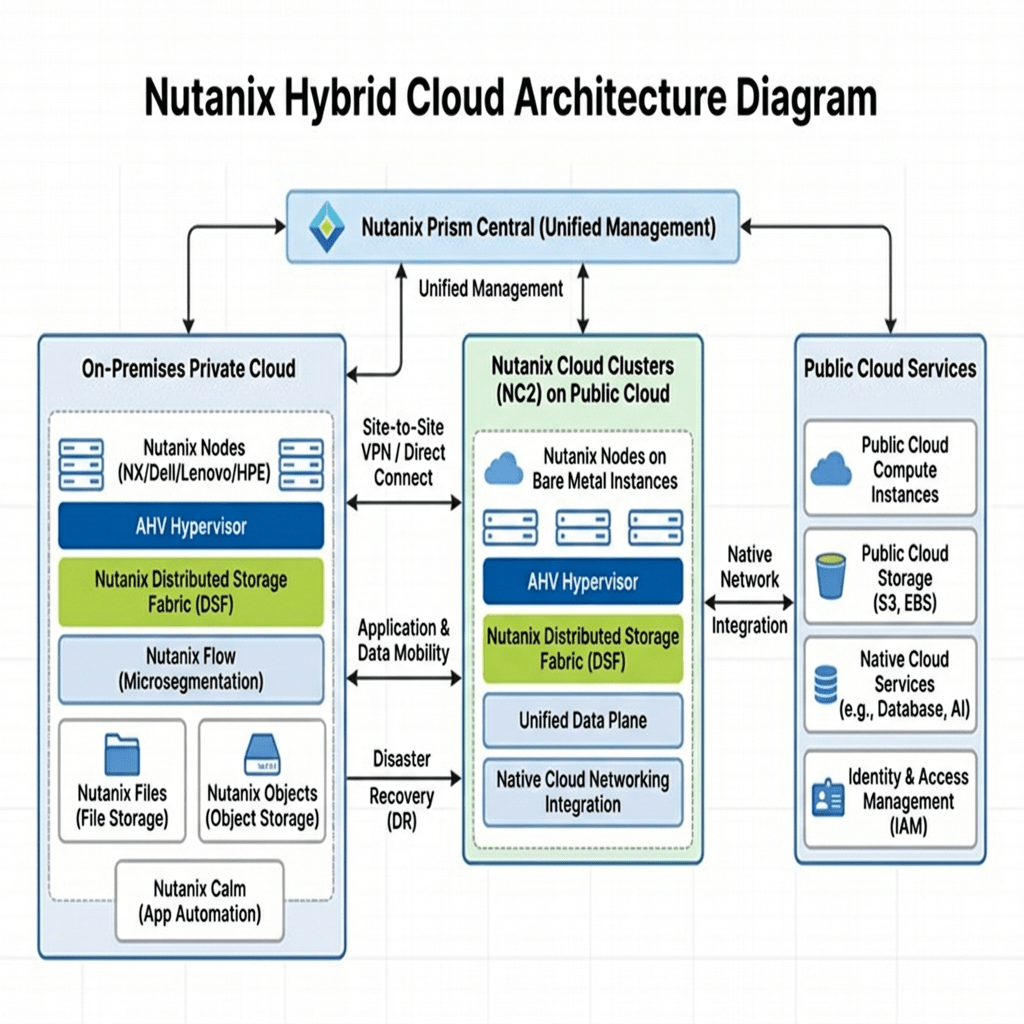
Building your own clouBuilding a full hybrid cloud with Nutanix means combining a strong on-prem private cloud foundation with a well-designed public cloud extension so workloads can move, scale, recover, and stay operationally consistent across both environments.
Building a hybrid cloud with Nutanix is not just about linking your datacenter to a public cloud provider. The real objective is to create a platform that allows your organization to operate with more flexibility while maintaining control, consistency, and resilience.
For many organizations, the challenge is not deciding whether cloud has value. The challenge is figuring out how to extend into cloud without losing the benefits of the infrastructure already running on-prem. That is where Nutanix can become a practical fit.
A Nutanix-based hybrid cloud can give you the ability to support existing enterprise workloads in a private cloud model while also creating a path for migration, disaster recovery, burst capacity, and modernization. The key is to build it intentionally and in phases.
What a Full Hybrid Cloud with Nutanix Looks Like
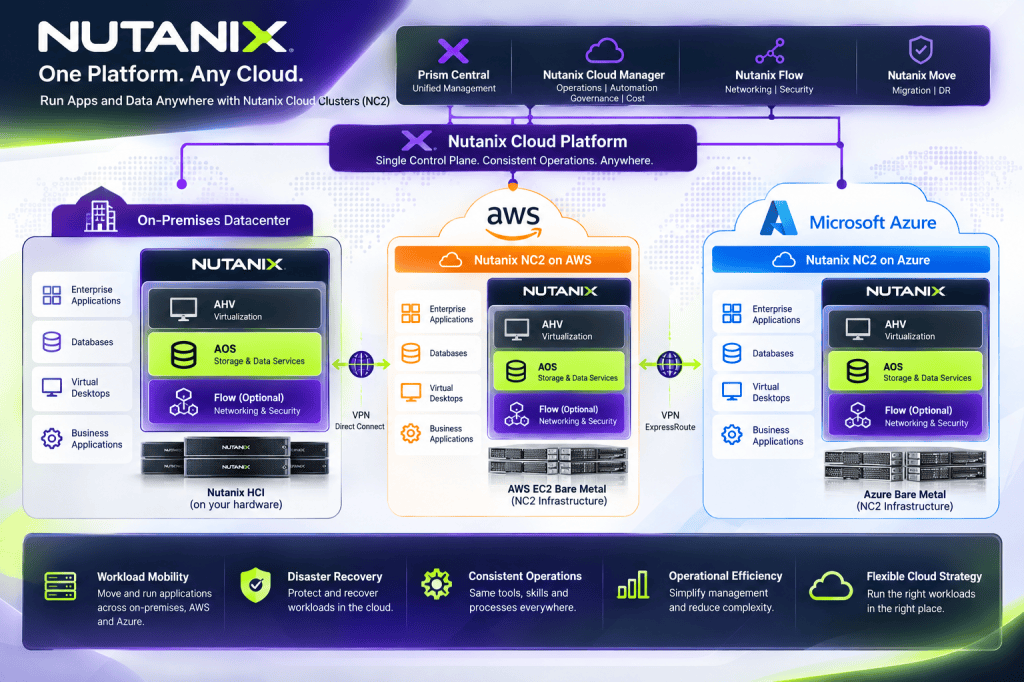
A full Nutanix hybrid cloud usually starts with an on-prem environment that acts as the private cloud core. From there, public cloud becomes an extension of that model rather than a separate, disconnected platform. This creates a more consistent way to manage workloads, recovery, networking, and operational processes.
Instead of treating cloud as a replacement for everything on-prem, the design works best when it supports both. Some workloads may stay local because of performance, dependency, or compliance needs. Others may benefit from being moved or extended into the cloud. A well-built hybrid design supports both decisions.
The Core Components
Private Cloud Foundation
The first part of the design is the on-prem Nutanix environment. This becomes the operational base for your private cloud and should be stable, well-segmented, monitored, and ready for production.
- Nutanix cluster sized for current demand and future growth
- Management visibility and operational control
- Segmentation for production, management, backup, and replication traffic
- Identity integration and role-based access controls
- Backup and recovery planning from the beginning
Public Cloud Extension
The next part is extending into public cloud. This allows you to support additional use cases such as disaster recovery, migration, workload flexibility, or temporary scale.
- Structured landing zone in the cloud
- Clear security and access boundaries
- Cloud networking aligned to the on-prem design
- Governance and cost visibility built in early
Connectivity and Networking
Networking is one of the most important parts of any hybrid cloud project. Weak routing, poor DNS planning, or overlapping IP space can make the environment harder to operate and can slow migration efforts significantly.
- VPN can support early testing or smaller environments
- Dedicated connectivity is often better for production
- DNS planning should happen early
- IP addressing should be clean and non-overlapping
Migration and Workload Mobility
A strong hybrid cloud is not about moving everything. It is about understanding which workloads should stay on-prem, which can move smoothly, and which may need to be modernized in stages over time.
- Start with lower-risk workloads first
- Map dependencies before migration begins
- Validate routing, identity, DNS, and rollback steps
- Use phased migration waves instead of one major cutover
Disaster Recovery and Operations
One of the strongest reasons to build hybrid cloud is resilience. But that value only shows up when recovery plans are tested, documented, and owned operationally.
- Replication and backup planning across environments
- Documented failover and failback procedures
- Monitoring and alerting across both sides
- Clear operational ownership and governance
A Simple Build Approach
Phase 1: Build the On-Prem Core
Start with a strong private cloud foundation. Make sure the environment is healthy, documented, monitored, and protected before extending outward.
- Validate cluster health and platform readiness
- Implement identity integration and access control
- Establish backup, monitoring, and documentation
- Separate traffic types clearly
Phase 2: Create the Cloud Landing Zone
Build the public cloud side with structure and discipline so it can support hybrid connectivity and future workloads cleanly.
- Create network segmentation and routing boundaries
- Implement access control and logging
- Prepare governance and cloud cost visibility
- Align the cloud design to the on-prem strategy
Phase 3: Connect and Validate
Once both environments exist, validate connectivity before moving workloads. That includes routing, DNS, management access, and service communication paths.
- Test site-to-site communication
- Validate DNS across both environments
- Confirm management traffic and workload traffic behavior
- Document constraints before migration waves begin
Phase 4: Migrate in Waves
Begin with pilot workloads and use those moves to refine documentation, procedures, and operational confidence.
- Move lower-risk workloads first
- Review performance and dependencies after each wave
- Adjust runbooks as needed
- Expand only after validation
Phase 5: Add Recovery, Governance, and Automation
Once the hybrid environment is working well, mature it into a long-term platform with tested recovery, stronger governance, and repeatable automation.
- Formalize DR runbooks
- Improve governance and access reviews
- Add automation for repeatable tasks
- Track performance, capacity, and cloud consumption
Common Challenges
The biggest challenge in hybrid cloud projects is usually not the hardware or the platform itself. It is the operational complexity that comes from weak planning. If networking, DNS, documentation, recovery, and governance are treated as secondary concerns, the environment will be much harder to manage over time.
- Networking: poor routing and name resolution create migration issues
- Operations: weak documentation slows support and recovery
- Security: inconsistent controls create risk across environments
- Recovery: untested DR workflows often fail when needed
- Governance: lack of cost and policy control leads to cloud sprawl
Best Use Cases
A Nutanix hybrid cloud can be a strong fit in several practical scenarios.
- Disaster recovery and business continuity
- Cloud extension for selected workloads
- Migration path from traditional virtualization environments
- Staged modernization of enterprise applications
- Private cloud control with public cloud flexibility
My Take
Nutanix hybrid cloud makes the most sense when the goal is not simply “move to cloud,” but rather build a platform strategy that gives the business more options without losing operational discipline.
That is what makes hybrid cloud valuable. It gives infrastructure teams flexibility, but it also gives them a way to modernize in layers instead of trying to force every application into the same path.
Final Thoughts
Building a full hybrid cloud with Nutanix is really about creating options. It gives you a stronger private cloud, a cleaner path to public cloud, and a more resilient platform strategy for the future.
Start with the foundation, build intentionally, validate each phase, and focus just as much on operations as you do on infrastructure. That is how hybrid cloud becomes practical and sustainable.
Stay Connected with Daily Cloud Blog
If you found this comparison helpful, follow Daily Cloud Blog for more practical content on cloud, virtualization, DevOps, cybersecurity, and infrastructure strategy.
We regularly share technical breakdowns, architecture guidance, and real-world insights designed for engineers, architects, and IT leaders.
Want more posts like this? Subscribe for fresh content on AWS, Azure, Kubernetes, virtualization, and modern infrastructure trends.
About Daily Cloud Blog
Daily Cloud Blog shares practical insights on cloud, virtualization, infrastructure, and modern IT strategy for engineers, architects, and technology leaders.


Leave a Reply