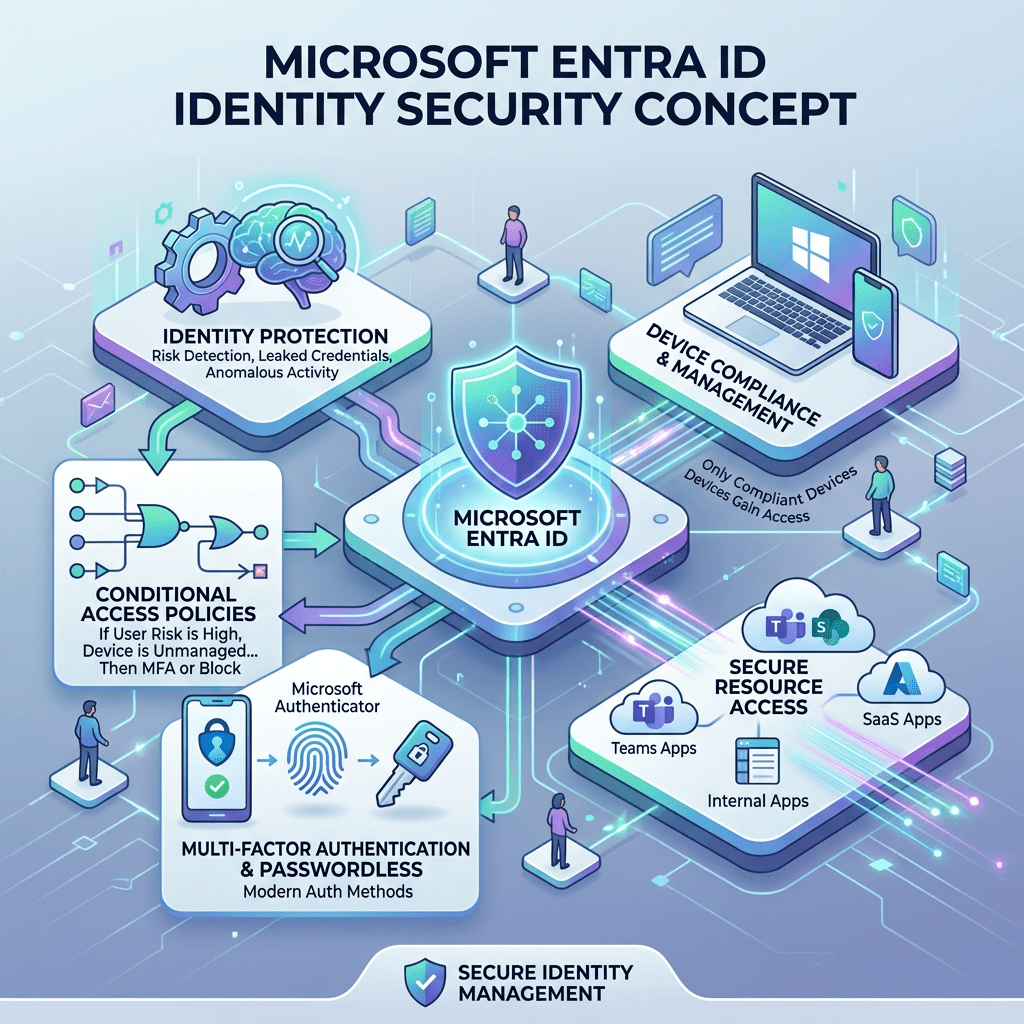
Microsoft Entra | Identity Security | Zero Trust
Microsoft Entra ID: A Detailed Overview for Modern Identity and Access Management
Microsoft Entra ID is the cloud-based identity and access management platform that helps organizations manage users, devices, applications, access policies, authentication, and security across Microsoft 365, Azure, SaaS applications, and hybrid environments.
Author: Christian Marrero
Blog: Daily Cloud Blog
Topic: Microsoft Entra ID Overview
Microsoft Entra ID
Identity • Access Management • MFA • Conditional Access • SSO • Governance • Zero Trust
What Is Microsoft Entra ID?
Microsoft Entra ID, formerly known as Azure Active Directory, is Microsoft’s cloud-based identity and access management service. It allows organizations to manage identities, secure authentication, control access to applications, enforce security policies, and support modern Zero Trust architecture.
In simple terms, Microsoft Entra ID acts as the identity control plane for users, groups, applications, devices, administrators, and external partners. It helps answer three critical security questions: who is signing in, what are they trying to access, and should access be allowed?
Daily Cloud Blog Take: Microsoft Entra ID is no longer just a cloud directory. It is the foundation for identity security, access control, hybrid authentication, SaaS integration, and Zero Trust enforcement.
Why Microsoft Entra ID Matters
Identity has become the new security perimeter. In traditional networks, security was often built around firewalls, VPNs, and internal network boundaries. Today, users access applications from home networks, mobile devices, cloud platforms, SaaS services, and unmanaged locations.
Because of this shift, organizations need a strong identity platform that can verify users, validate devices, enforce MFA, evaluate risk, and apply access policies in real time. Microsoft Entra ID helps provide that layer of control.
For most Microsoft-centric organizations, Entra ID is at the center of Microsoft 365, Azure, Intune, Defender, Teams, SharePoint, Exchange Online, and thousands of third-party SaaS applications.
Core Capabilities of Microsoft Entra ID
Microsoft Entra ID includes a wide range of identity and access management capabilities. These features help administrators manage identities, secure authentication, protect privileged access, and automate identity lifecycle operations.
Key Microsoft Entra ID Capabilities
- User and group management
- Single sign-on for cloud and SaaS applications
- Multifactor authentication
- Conditional Access policies
- Passwordless authentication
- Application registrations and enterprise applications
- Role-based access control
- Privileged Identity Management
- Identity Protection
- Access reviews and identity governance
- Hybrid identity with Active Directory synchronization
- External identities for partners, vendors, and guests
Entra ID vs Traditional Active Directory
One common misconception is that Microsoft Entra ID is simply Active Directory in the cloud. It is not. Traditional Active Directory Domain Services was designed for domain-joined computers, Kerberos authentication, LDAP, Group Policy, and internal network-based identity.
Microsoft Entra ID was designed for cloud identity, web authentication, OAuth, OpenID Connect, SAML, SaaS applications, mobile devices, and modern access control. Both platforms can work together, but they serve different roles.
| Feature | Active Directory DS | Microsoft Entra ID |
|---|---|---|
| Primary Use | On-premises identity | Cloud identity and access management |
| Authentication | Kerberos, NTLM, LDAP | OAuth, SAML, OpenID Connect |
| Device Model | Domain-joined devices | Cloud-joined and hybrid-joined devices |
| Policy Control | Group Policy | Conditional Access and cloud policies |
| Best Fit | Legacy apps and internal infrastructure | Microsoft 365, Azure, SaaS, and Zero Trust |
Single Sign-On
Single sign-on is one of the most important user experience benefits of Microsoft Entra ID. With SSO, users can sign in once and access multiple applications without repeatedly entering credentials.
Entra ID supports thousands of SaaS applications through the Microsoft Entra application gallery. It also supports custom application integrations using modern authentication protocols such as SAML, OAuth 2.0, and OpenID Connect.
For organizations, SSO improves security and productivity. Users have fewer passwords to manage, administrators get centralized access control, and security teams gain better visibility into sign-in behavior.
Multifactor Authentication
Multifactor authentication is one of the most effective ways to protect user accounts. Microsoft Entra ID supports MFA through push notifications, one-time passcodes, phone methods, FIDO2 security keys, Windows Hello for Business, and passwordless authentication options.
MFA should be treated as a baseline security requirement, especially for administrators, remote users, executives, finance teams, and anyone accessing sensitive data.
Best Practice: Start with MFA for all users, then move toward phishing-resistant authentication such as FIDO2 security keys, certificate-based authentication, or Windows Hello for Business.
Conditional Access
Conditional Access is one of the most powerful features in Microsoft Entra ID. It allows organizations to make access decisions based on signals such as user, group, location, device compliance, application, risk level, and authentication strength.
Instead of allowing or blocking access with a single static rule, Conditional Access lets administrators create smarter policies. For example, a user accessing SharePoint from a compliant corporate laptop may be allowed normally, while the same user accessing from an unknown device in a risky location may be required to complete MFA or be blocked.
Common Conditional Access Scenarios
- Require MFA for all users
- Require compliant or hybrid-joined devices
- Block legacy authentication
- Restrict access from high-risk countries
- Require stronger authentication for administrators
- Control access to sensitive applications
- Apply session controls for unmanaged devices
Identity Protection
Microsoft Entra ID Protection helps detect identity-based risks such as risky sign-ins, leaked credentials, unfamiliar sign-in properties, impossible travel patterns, and suspicious activity.
These risk signals can be used with Conditional Access to automate response actions. For example, a risky sign-in may require MFA, while a high-risk user may be required to reset their password.
This is where Entra ID becomes more than a directory. It becomes a security decision engine that evaluates identity risk before granting access.
Privileged Identity Management
Privileged Identity Management, commonly known as PIM, helps reduce standing administrative access. Instead of giving administrators permanent privileged roles, organizations can require just-in-time activation.
With PIM, an administrator can request temporary access to a privileged role, provide justification, complete MFA, and receive access only for a limited time. This reduces the attack surface if an admin account is compromised.
Security Reminder: Permanent Global Administrator access should be extremely limited. Use PIM, break-glass accounts, alerting, and strong authentication controls.
Identity Governance
Identity Governance helps organizations manage the full lifecycle of access. This includes onboarding, access requests, entitlement management, access reviews, lifecycle workflows, and automated removal of access when users change roles or leave the organization.
Without governance, access tends to accumulate over time. Users change jobs, join projects, move departments, and keep permissions they no longer need. Entra ID Governance helps reduce this risk by making access reviewable, auditable, and temporary where needed.
Hybrid Identity
Many organizations still use on-premises Active Directory. Microsoft Entra ID supports hybrid identity by synchronizing users, groups, and credentials from on-premises AD into Entra ID.
This allows users to have a common identity across on-premises resources, Microsoft 365, Azure, and cloud applications. Hybrid identity is commonly implemented using Microsoft Entra Connect Sync or Microsoft Entra Cloud Sync.
Hybrid identity is especially important for organizations that still rely on file servers, legacy applications, domain-joined devices, or traditional Windows Server infrastructure.
External Identities
Microsoft Entra ID also supports external collaboration. Organizations can invite partners, contractors, vendors, and customers to access applications or resources without creating traditional internal accounts for every external user.
This is commonly used for Microsoft Teams collaboration, SharePoint access, B2B partnerships, and vendor access to business applications.
External access should always be controlled with Conditional Access, MFA, access reviews, and expiration policies.
Application Management
Applications are a major part of Entra ID. Administrators can manage enterprise applications, configure SSO, assign users and groups, review permissions, manage consent, and monitor sign-ins.
Developers can also register applications in Entra ID to use Microsoft identity services for authentication and authorization.
Application governance is important because OAuth permissions, admin consent, and third-party app integrations can become major security risks if they are not reviewed properly.
Device Identity and Intune Integration
Microsoft Entra ID integrates closely with Microsoft Intune and device management. Devices can be Microsoft Entra joined, hybrid joined, or registered. Device identity can then be used as a Conditional Access signal.
This means organizations can create policies that require devices to be compliant before accessing corporate resources. For example, a device may need encryption, antivirus, updated security patches, and a compliant configuration before accessing Exchange Online or SharePoint.
Zero Trust and Microsoft Entra ID
Microsoft Entra ID is a key component of a Zero Trust strategy. Zero Trust is based on the principle of never trust, always verify. Instead of assuming users or devices are trusted because they are on the corporate network, every access request is evaluated.
Entra ID supports this model by evaluating identity, device health, location, risk, application sensitivity, and authentication strength before access is granted.
Zero Trust Controls with Entra ID
- Verify explicitly with MFA and strong authentication
- Use least privilege with PIM and RBAC
- Assume breach with risk-based access controls
- Continuously monitor sign-ins and user behavior
- Limit access based on device compliance
- Review and remove unnecessary permissions
Recommended Baseline Design
A good Microsoft Entra ID deployment should not be treated as a default configuration. It should be designed carefully around security, operations, compliance, and user experience.
- Enable MFA for all users.
- Use phishing-resistant authentication for privileged roles.
- Block legacy authentication.
- Implement Conditional Access in report-only mode first.
- Use PIM for administrative roles.
- Create emergency break-glass accounts.
- Monitor risky users and risky sign-ins.
- Review enterprise application permissions regularly.
- Use access reviews for guests and privileged groups.
- Integrate logs with Microsoft Sentinel or another SIEM.
Common Mistakes to Avoid
Microsoft Entra ID is powerful, but poor configuration can create risk. Many organizations enable cloud identity quickly but fail to properly secure privileged accounts, external users, app consent, and legacy protocols.
Common Mistakes: No MFA baseline, too many Global Administrators, unmanaged guest accounts, excessive app permissions, no access reviews, weak break-glass strategy, and Conditional Access policies that are never tested.
Where Microsoft Entra ID Fits in the Enterprise
Microsoft Entra ID is now one of the most important platforms in the enterprise technology stack. It touches security, cloud, endpoint management, compliance, collaboration, DevOps, and application access.
For cloud architects, Entra ID is critical for Azure RBAC, workload identity, managed identities, application access, and secure administration. For security teams, it provides identity risk data, authentication controls, privileged access management, and audit logs. For IT operations, it simplifies user lifecycle, group management, SSO, and access control.
Final Thoughts
Microsoft Entra ID is more than the replacement name for Azure Active Directory. It represents Microsoft’s broader identity security strategy for modern enterprises.
As organizations continue moving toward cloud, SaaS, hybrid work, and Zero Trust security models, identity becomes the most important control point. Microsoft Entra ID gives organizations the tools to secure access, reduce risk, simplify sign-in, govern permissions, and protect critical resources.
The organizations that get the most value from Entra ID are the ones that treat it as a strategic security platform, not just a user directory.
Stay Connected with Daily Cloud Blog
If you found this Microsoft Entra ID overview helpful, follow Daily Cloud Blog for more practical content on cloud identity, Microsoft security, Azure architecture, cybersecurity, and enterprise infrastructure.
We regularly share technical breakdowns, architecture guidance, and real-world insights designed for engineers, architects, and IT leaders.
Want more posts like this? Subscribe for fresh content on AWS, Azure, Microsoft Entra, Windows Server, cybersecurity, virtualization, and modern infrastructure trends.
Daily Cloud Blog shares practical insights on cloud, virtualization, infrastructure, identity security, and modern IT strategy for engineers, architects, and technology leaders.


Leave a Reply