Azure Networking • Hybrid Cloud • Secure Connectivity
Azure VPN Gateway: Building Secure Hybrid Cloud Connectivity
Azure VPN Gateway allows organizations to securely connect on-premises networks, remote users, branch offices, and Azure virtual networks using encrypted IPsec/IKE tunnels. It is one of the foundational services for building a practical hybrid cloud architecture.
Point-to-Site VPN
VNet-to-VNet
Hybrid Cloud
Daily Cloud Blog • Azure Networking Overview • Hybrid Cloud Architecture
What Is Azure VPN Gateway?
Azure VPN Gateway is a Microsoft Azure networking service that provides secure encrypted connectivity between Azure virtual networks and external networks such as on-premises datacenters, branch offices, remote users, or other Azure VNets.
For organizations adopting hybrid cloud, Azure VPN Gateway is often the first step toward securely extending existing infrastructure into Azure without exposing workloads directly to the public internet.
Site-to-Site VPN
Connect an on-premises firewall or router to Azure over an encrypted IPsec/IKE tunnel.
Point-to-Site VPN
Allow individual users to securely connect from laptops or remote locations into Azure.
VNet-to-VNet
Connect Azure virtual networks across regions or environments for disaster recovery and segmentation.
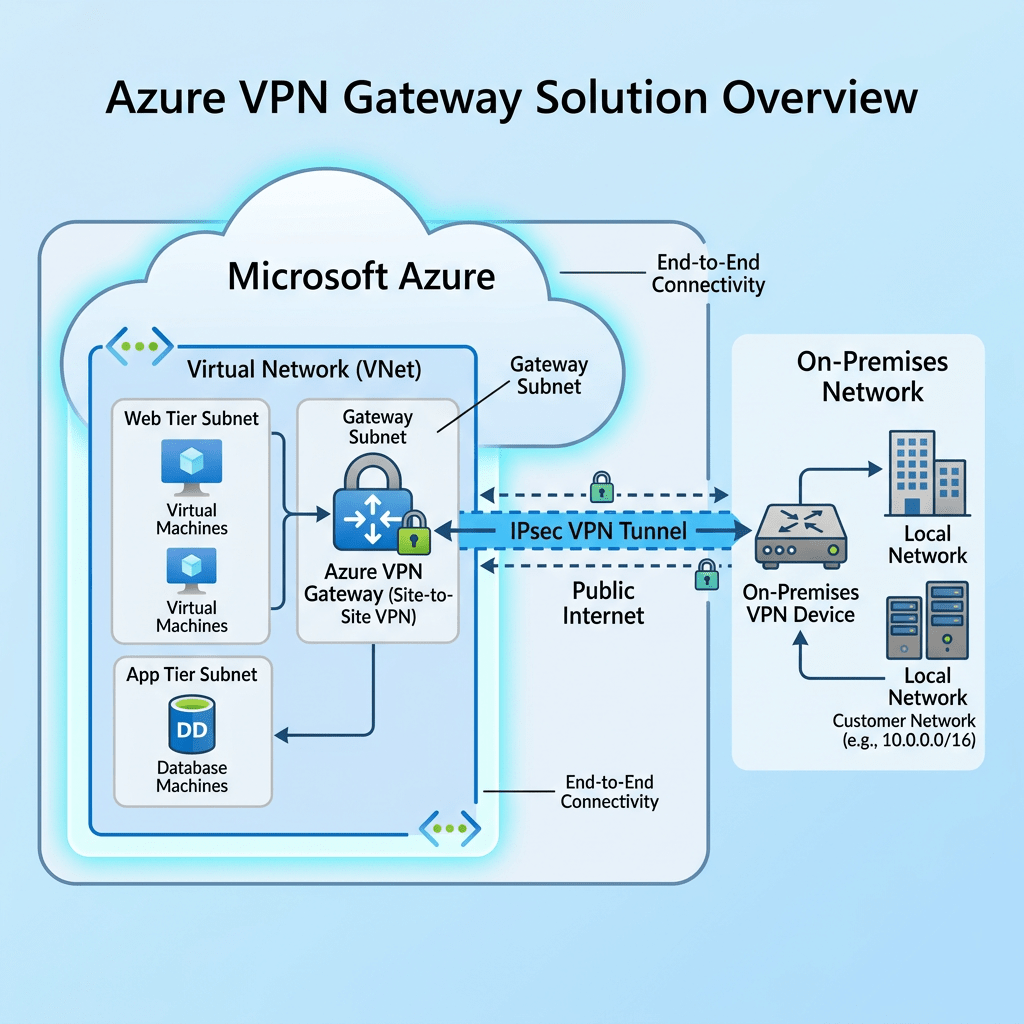
Architecture Diagram: Site-to-Site VPN
This diagram shows a common hybrid cloud architecture where an on-premises datacenter connects securely to Azure through Azure VPN Gateway.
On-Premises Datacenter
Example CIDR: 192.168.1.0/24
Microsoft Azure
Example CIDR: 10.10.0.0/16
Core Azure VPN Gateway Components
Virtual Network
The Azure network where virtual machines, private endpoints, firewalls, and application resources are deployed.
GatewaySubnet
A required subnet named exactly GatewaySubnet. This is where Azure deploys the VPN Gateway service.
Local Network Gateway
Represents the on-premises VPN device, public IP address, and local network address spaces.
Connection Resource
Defines the tunnel relationship between the Azure VPN Gateway and the on-premises network gateway.
Architecture Diagram: Hub-and-Spoke VPN Design
For enterprise environments, Azure VPN Gateway is commonly placed in a central hub virtual network. Spoke VNets connect to the hub using VNet peering, allowing shared security and connectivity services.
On-Premises
Datacenter
Branch Office
Firewall/VPN Device
Azure Hub VNet
Production Workloads
Dev/Test Workloads
Security / Management
Step-by-Step Deployment Overview
- Create the Azure Virtual Network with a non-overlapping address space such as
10.10.0.0/16. - Create the GatewaySubnet, commonly sized as
/27or larger for future scalability. - Deploy the Azure VPN Gateway using a route-based VPN type and the appropriate SKU.
- Create the Local Network Gateway to define the on-premises firewall public IP and local address ranges.
- Create the VPN Connection and configure the shared key, IKE/IPsec parameters, and routing.
- Configure the on-premises VPN device with matching tunnel settings.
- Validate connectivity using ping, private IP connectivity, route tables, and Azure VPN diagnostics.
Security and Design Best Practices
Azure VPN Gateway vs ExpressRoute
| Feature | Azure VPN Gateway | ExpressRoute |
|---|---|---|
| Transport | Internet-based encrypted tunnel | Private dedicated circuit |
| Cost | Lower entry cost | Higher cost |
| Performance | Good for SMB and many hybrid scenarios | Best for enterprise high-throughput needs |
| Best Use Case | Hybrid cloud, remote access, migration, DR | Mission-critical enterprise connectivity |
Real-World Use Cases
Move applications, servers, and data into Azure using private connectivity.
Replicate workloads into Azure and maintain secure connectivity during failover.
Extend Active Directory, DNS, and management services into Azure.
Allow IT administrators to securely manage Azure resources through private IP connectivity.
Recommended Enterprise Design
For most organizations building a scalable hybrid cloud, a hub-and-spoke model is the recommended starting point. Place shared services such as VPN Gateway, Azure Firewall, DNS forwarding, monitoring, and management services in the hub. Application workloads should live in separate spoke VNets.
- Hub VNet for connectivity and security services
- Spoke VNets for production, development, security, and management workloads
- Azure Firewall or network virtual appliance for traffic inspection
- BGP-enabled VPN tunnels for dynamic routing
- Future-ready design that can later support ExpressRoute
Final Thoughts
Azure VPN Gateway is a practical and powerful service for organizations starting or expanding their hybrid cloud journey. It provides secure connectivity, supports multiple deployment models, and fits well into modern Azure hub-and-spoke architectures.
Stay Connected with Daily Cloud Blog
If you found this comparison helpful, follow Daily Cloud Blog for more practical content on cloud, virtualization, DevOps, cybersecurity, and infrastructure strategy.
We regularly share technical breakdowns, architecture guidance, and real-world insights designed for engineers, architects, and IT leaders.
Want more posts like this? Subscribe for fresh content on AWS, Azure, Kubernetes, virtualization, and modern infrastructure trends.
About Daily Cloud Blog
Daily Cloud Blog shares practical insights on cloud, virtualization, infrastructure, and modern IT strategy for engineers, architects, and technology leaders.


Leave a Reply